
Building a startup means wearing multiple hats. Sales Navigator for founders helps you excel at the most critical one: finding customers.
Traditional prospecting wastes precious time. Cold calling feels outdated. Generic email lists produce terrible results.
Sales Navigator for founders changes everything.
This powerful LinkedIn tool helps you find decision-makers who actually need your product. No more guessing games. No more spray-and-pray outreach.
Whether you’re doing founder-led sales, seeking partnerships, or raising funds, Sales Navigator for founders gives you the edge you need.
Comment byu/dipaq from discussion inlinkedin
In this guide, I’ll be providing practical tips and insights on:
- Why Founders Need LinkedIn Sales Navigator
- How Founders Can Set Up Their Sales Navigator For Success
- Advanced Sales Navigator Strategies for Founders
- How To Export Lead Lists from LinkedIn Sales Navigator
- Outreach Strategies That Convert
Let’s explore how to leverage this game-changing platform for startup success.
Why Founders Need LinkedIn Sales Navigator
Building a startup means convincing people to believe in something that doesn’t exist yet. You’re selling vision, not proven results. You’re asking customers to take risks on unproven solutions.
This creates unique challenges that established companies don’t face.
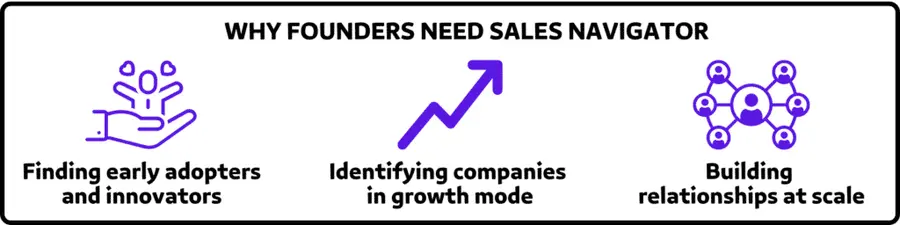
LinkedIn Sales Navigator for founders solves three critical problems:
- Finding early adopters and innovators. Regular LinkedIn shows you basic job titles. Sales Navigator reveals the people who embrace new technologies, drive digital transformation, and have authority to pilot innovative solutions.
- Identifying companies in growth mode. Advanced filters help you find businesses raising capital, expanding teams, or adopting new technologies (signals they’re ready to invest in solutions that accelerate their growth).
- Building relationships at scale. As a founder, your time is everything. Sales Navigator helps you identify high-value prospects, warm introductions, and strategic partnerships without endless manual research.
The result? Faster customer acquisition. Stronger investor relationships. Strategic partnerships that accelerate growth.
How Founders Can Set Up Their Sales Navigator For Success
Strategic setup determines your Sales Navigator for founders success.
Here’s how to optimize your account:
- Choose the Right Plan
- Optimize Your LinkedIn Profile
- Define Your Ideal Client Profile
1. Choose the Right Plan
LinkedIn Sales Navigator offers three tiers: Business (Core), Advanced (Team), or Advanced Plus (Enterprise).
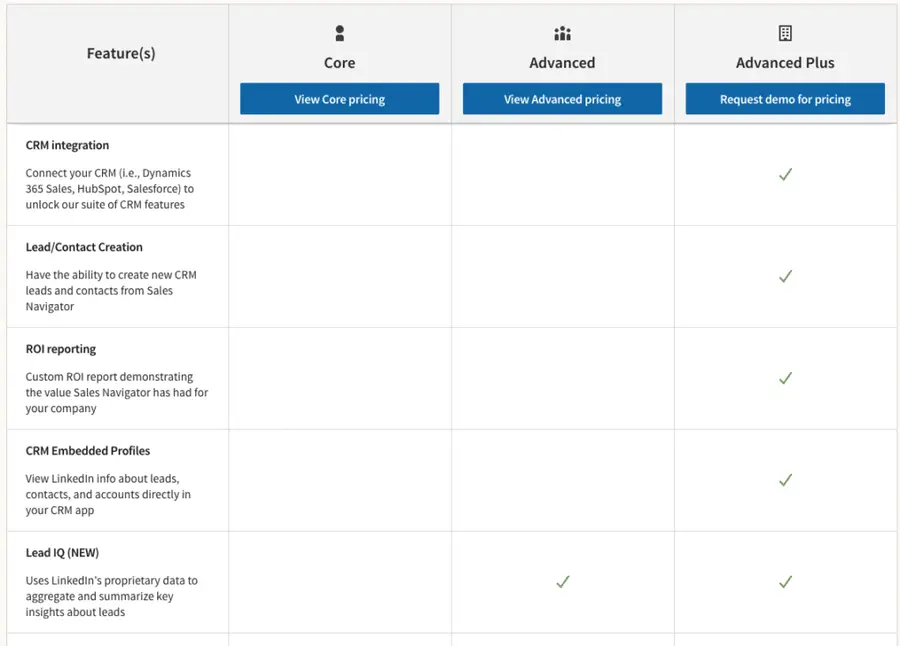
- Sales Navigator Core fits solo founders and early-stage startups. You get advanced search capabilities, lead recommendations, and monthly InMail credits for direct outreach.
- Sales Navigator Advanced works for growing startups with sales teams. It adds team collaboration tools, shared lead lists, and bulk actions for scaling outreach.
- Sales Navigator Advanced Plus serves larger startups and scale-ups. You get enhanced CRM integration, advanced reporting, and enterprise-level features.
Most founders begin with Core and upgrade as their team grows.
2. Optimize Your LinkedIn Profile
Prospects research you before engaging. Your LinkedIn profile needs to build credibility and trust.

Here are some key optimization areas to optimize on your LinkedIn Profile:
- Professional headshot: Use a high-quality photo that conveys leadership and approachability.
- Founder-focused headline: Skip generic titles. Highlight your mission and impact. Example: “Building AI tools that help marketers create content 10x faster | Founder at [Company]”
- Vision-driven summary: Share your startup story, the problem you’re solving, and early traction metrics. Include customer testimonials when possible.
- Comprehensive background: Detail your entrepreneurial journey, previous exits, and relevant expertise that validates your ability to execute.
Your profile should answer: “Why should I trust this founder with my business?”
Want more tips to optimize your LinkedIn profile? Watch the video I made here:
Define Your Ideal Customer Profile (ICP)
Start with crystal-clear targeting. Vague ICPs produce mediocre results.
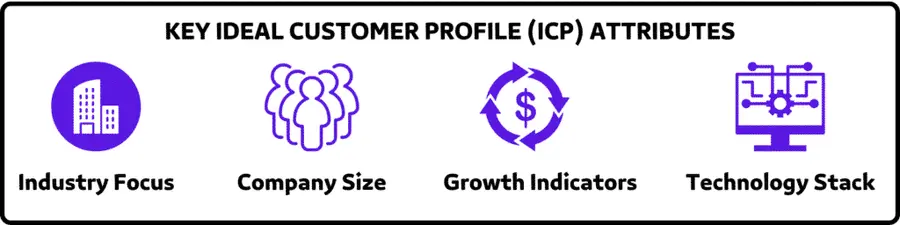
Here are the key ICP attributes you should focus on as a founder:
- Industry focus: Which sectors does your product serve best? Where do you have proven results?
- Company size: Are you targeting startups, SMBs, or enterprise clients? Each requires different approaches.
- Growth indicators: Look for companies showing expansion signals, hiring patterns, or funding events.
- Technology stack: What tools do your ideal customers use? This helps with targeting and messaging.
Clear targeting makes your Sales Navigator for founders strategy much more effective.
Advanced Sales Navigator Strategies for Founders
Sales Navigator for founders requires systematic prospecting.
Here’s your playbook:
- Company-First Strategy
- Create an account list
- Find the right decision-makers
- Use Account IQ for Instant Company Insights
- Combine Sales Navigator and LinkedIn Ads
- Use Alerts for Perfect Timing
1. Company-First Strategy
Start with companies, then find decision-makers within them.
For that, you need to use Sales Navigator’s 14 company search filters strategically.
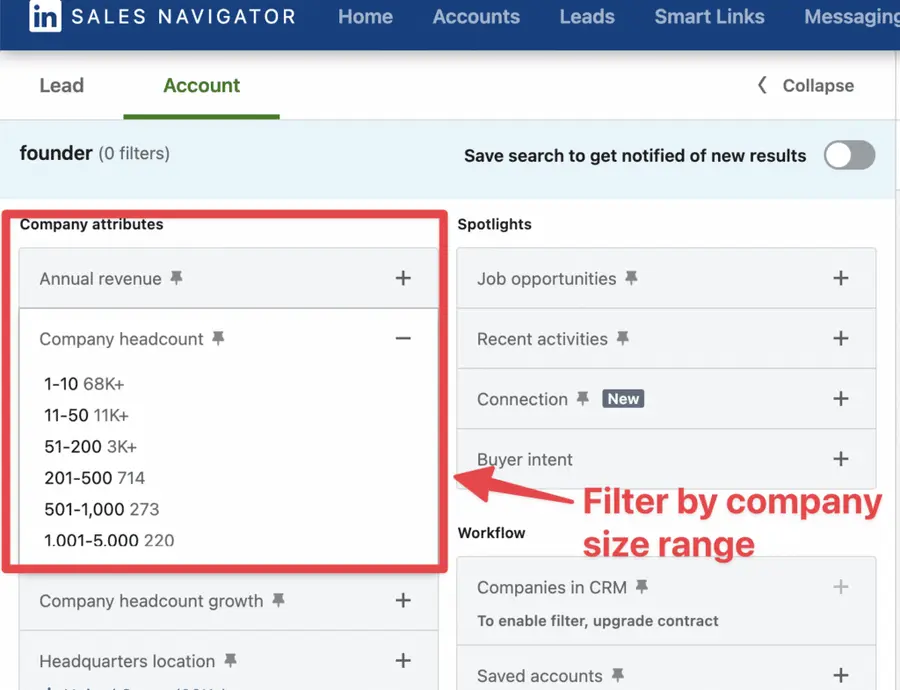
You can filter by:
- Company Size
- Location
- Industry
- Global headcount growth
- Department headcount growth
- Recent activities
- And much more…
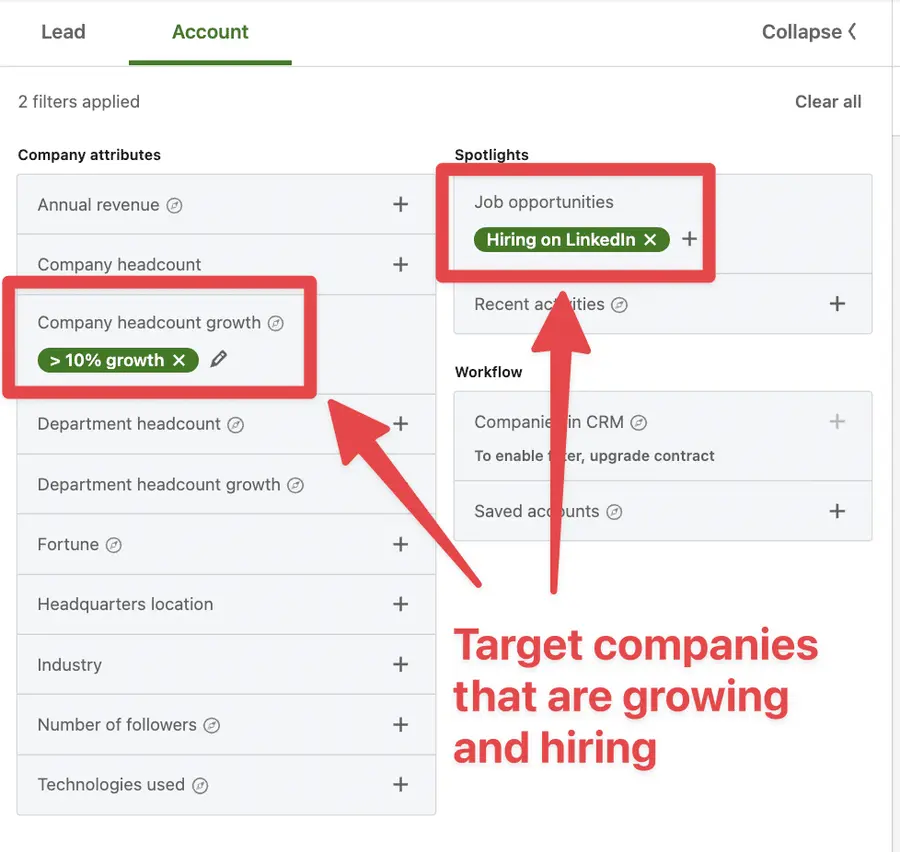
The growth and hiring filters help you target scaling companies — perfect prospects for innovative solutions.
LinkedIn’s event detection identifies companies with recent Crunchbase funding events. These businesses have fresh capital and appetite for new tools.
LinkedIn also detects when they are a Senior Leadership change in the last 3 months in a company.
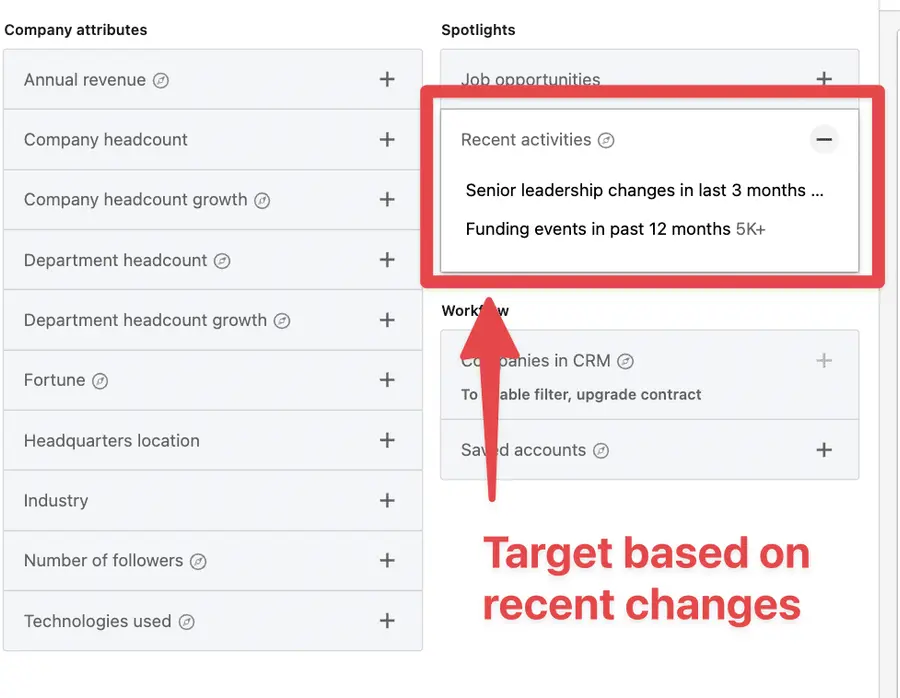
New executives bring fresh perspectives and budget for solutions that drive results. It’s a great opportunity to launch a conversation.
The next step?
It’s to create account lists.
2. Create an account list
Once you identify promising companies, it’s time to find the right people.
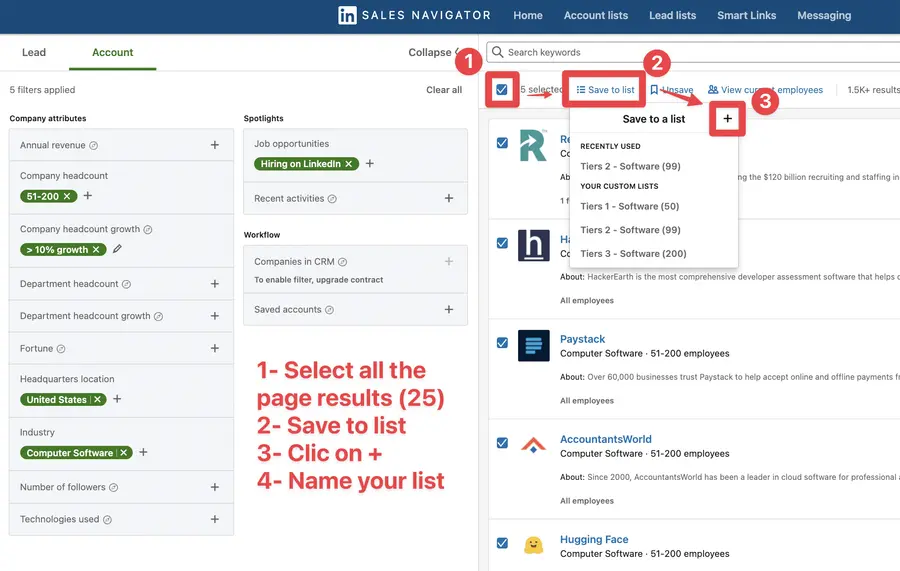
To create an account list on Sales Navigator:
- Tick the checkboxes
- Click “Save to list”
- Click +
- Give a name to your list
Once the account is added to your list, automatic alerts notify you when companies:
- Get mentioned in industry news
- Publish company updates
- Experience leadership changes
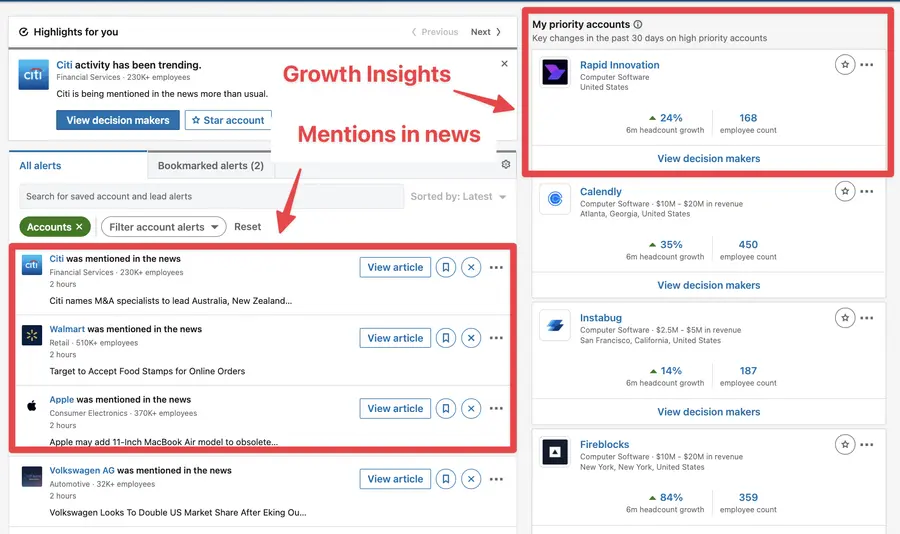
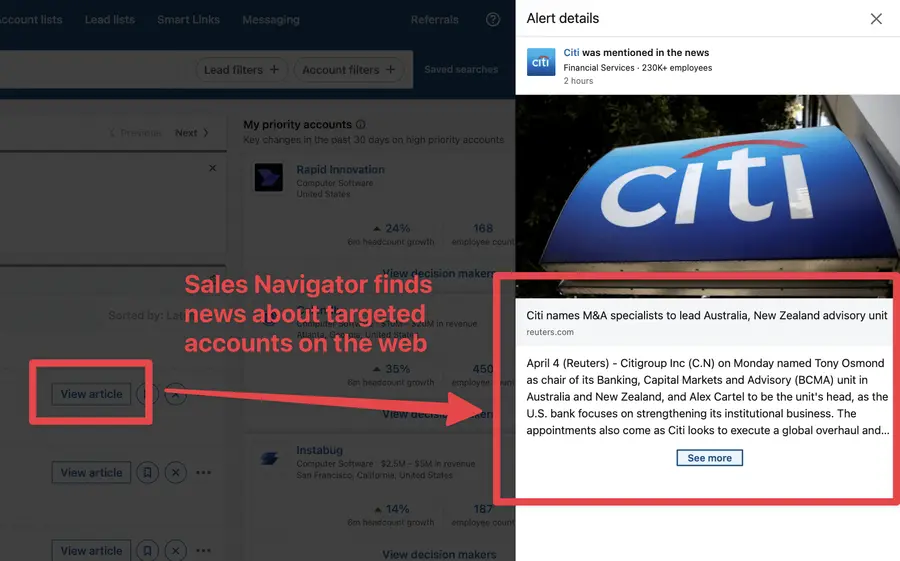
LinkedIn will also track your targeted companies online and send you a blog post mentioning them. If you click “View article”, you can see an abstract and read the post.
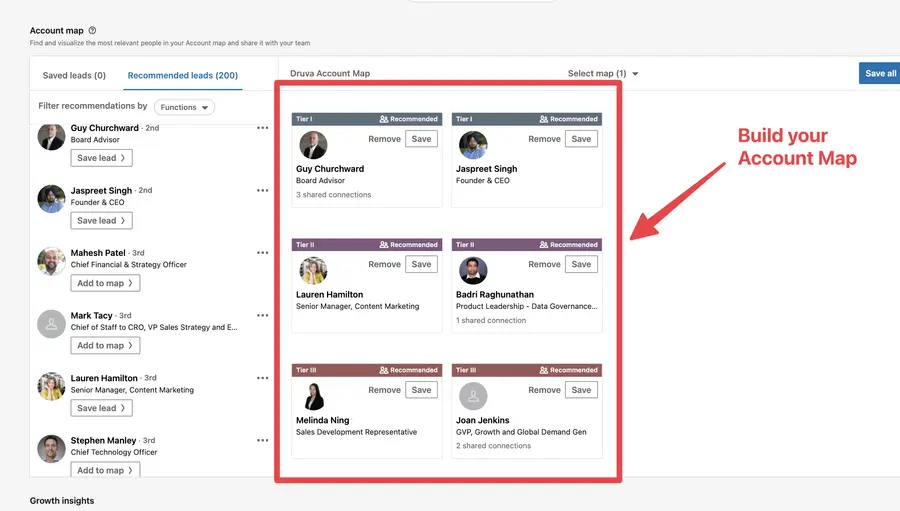
Another useful tool for is the LinkedIn company page.
You can build your relationship map there by dragging and dropping leads into several categories (Tiers 1, Tiers 2, Tiers 3).
On LinkedIn, you can get some insights about growth, the size of the department, the hires, and job openings.
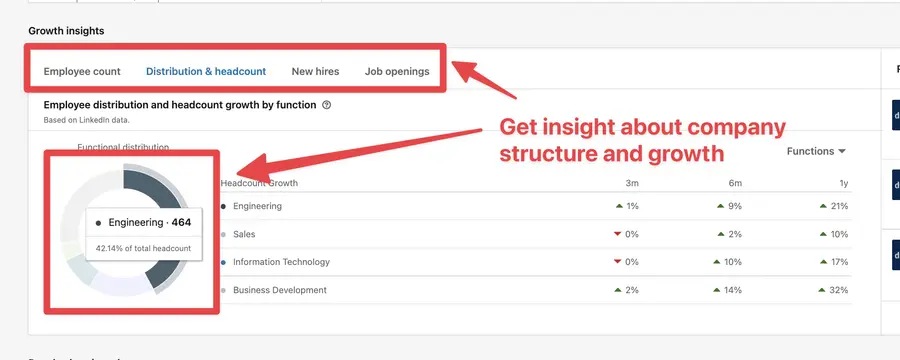
This is useful to get to know your account to write super personalized sales prospecting messages.
But to whom should you send the messages?
How do we find the decision-makers?
3. Find the right decision-makers
Here is how to find decision-makers within an account list using Sales Navigator:
- Navigate to lead search
- Go to Workflow
- Open the filter Account List
- Select your account list
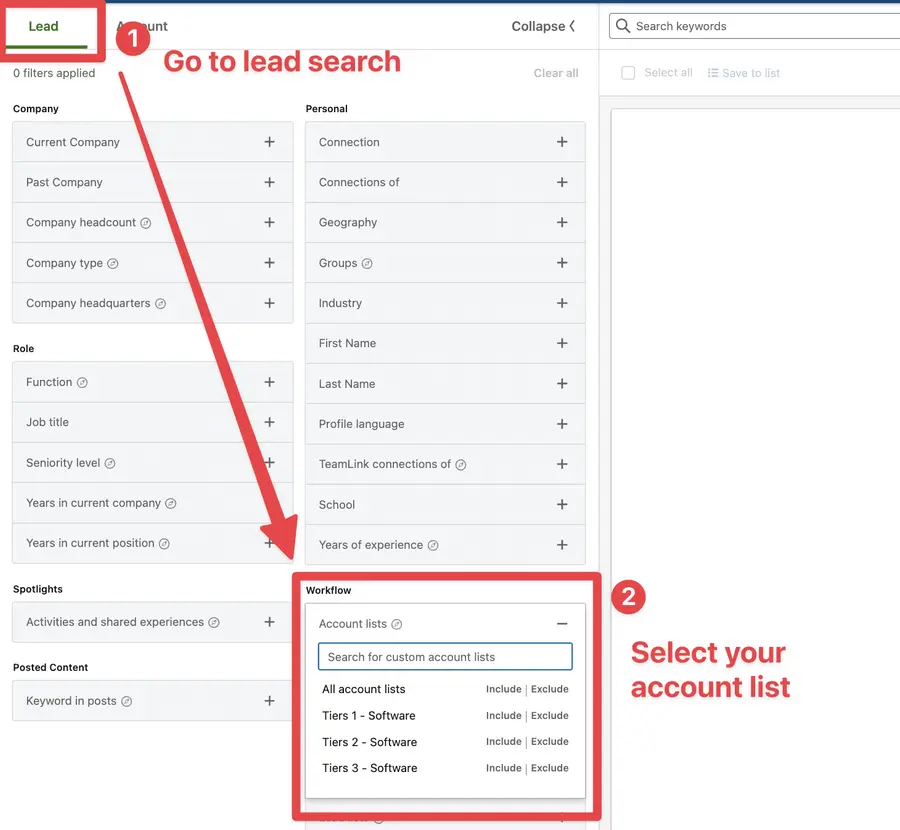
Once you have selected your account list, all the people working at these companies will appear in the search results.
Now you need to add filters to get the right decision-makers. The job title filter is a great way to do that.
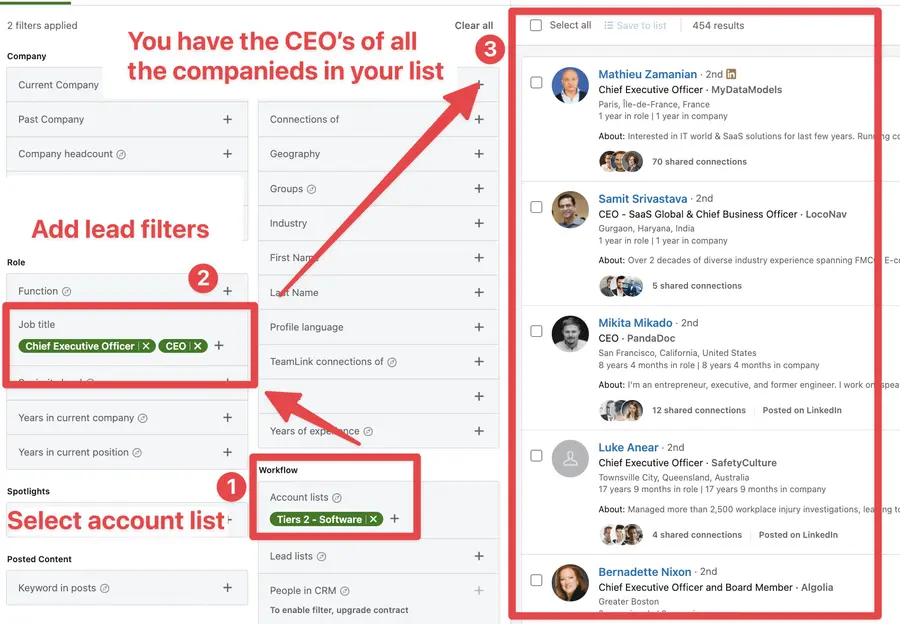
Focus on titles like CTO, VP Engineering, Head of Growth, or Chief Innovation Officer — people who evaluate and adopt new solutions.
4. Use Account IQ for Instant Company Insights
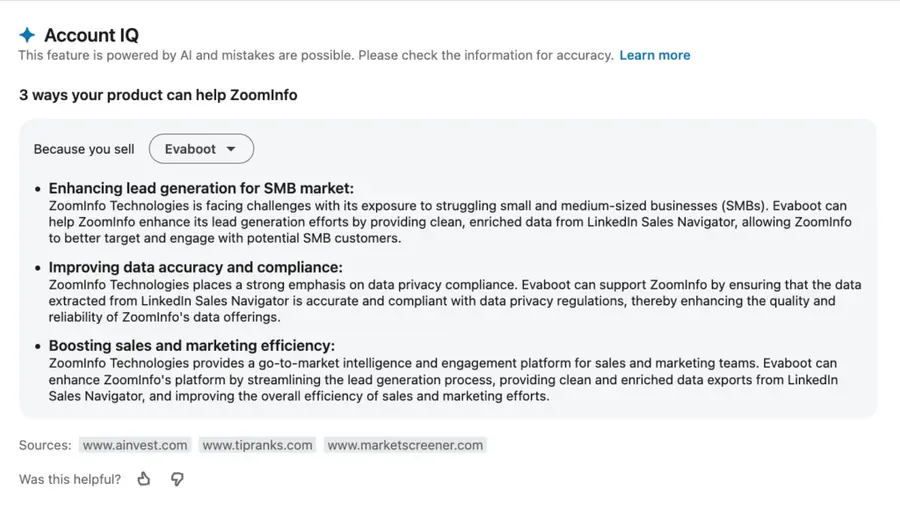
Once you’ve saved target companies in your account list, click into any company page to activate Account IQ in Sales Navigator — a powerful AI feature that summarizes everything you need to know before reaching out.
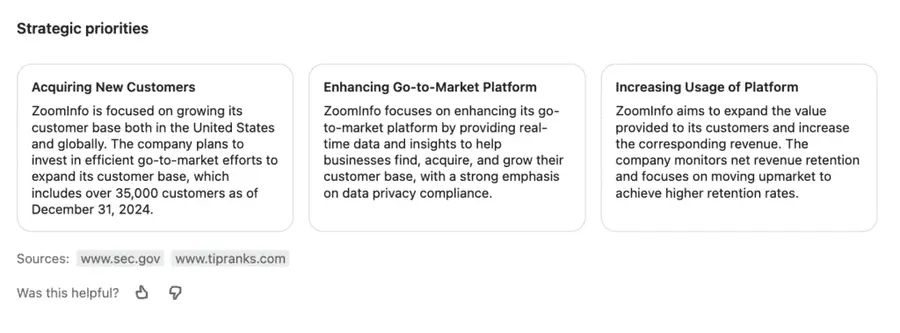
Here’s what you get in seconds:
- AI-generated pitch suggestions: Account IQ suggests different ways your product could help based on what you sell.
- Business model & revenue estimates: Understand how the company makes money, who they serve, and how big they are.
- Strategic priorities & business challenges: Get a snapshot of what’s keeping them up at night, and where your solution fits.
- Org chart & executive insights: Identify key decision-makers, recent job changes, and executive posts to reference in outreach.
- Hiring trends & growth signals: Spot departments with strong headcount growth — a key signal of need or pain.
- Competitive landscape: See how the company positions itself and who it’s up against.
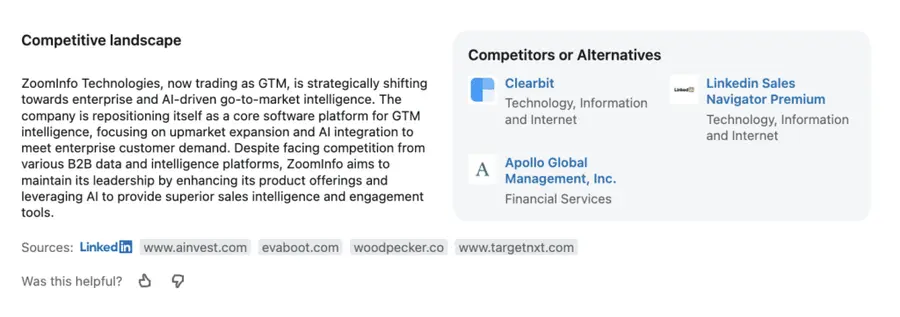
Pro tip: Use the AI-generated insights to write hyper-personalized cold emails with ChatGPT.
Simply click on “Generate insights” to see a detailed list of different ways you could help the company you’re targeting:
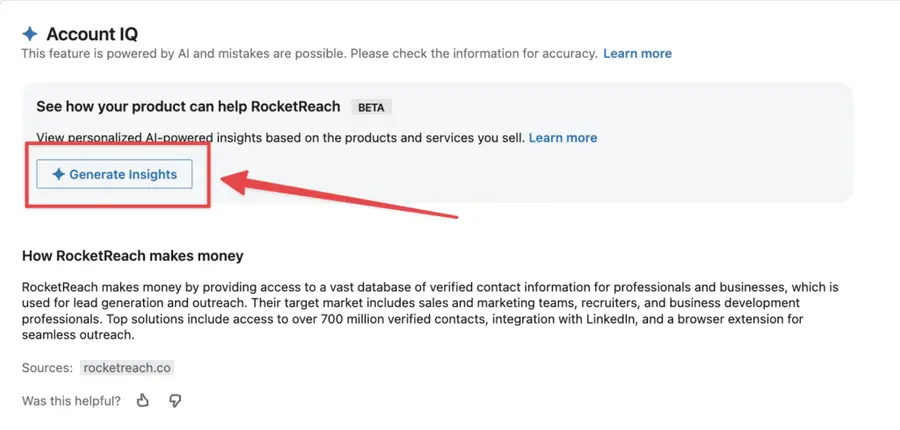
Copy the “3 ways your product can help” block…
And prompt ChatGPT like this:
Write a short cold email to ZoomInfo, pitching Evaboot. Use the RABT framework:
Example output:
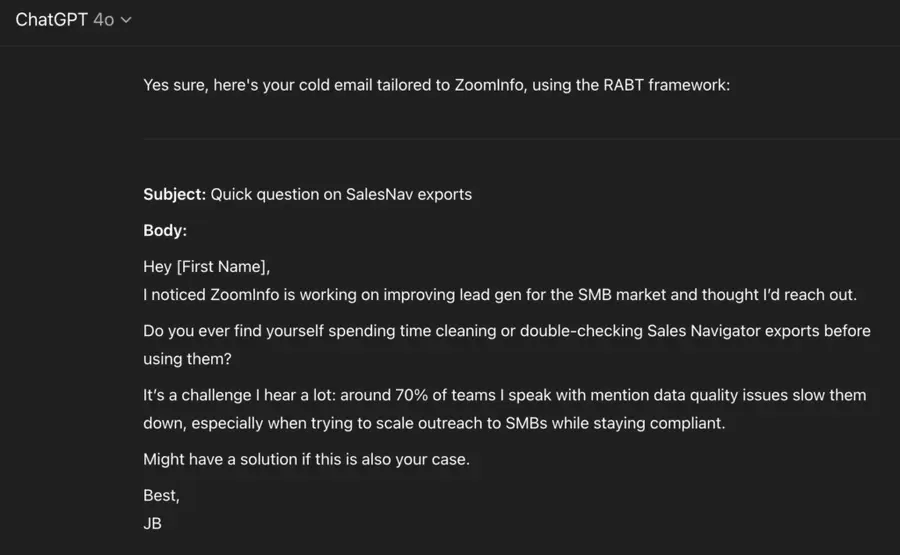
That’s how you turn AI insights into high-performing cold messages in seconds.
5. Combine Sales Navigator and LinkedIn Ads
You can amplify your Sales Navigator for founders strategy with targeted advertising.
There’s a hack to create super-targeted LinkedIn ads with your Sales Navigator extractions.
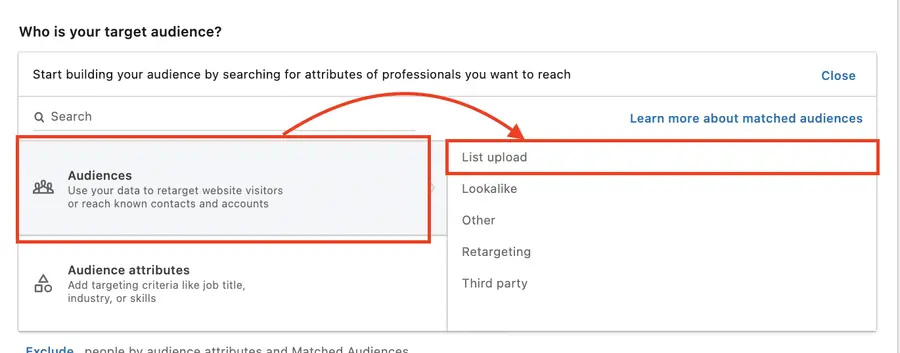
Instead of trusting the LinkedIn Algorithm, you provide LinkedIn with the exact list of people to target.
When choosing your audience, click List Upload > Contact List or Company List.
I’ve explained the entire process in this video:
This creates multiple touchpoints with prospects before direct outreach, increasing response rates and building familiarity with your startup.
6. Use Alerts for Perfect Timing
Once you add a lead to a list, Sales Navigator alerts will track their activity on LinkedIn and send you updates like:
- Content they publish or share
- Job changes and promotions
- Company announcements
- Industry engagement
This social selling feature is really valuable for sending personalized follow-up messages.
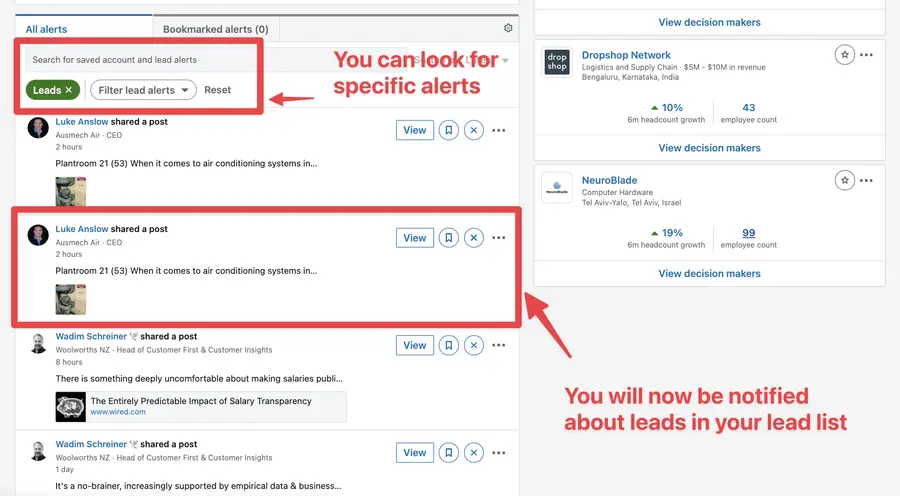
Bookmark important alerts for later action.
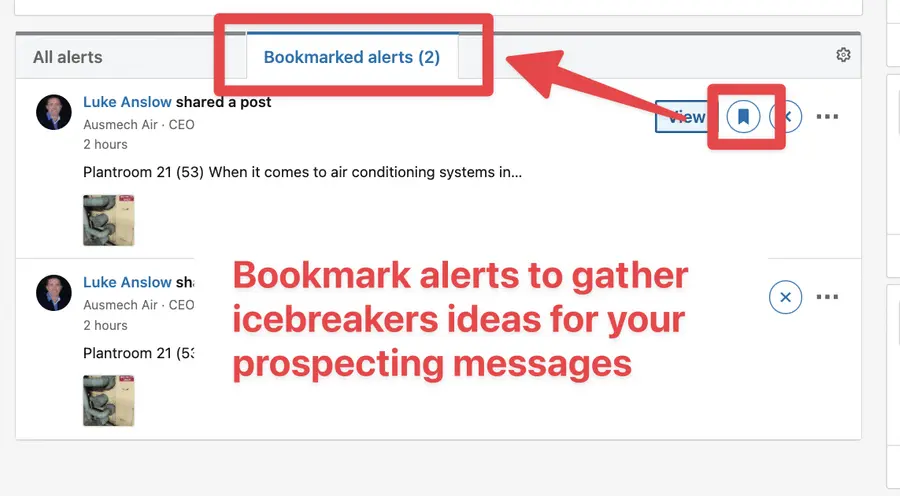
If you click View, the LinkedIn post will open on the left, and you can like and comment directly from LinkedIn Sales Navigator.
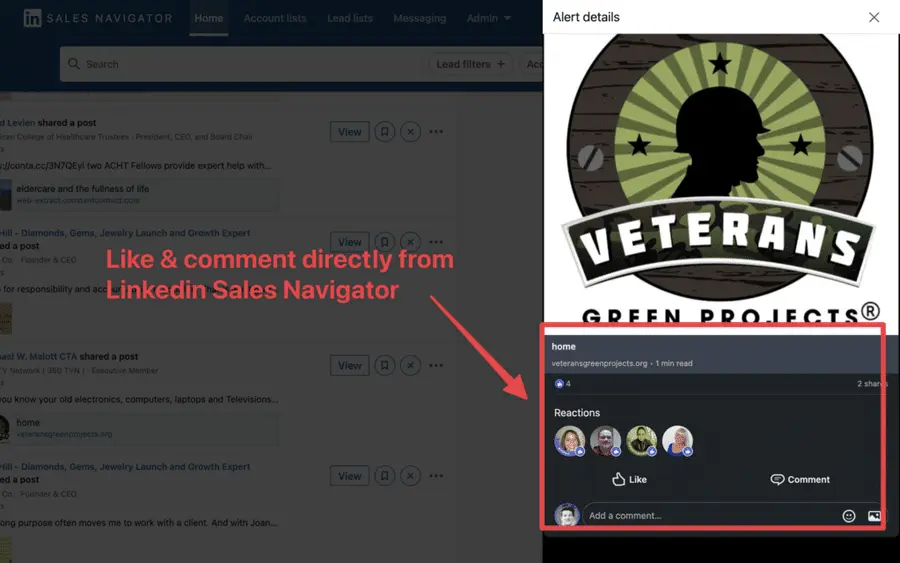
This is convenient for B2B sales if you want to break the ice or follow up with your prospect by commenting on the content they publish.
How To Export Lead Lists from LinkedIn Sales Navigator
Sales Navigator for founders data becomes powerful when integrated with your workflow.
Here’s how to export leads from Sales Navigator:
- Create an Evaboot account
- Download the Chrome Extension
- Select your Sales Navigator lead or account lists
- Name and launch your export
- Download your cleaned list
1. Create an Evaboot account
Step 1 is to go to Evaboot and click “Sign up”. Then, create an account.
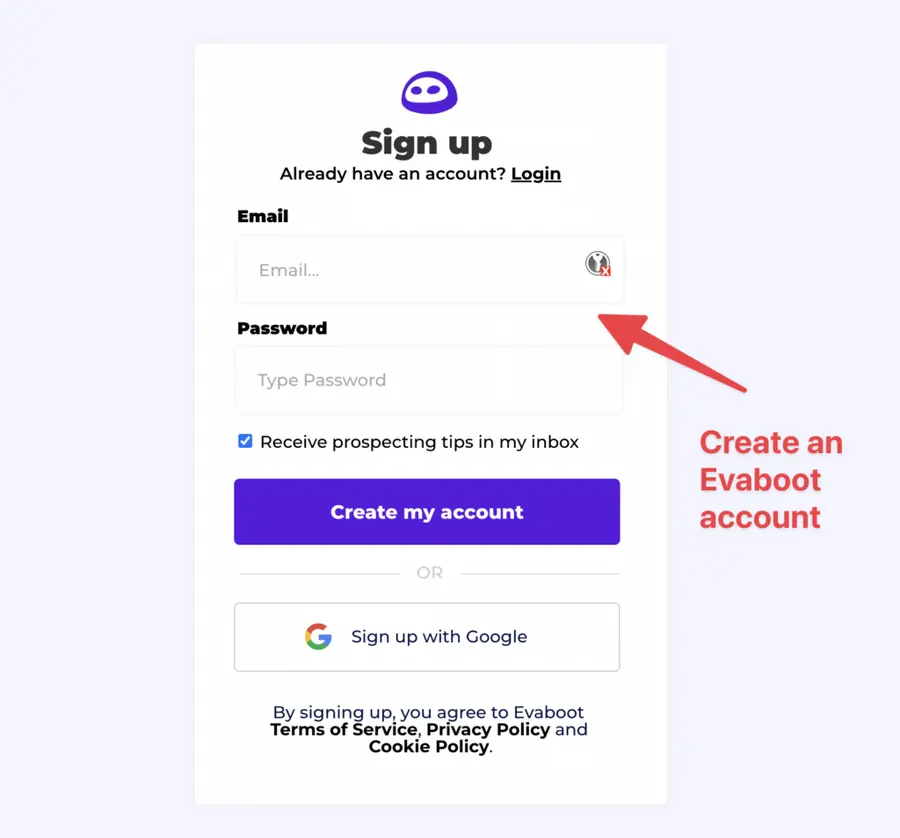
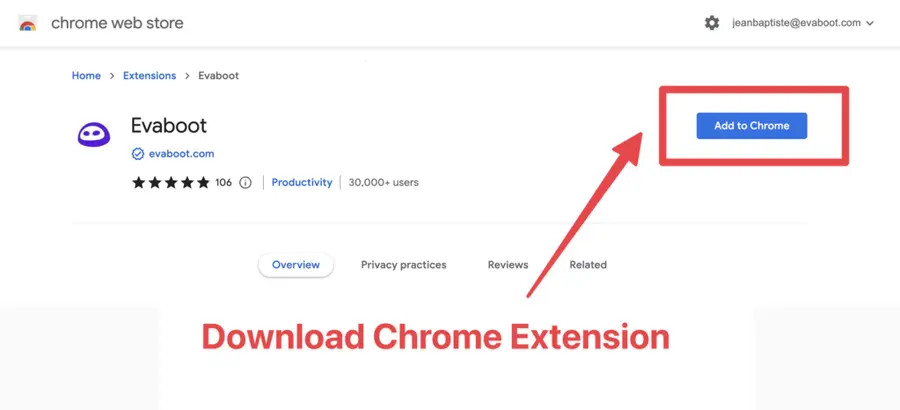
Once you’ve created your account, click on “Get Chrome Extension” to download it from the Chrome Web Store.
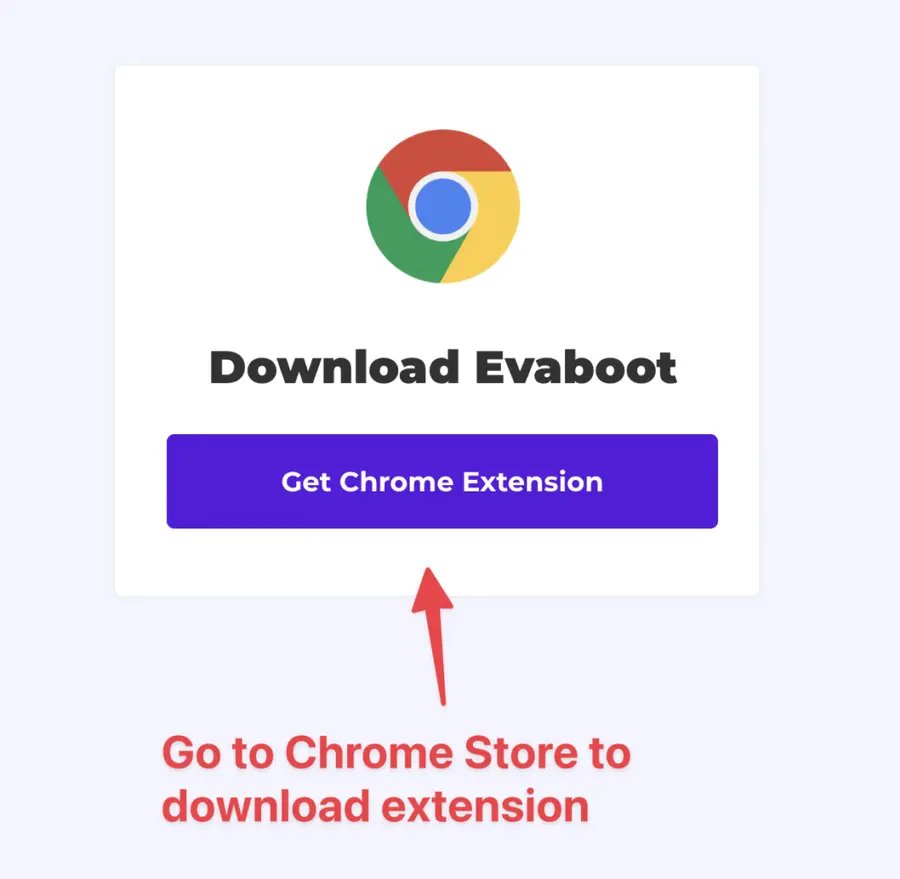
2. Download the Chrome Extension
When on the Chrome Store page, click “Add to Chrome” to install the extension.
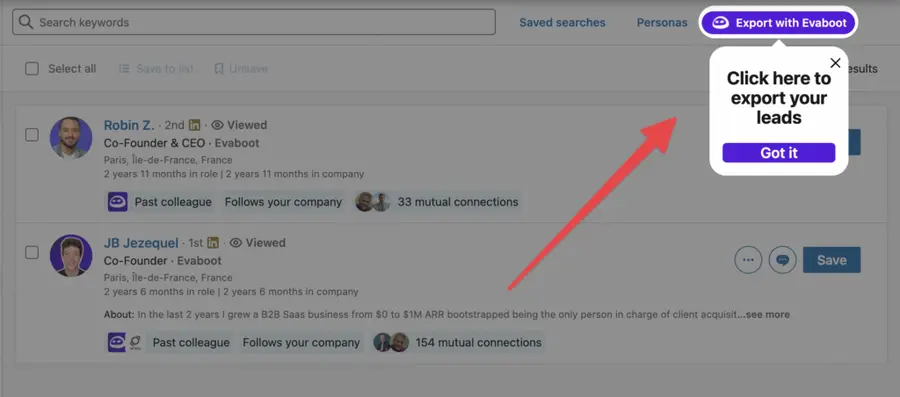
You’ll be automatically redirected to Sales Navigator. A popup will show you where the button is located.
3. Select your Sales Navigator lead or account list
Once the Chrome extension is installed, go to the list of leads or accounts you want to export. It can be:
- Lead Searches
- Lead Lists
- Account Searches
- Account Lists
- Saved Searches
Evaboot handles all the use cases.
The “Export with Evaboot” button is at the top of these LinkedIn Sales Navigator pages.
This is what it will look like for lead lists:
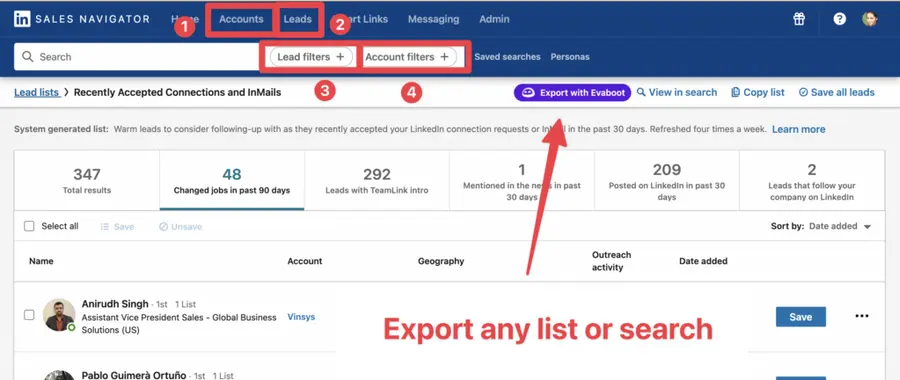
You can export specific tabs in your lead lists, such as “Changed jobs in the past 90 days.”
And this is what it will look like for account lists:
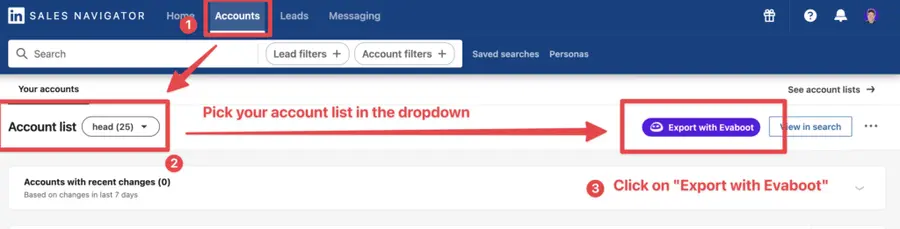
When you export account lists from the Sales Navigator with Evaboot, you get the following:
- Company Name
- Company Website
- Industry
- Specialties
- Employee Count
- Employee Range
- Location
- Company Linkedin URL
- Company Type
- Year Founded
- Company Profile Picture
- Company Description
Evaboot’s cleaning and filtering algorithms also clean and filter all this data.
4. Name and launch your export
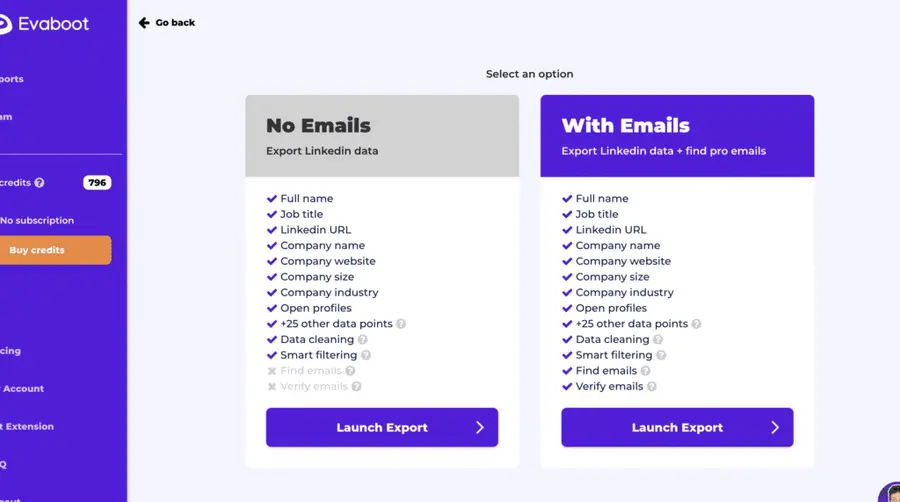
When you click “Export with Evaboot” you will be redirected to the Evaboot app.
Choose whether you want to find emails for these leads.
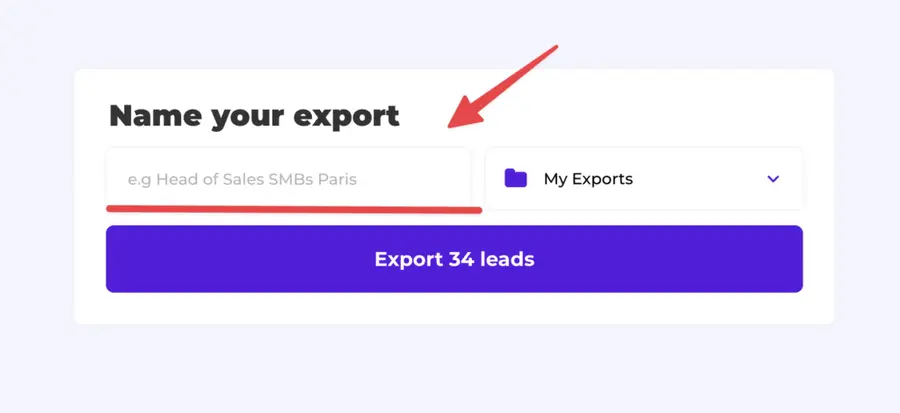
Give a name to your export and click on “Export leads”.
The estimated end date will appear on the left right after launching the export.
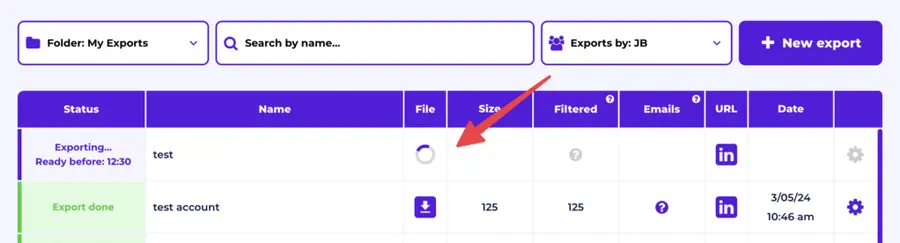
Evaboot will export all these leads in real-time.
That makes your lead generation process GDPR-compliant, in opposition to using databases.
5. Download your cleaned list
After the extraction is done, you will get an email. This email will have a link to download your lead list in a CSV file.
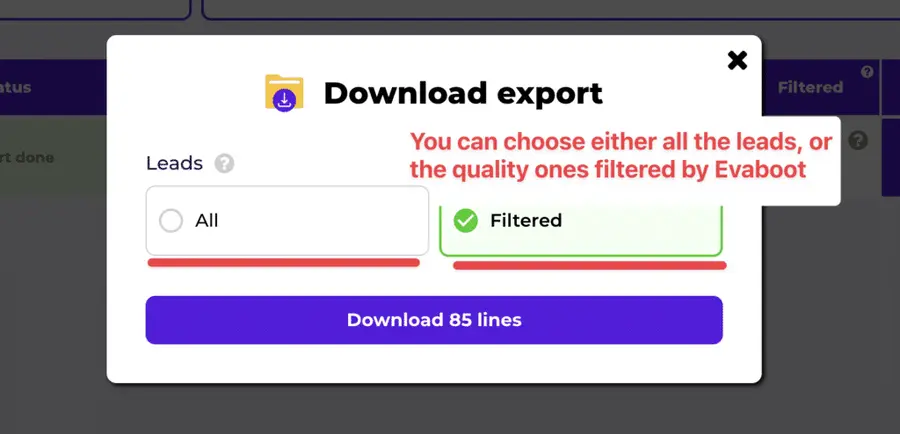
Choose the list type that you want to download. And you’re done.
Evaboot does much more than export your list. It also cleans all the names and company names of your LinkedIn contacts.
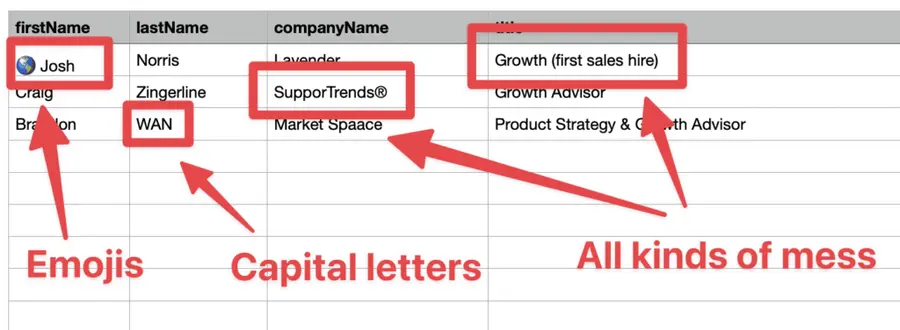
The data on LinkedIn is not clean.
Cleaning data from your sales navigator export can take hours if you do it manually.
Hopefully, the Evaboot cleaning algorithm takes care of all this work for you by automatically cleaning:
- First names
- Last names
- Company names
- Job titles
Nobody wants to spend hours cleaning Excel files. Better let robots do this boring job.
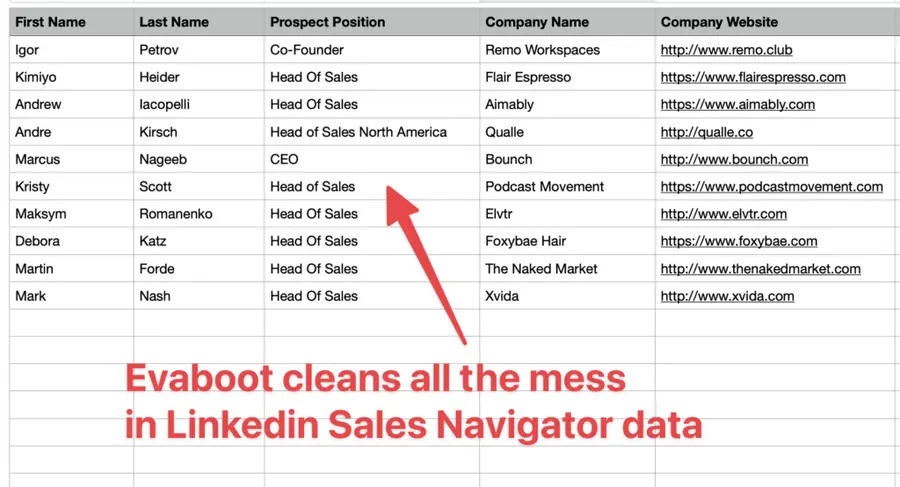
You will often find false positives in your LinkedIn Sales Navigator search results.
Even if you’re using super precise LinkedIn boolean search operators.

You will frequently find leads that don’t match the search filters you chose in the Sales Navigator search engine.
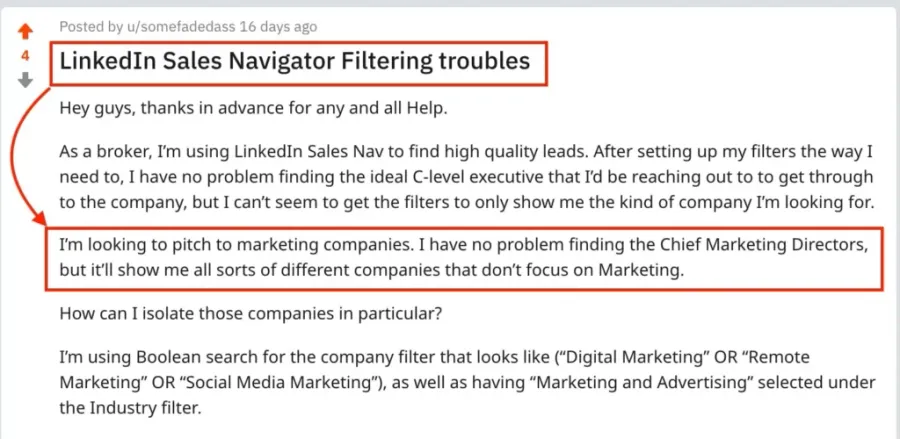
That’s why many people spend hours double-checking their search results manually.
This is a painful task, but it’s no problem.
Evaboot is the best Sales Navigator scraper.
Our algorithm checks your leads twice to make sure they fit your search filters.
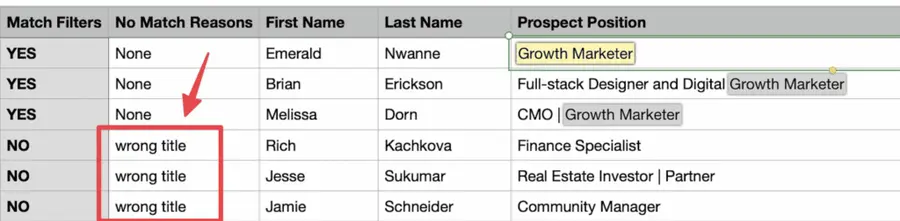
In this export, there’s a column named “No Match Reasons.” This column tells you if your leads really match your search filters.
If they don’t, we will explain why. In this example, the leads have the wrong title. The initial search was for growth marketers.
To reduce false positives in your Sales Navigator searches, check out our full Sales Navigator tutorial.
And here you go!
With this data, you can use multichannel outreach.
This will help you reach new prospects in many ways.
Outreach Strategies That Convert
Sales Navigator gives you the leads.
Your job as a founder?
Build relationships that turn them into clients or investors.
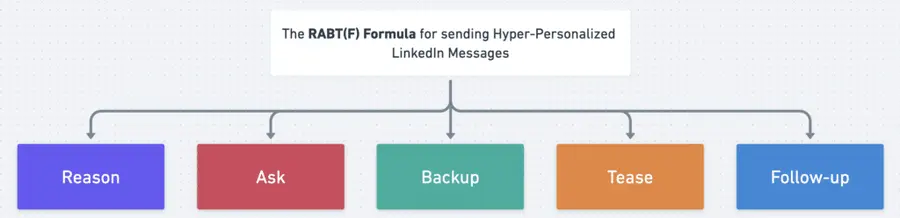
Here’s how to craft effective LinkedIn messages that speak your prospect’s language and move them to respond:
- Give a reason for outreach
- Ask a question
- Backup with data
- Tease a solution
- Follow-up
- Bonus Strategy: Use LinkedIn InMail
1. Give a reason for outreach
As a founder, your outreach on LinkedIn reflects your company’s identity and values.
Before engaging cold, send a connection request (personalized or not) to lay the groundwork.
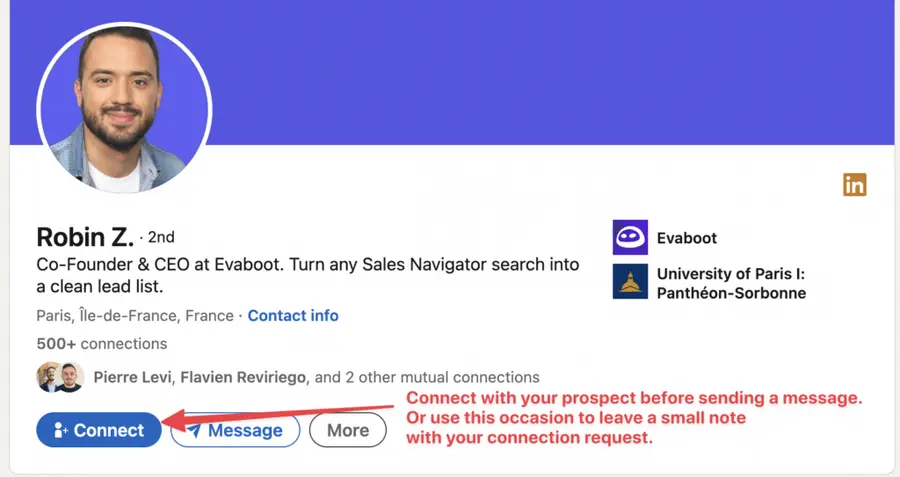
Expanding your network boosts the likelihood of accepted requests.
Make your approach intentional by referencing something specific and relevant to the prospect (custom visuals like gifs or tailored screenshots can help here).
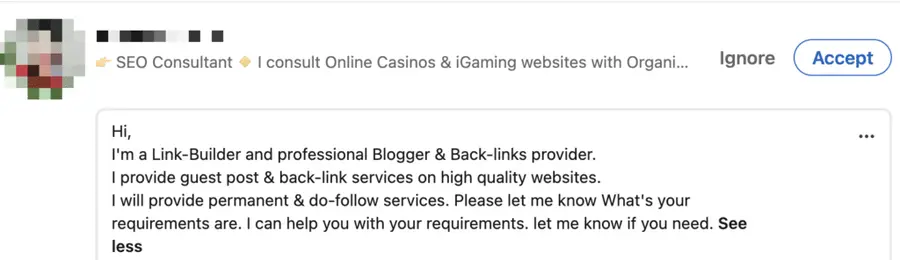
This shows you’re not spamming them with mass messages but are genuinely reaching out based on their context.
Your reason should connect directly to their job role, recent updates in their company, trends in their industry, or challenges they’re likely experiencing.

Then, you can start the conversation by mentioning a post they published, a shared professional interest, or a strategic opportunity that fits their business goals.
2. Ask a question
Keep the conversation going by asking a thoughtful question that encourages your lead to engage and share more about their objectives or pain points.
The best questions are open-ended, specific to your message, and encourage discussion.

You might ask:
- “Curious how you’re approaching customer acquisition now that you’ve scaled past X stage?”
- “We’ve seen [trend] a lot with companies like yours. What’s been your experience?”
You’re not selling, you’re initiating a dialogue.
3. Backup with data
Credibility is critical when you’re not (yet) a household name.

Support your message with concise, relevant proof points:
- Key metrics your startup achieved (e.g., “Helped [X] SaaS companies cut churn by 30%”)
- An insight from your market research
- A client testimonial or user feedback quote
This builds authority and sets you apart from generic outreach.
4. Tease a solution
Once you’ve established context and trust, tease how you can help.
Think curiosity over closing.
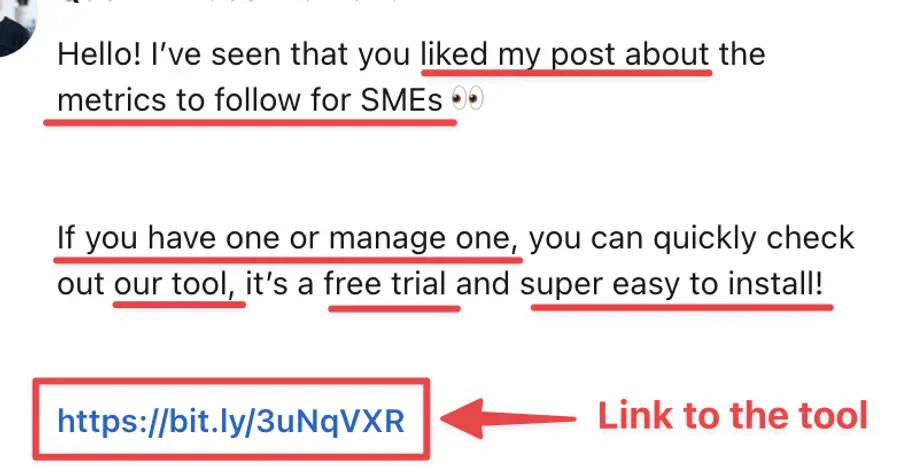
Ensure your suggested solution is directly linked to their needs and presents clear advantages.
You could:
- Introduce a product or service,
- Recommend a tool,
- A step-by-step guide or case study,
- Share a resource or a tutorial,
- Propose a strategic approach.
5. Follow-up
Completing our five-step framework is the crucial follow-up stage.
Your task is to keep in contact with your potential customer by consistently reaching out until you receive a response or secure a meeting.
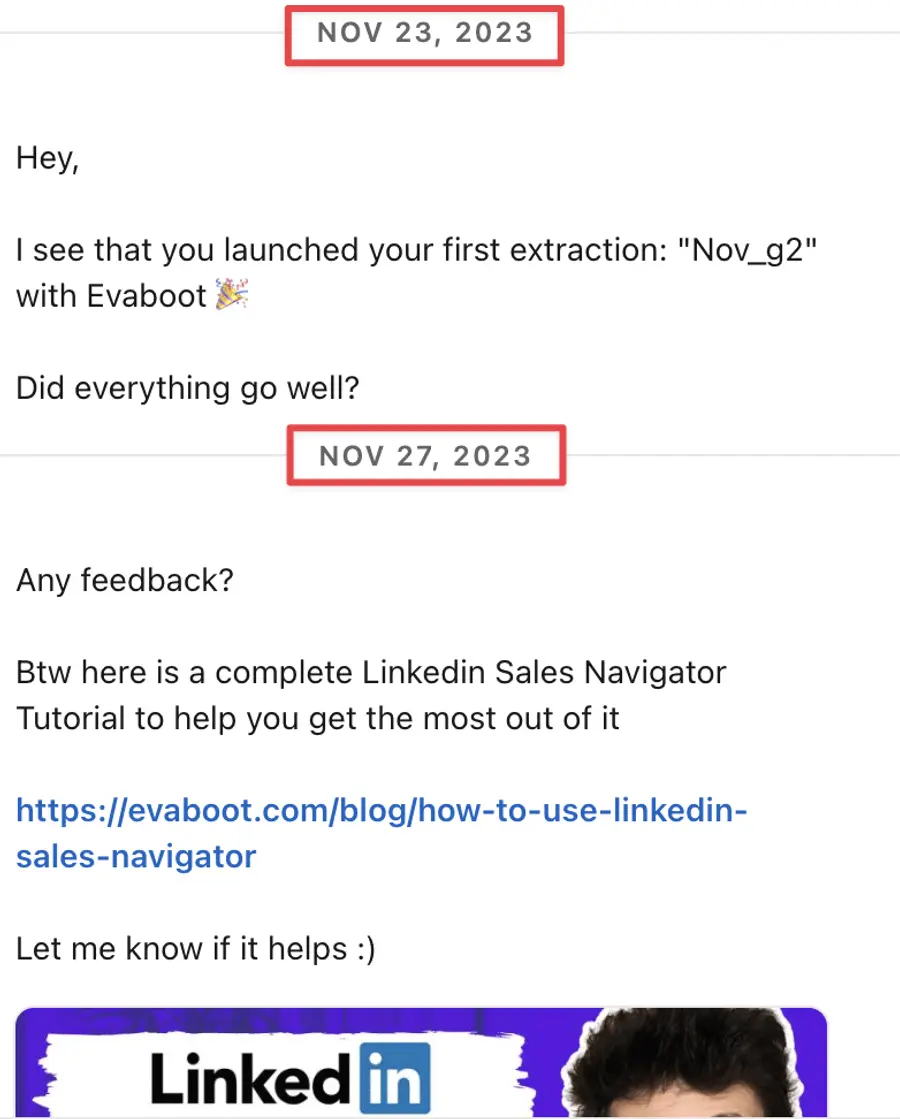
This tenacity keeps you fresh in their memory and demonstrates your dedication and professionalism.
Keep it light, value-driven, and human. If they don’t reply in a few days:
- Share a fresh insight
- Offer something useful (e.g., “Saw this post and thought of your GTM strategy”)
- Ask if they’re the right person to chat
But here is another tip.
Bonus Strategy: Use LinkedIn InMail
To boost your response rates even further, don’t hesitate to send an InMail message, which is more effective than a simple cold message.
1. Keep your InMail messages under 400 characters, as shorter InMails achieve a 22% higher response rate.
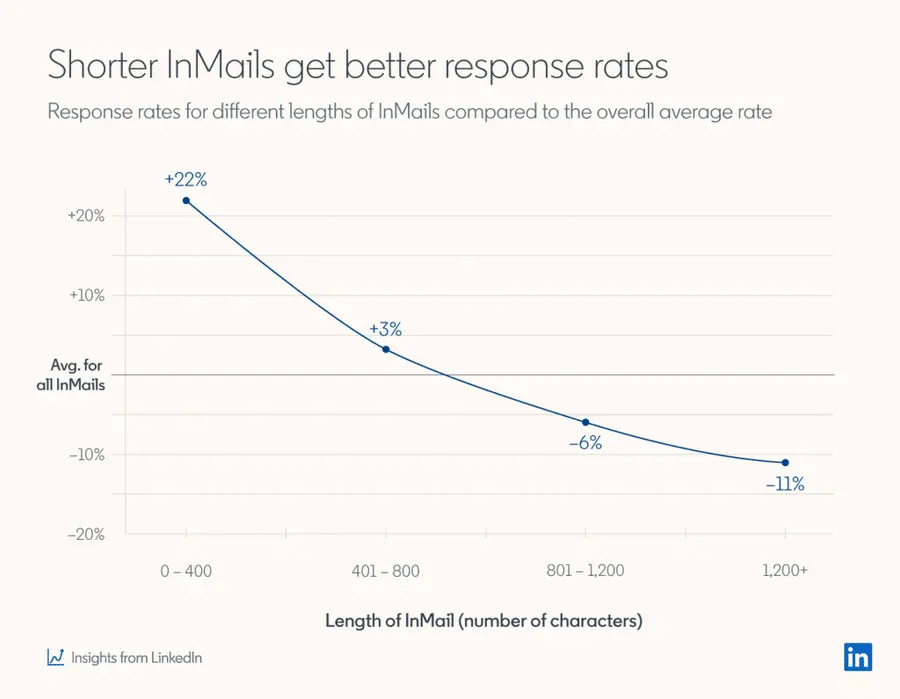
This is because today people are busy!
This way, you respect the recipient’s time and increase your chances of getting a reply.
2. Write short subject lines.
Your profile picture and InMail subject lines are the first things people see in your InMail.
The average email open rate is about 21.6%, and LinkedIn InMail has a 57.5% open rate, which can be further optimized with the right subject line strategy.
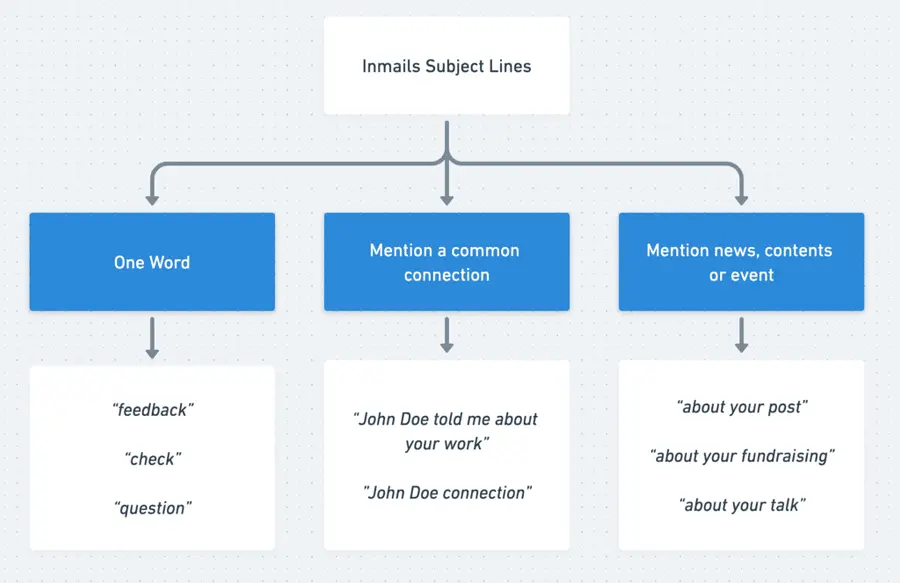
Here are a few tested angles:
- One-word subject: Creates intrigue and gives the recipient a reason to open the message.
- Mention a mutual connection: Uses existing relationships to build trust and rapport.
- Mention recent news: Shows that your message aligns with their interests or concerns.
3. Use InMails as your backup channel.
LinkedIn InMails should be your strategic option rather than your first choice when connecting with prospects.
Only send an InMail when your emails and LinkedIn messages don’t generate a response.
Here’s why: Sales Navigator accounts typically include just 50 InMail credits per month.
Meanwhile, you can send up to 200 emails and 150 LinkedIn messages daily.
Here’s an effective Multichannel outreach strategy to use:
- First, send 2-3 emails.
- If there’s no response, send a connection request.
- Follow up with 2-3 LinkedIn messages if your connection request is accepted.
- If these messages go unanswered, consider using an InMail.
Now you have a clear game plan for writing targeted LinkedIn messages, and boosting responses with a multichannel outreach strategy.
Conclusion
Sales Navigator for founders transforms how you approach business development.
The platform provides laser-focused targeting. Advanced search filters help you find prospects who actually need your solution. Rich prospect data enables personalized outreach that gets responses.
Start with clear targeting criteria. Build organized prospect lists. Develop personalized outreach sequences. Track results and optimize continuously.
Ready to accelerate your startup’s growth?
Your next customer, partner, or investor is waiting to be discovered on LinkedIn Sales Navigator.
Frequently Asked Questions
Is LinkedIn Sales Navigator Really Worth It For Founders?
Yes, especially for founder-led sales, partnerships, and fundraising. Sales Navigator for founders provides targeting capabilities impossible with free LinkedIn.
The ROI becomes clear quickly. Most founders see qualified conversations within 2-3 weeks of strategic use.
Can I Get LinkedIn Sales Navigator For Free?
Microsoft for Startups offers 75% off 4 months of LinkedIn Sales Navigator for qualifying startups. Free trials are also available periodically.
The investment pays for itself through improved lead quality and conversion rates.
What’s The Difference Between Core And Advanced Plans?
Sales Navigator Core works for individual founders. You get advanced search filters, lead recommendations, and InMail credits.
Sales Navigator Advanced includes team features like CRM sync, shared lead lists, and collaboration tools. Choose Advanced when scaling your sales team.
How Can I Avoid Spam Filters When Using InMail?
Best practices:
- Avoid links in initial messages
- Use natural, conversational language
- Personalize every message
- Focus on value, not selling
InMail messages have higher deliverability than email when done correctly.
Can I Use Sales Navigator To Find Investors?
Absolutely. Sales Navigator for founders excels at investor outreach.
Targeting strategy:
- Filter by job title: “Investor”, “VC”, “Partner”
- Company type: Venture capital, private equity
- Geography: Your target investment regions
- Investment focus: Your industry or stage
Research approach:
- Review portfolio companies
- Check investment criteria
- Find warm introductions
- Time outreach strategically


