
Looking to connect LinkedIn Sales Navigator to n8n and automate your lead workflows without manual exports or spreadsheets?
You’re in the right place.
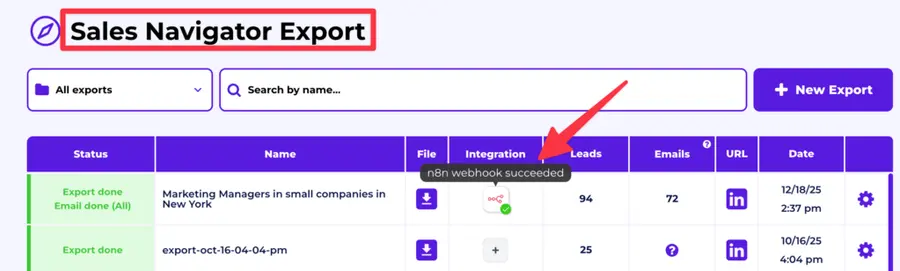
With the help of Evaboot’s webhook integration, you can send verified LinkedIn leads directly from Sales Navigator into your CRM, outreach platform, Google Sheets, Slack, and more.
In this guide, you’ll learn:
- How to Connect LinkedIn Sales Navigator to n8n
- Best Use Cases to Automate with Sales Navigator + n8n
- Why Automate Your LinkedIn Lead Workflow?
Whether you’re a solo founder, sales rep, or ops team building custom lead flows, this setup will help you move faster and close more deals.
Let’s dive in.
How to Connect LinkedIn Sales Navigator to n8n
To automate your LinkedIn lead workflow with n8n, you’ll need a tool that can extract leads from Sales Navigator and send them to n8n using webhooks — that’s exactly what Evaboot does.
Here’s how to set up the integration in just a few minutes:
- Step 1: Create an Evaboot account
- Step 2: Find your n8n Webhook URL
- Step 3: Set up your webhook inside Evaboot
- Step 4: Export your leads from Sales Navigator using Evaboot
Step 1: Create an Evaboot account
Start by creating an account on Evaboot.
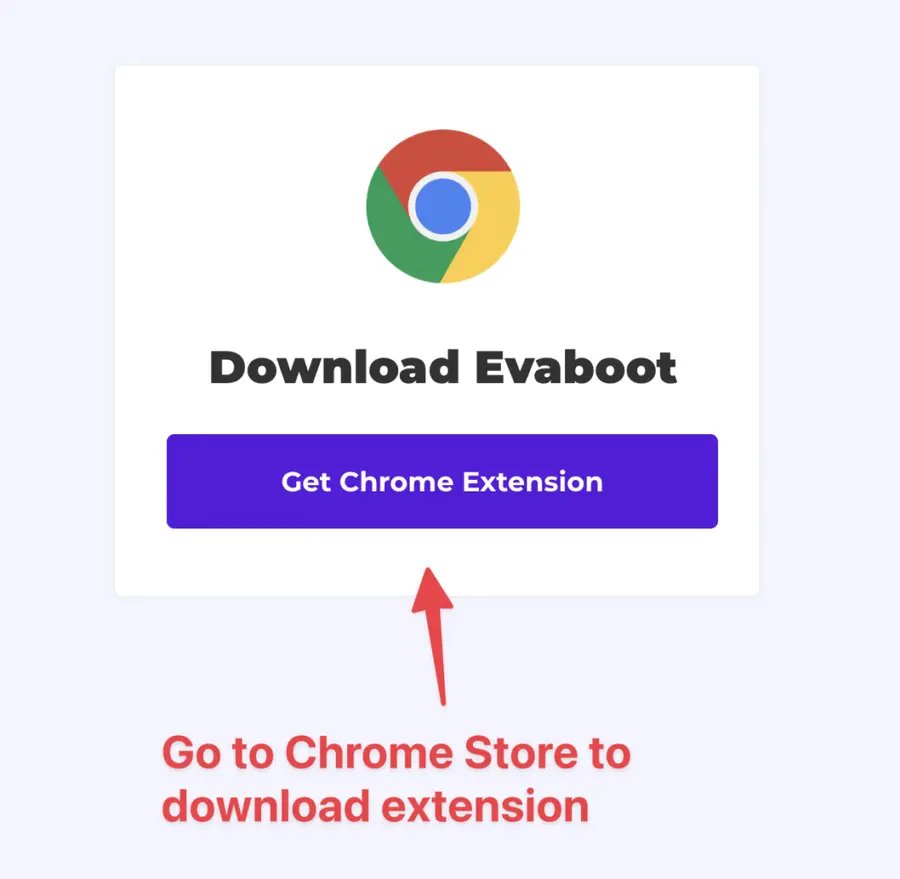
Once you’ve created your account, click on “Get Chrome Extension” to download it from the Chrome Web Store.
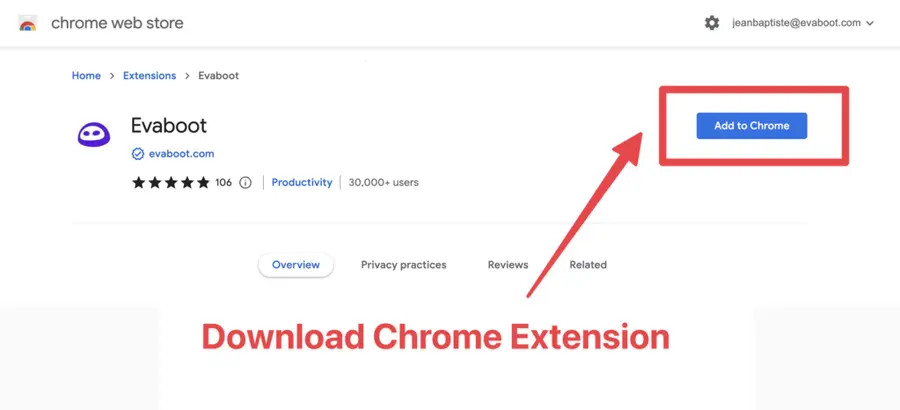
When on the Chrome Store page, click “Add to Chrome” to install the extension.
You’ll be automatically redirected to Sales Navigator. A popup will show you where the button is located.
Step 2: Find your n8n Webhook URL
You can either follow the steps below, or watch this tutorial:
Head to n8n and create a new Workflow.
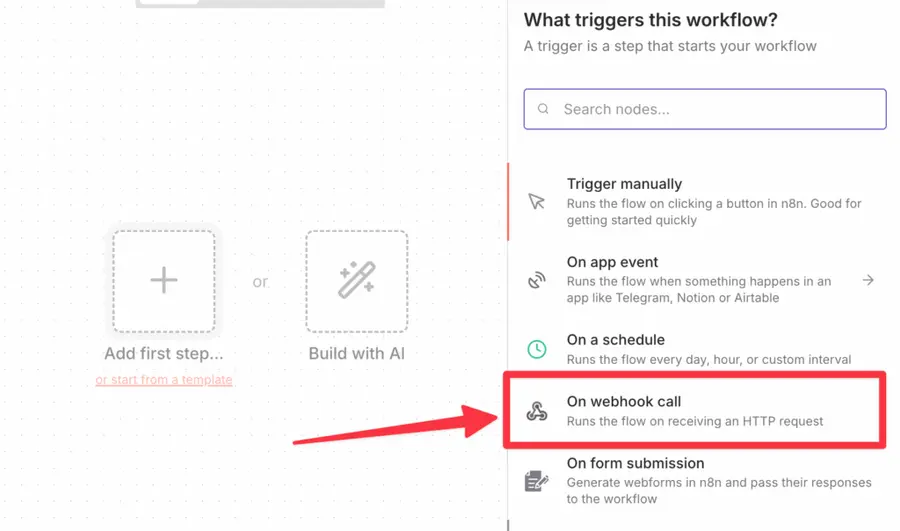
Start by adding a trigger.
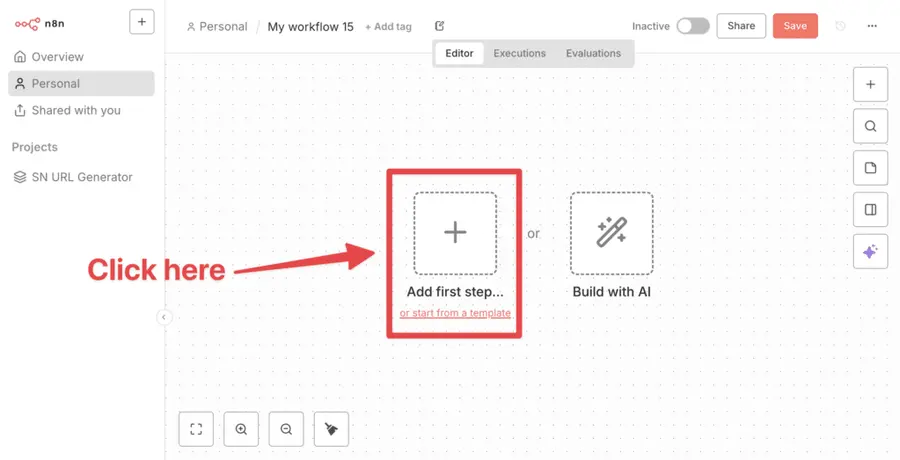
Choose “On webhook call”.
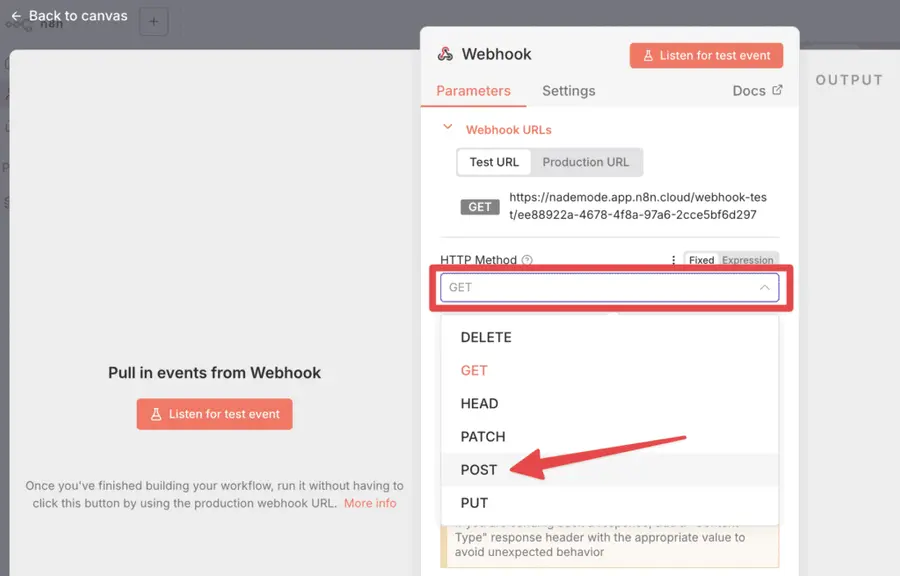
Change the GET method to POST method.
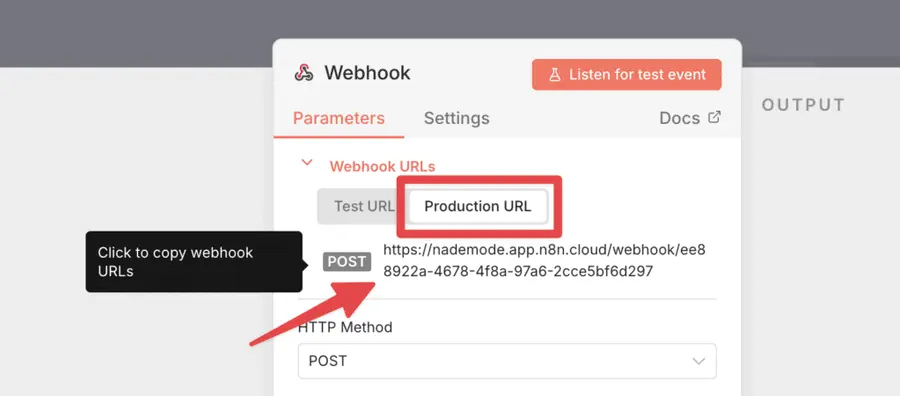
Then copy the Production URL.
Save your workflow and set it as Active to make it start listening.
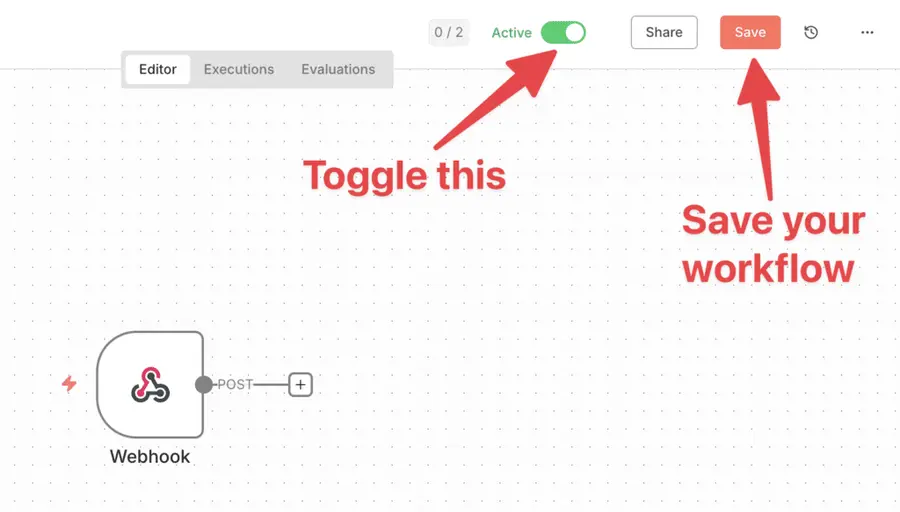
That’s it on the n8n side.
Step 3: Set up your webhook inside Evaboot
Inside your Evaboot dashboard:
Go to the “Integrations” → “Webhooks” section.
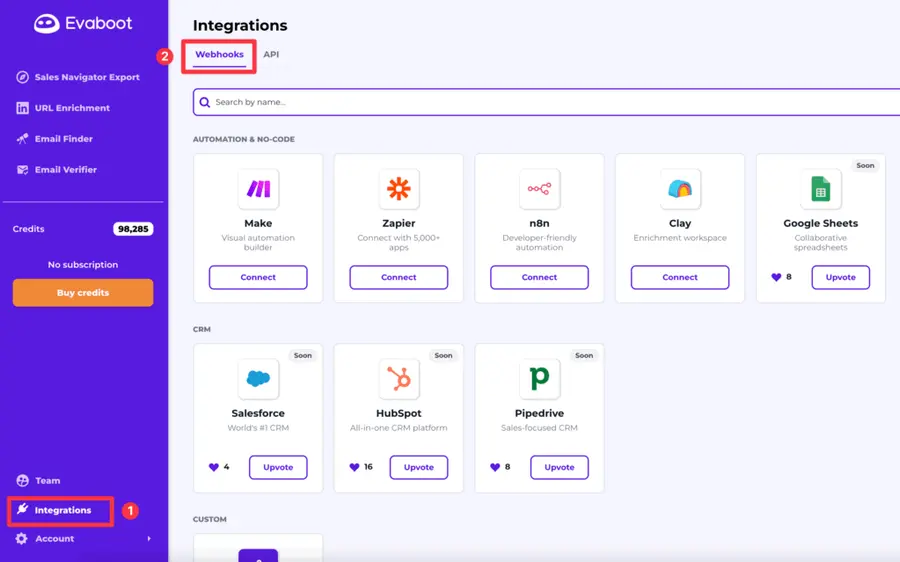
Select n8n and paste your n8n webhook URL.
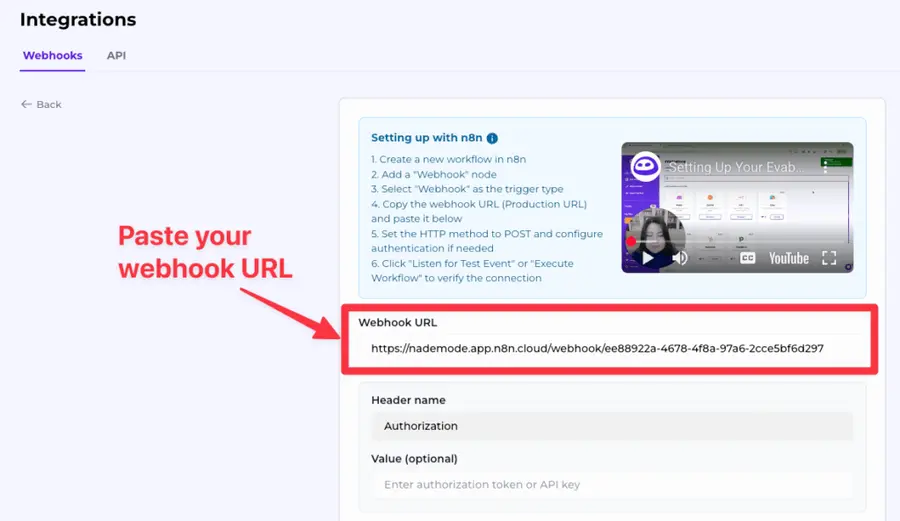
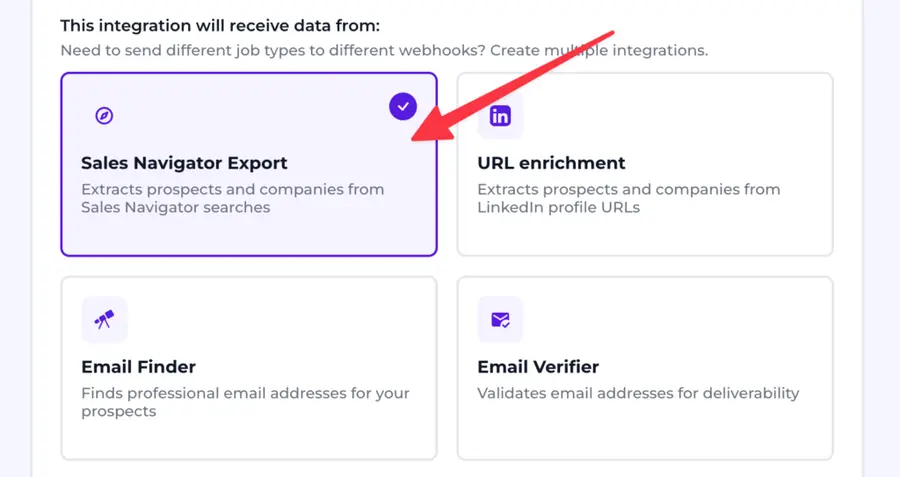
Choose “Sales Navigator export” as the type of data you want to send over.
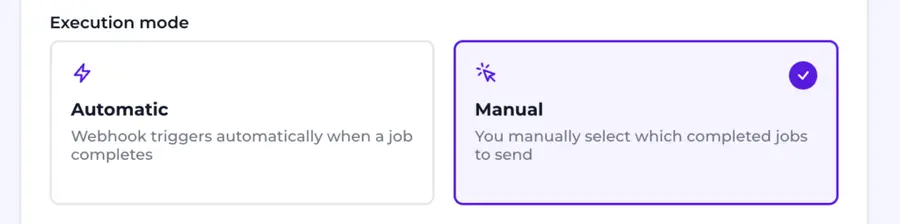
Decide whether you want manual or automatic execution.
You can only set up one automatic webhook. Once you set ip up, all your future exports will be sent to this automatically.
Name your export (optional) and click on “Test webhook”.
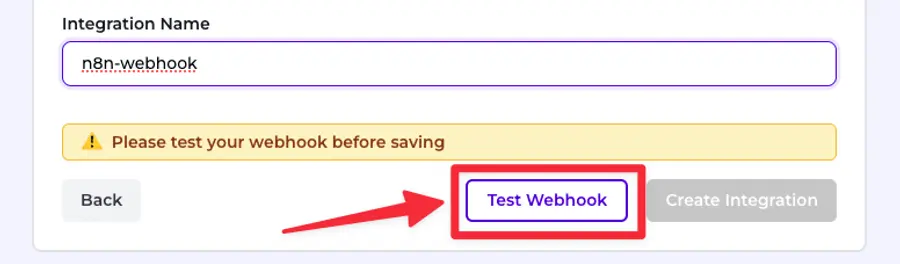
You always have to test before saving — this confirms the data is flowing correctly into n8n.
If you run into any issues, you can copy the response details and send it to the Evaboot support chat.
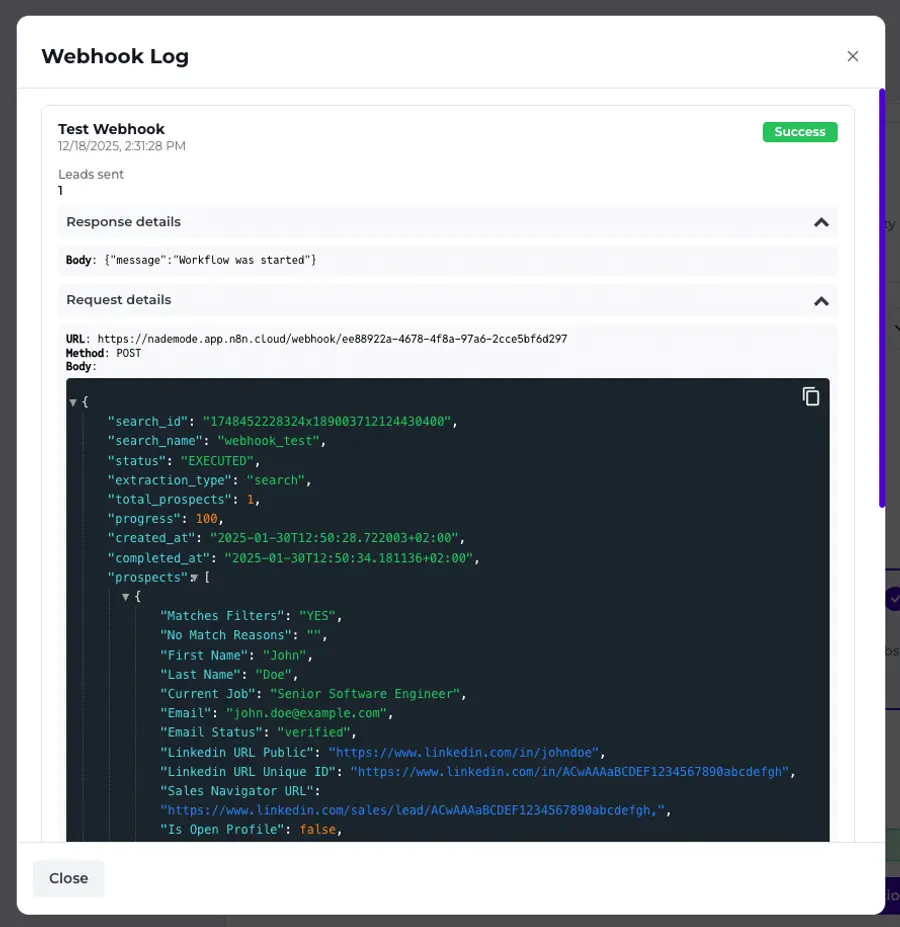
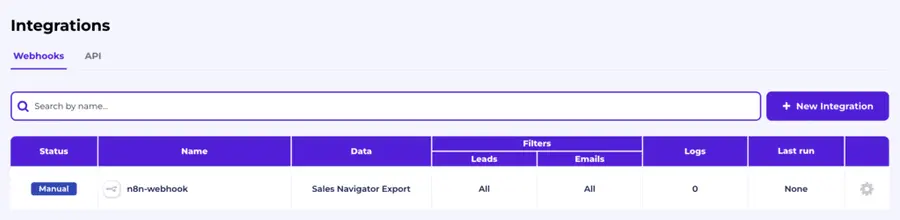
If everything looks good, click on “Create integration”. It will redirect you to the table with all your integrations.
Step 4: Export your leads from Sales Navigator using Evaboot
Now that your n8n webhook is connected inside Evaboot, it’s time to trigger your first data flow.
Go to Sales Navigator and create or choose the lead list you want to export. It can be:
- Lead Searches
- Lead Lists
- Account Searches
- Account Lists
- Saved Searches
Evaboot handles all the use cases.
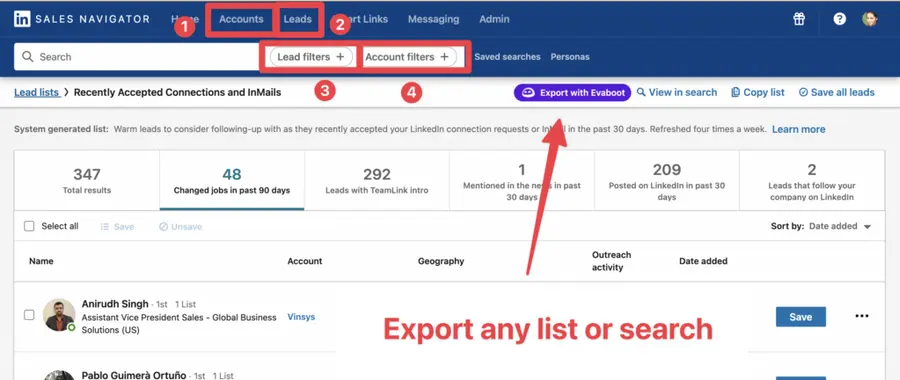
You can export specific tabs in your lead lists, such as “Changed jobs in the past 90 days.”
When you click “Export with Evaboot” you will be redirected to the Evaboot app.
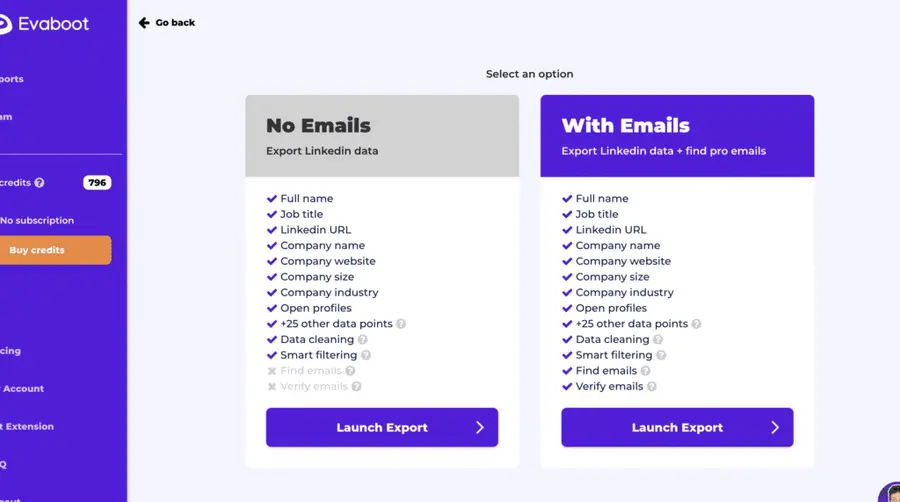
Choose whether you want to find emails for these leads.
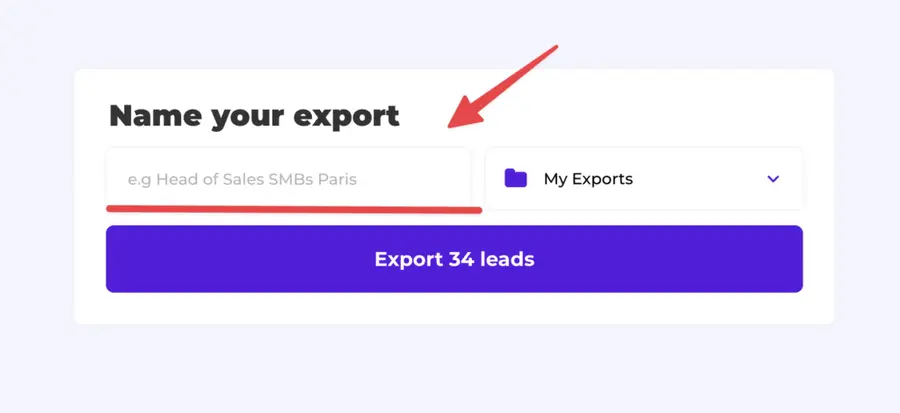
Give a name to your export and click on “Export leads”.
The estimated end date will appear on the left right after launching the export.
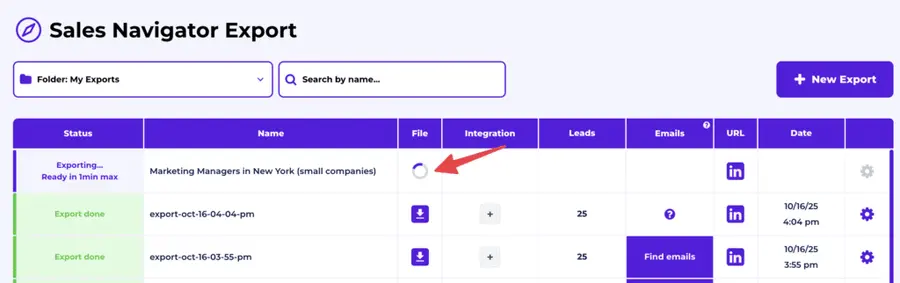
Evaboot will export your Sales Navigator leads in real-time.
That makes your lead generation process GDPR-compliant, in opposition to using databases.
After email enrichment is complete, your webhook will be triggered automatically if you set it up in automatic mode.
If you didn’t choose automatic mode, click on the “+” icon in the “Integrations” column.
Click it and choose your n8n integration from the list.
Confirm the send.
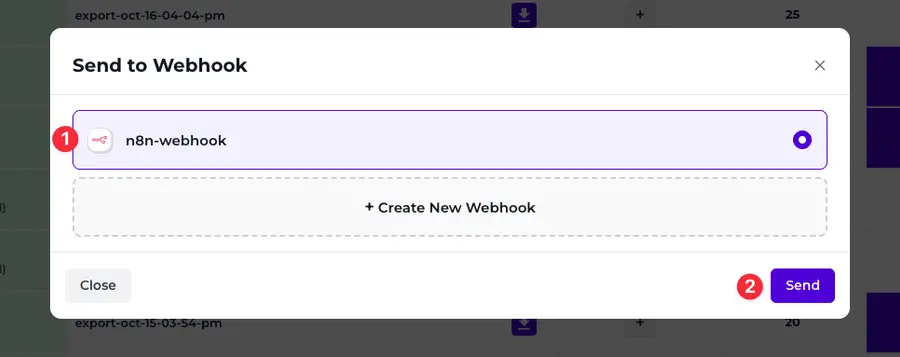
The webhook will be triggered instantly, and the data will be sent to n8n.

Manual mode is useful if:
- You want to send only certain exports to n8n.
- You want to run multiple webhooks for the same data type (Sales Navigator, Email Finder, etc.).
And here you go!
Best Use Cases to Automate with Sales Navigator + n8n
Once you’ve connected Sales Navigator to n8n using Evaboot’s webhook integration, the real power lies in what you do next.
Here are some of the most impactful workflows you can automate:
- Send LinkedIn leads to your CRM in real-time
- Trigger outbound emails or sequences
- Add new contacts to your newsletter or lead nurturing flows
- Get notified instantly when new leads are captured
- Sync Sales Navigator leads with Google Sheets for live reporting
1. Send LinkedIn leads to your CRM in real-time
Automatically push Sales Navigator leads into tools like HubSpot, Salesforce, or Pipedrive — no CSVs, no manual entry. Keep your CRM updated as you prospect.
This means your sales team gets real-time access to freshly scraped, verified LinkedIn leads without lifting a finger. No spreadsheet cleanup, no formatting errors.
Example:
- A sales rep exports a list of HR Directors from Sales Navigator.
- Evaboot enriches the list with emails, clean job titles, and company names.
- n8n pushes those enriched leads directly into HubSpot as contacts — ready to trigger workflows or be assigned to sales.
Best for: Sales teams that want instant access to LinkedIn leads inside their CRM, without any spreadsheet handling.
2. Trigger outbound emails or sequences
Speed is everything in outbound.
Once your leads are enriched with Evaboot, you can use n8n to automatically trigger cold email sequences in cold outreach platforms like Mailshake, Instantly, or Lemlist.
Example:
- A Sales Navigator list of CEOs is exported and enriched.
- n8n sends each new contact into a Mailshake campaign.
- Personalized emails go out within minutes of export — while the lead is still fresh.
Best for: SDRs and growth marketers who want to move from lead discovery to inbox outreach automatically.
3. Add new contacts to your newsletter or lead nurturing flows
Not every lead is ready to convert right away.
You can send LinkedIn leads into tools like Mailchimp, ActiveCampaign, or ConvertKit to keep them warm with long-term content or offers.
Example:
- Marketing exports a list of Heads of Marketing at SaaS companies.
- n8n adds them to an ActiveCampaign automation that shares a 5-part email course.
- Leads are gradually educated over time before being handed off to sales.
Best for: Marketing teams building nurture campaigns or lead scoring workflows.
4. Get notified instantly when new leads are captured
Want to alert your sales or success team the moment a target account appears?
Use n8n to send notifications to Slack, email, or even Microsoft Teams when a new lead is added to your Evaboot export.
Example:
- A list of Series B tech companies is being exported.
- Every time a C-level contact is enriched, a Slack alert goes to the sales team with the contact’s info and LinkedIn profile.
- Reps jump in immediately to connect or start outreach.
Best for: RevOps teams or founders who want real-time alerts on VIP leads or ICP matches.
5. Sync Sales Navigator leads with Google Sheets for live reporting
If your team runs dashboards or reports in Google Sheets or Airtable, this automation will save you hours.
Skip the manual CSV upload: n8n can send enriched leads to your spreadsheet automatically.
Example:
- You export a list of 300 marketing leaders.
- Each enriched contact appears in your Google Sheet with email, company, title, and LinkedIn URL — instantly.
- Your team can slice and dice the data, calculate response rates, or track outreach performance in real time.
Best for: Founders, freelancers, or marketers managing lead gen from spreadsheets or internal dashboards.
Why Automate Your LinkedIn Lead Workflow?
If you’re using LinkedIn Sales Navigator to generate leads, chances are you’re doing a lot of repetitive, manual work — exporting lists, cleaning data, uploading to your CRM, or copy-pasting into email tools.
That works… until it doesn’t.
Here’s why automating this workflow with n8n (and a LinkedIn-compatible export tool) is a game changer:
- Save hours every week
- Respond to leads faster
- Eliminate data loss and human error
- Create smarter multichannel sequences
1. Save hours every week
Manually exporting and formatting CSV files can eat up several hours per week — especially if you’re working across multiple segments, geographies, or personas.
Is there any way to make CRM data entry less painful for SDRs? byu/Broad_Ad5455 inCRMSoftware
According to a HubSpot sales report, sales representatives dedicate only two hours daily to active selling. The rest is lost to admin tasks like data entry, lead cleanup, and manual exports.
With automation, you can eliminate these repetitive tasks, freeing up hours every week to focus on what actually moves the needle: booking meetings and closing deals.
2. Respond to leads faster
Speed-to-lead matters. The faster a lead hits your CRM, the faster you can start building a relationship.
Automations allow your team to trigger real-time workflows the moment a lead is added to your Sales Navigator list.
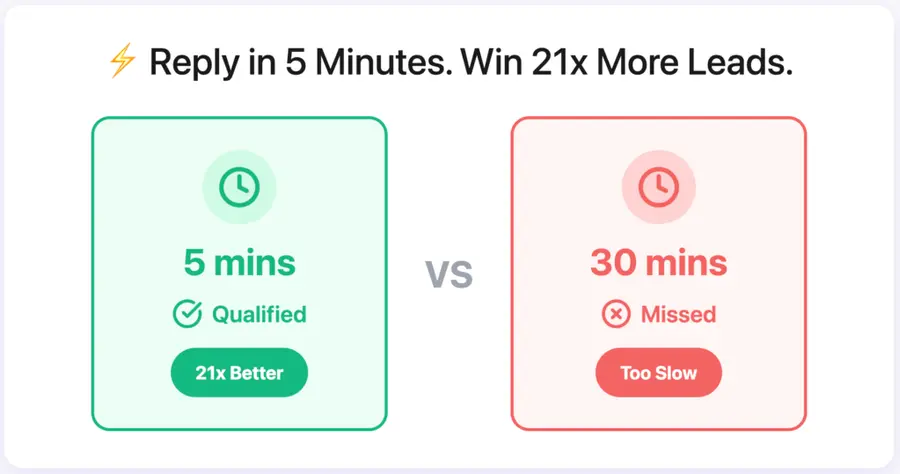
According to Harvard Business Review, replying within the first 5 minutes increases your odds of qualifying a lead by 21x compared to a 30-minute delay.
Imagine: you export a list of CHROs from LinkedIn at 10am. By 10:01am, they’re already in your CRM, assigned to a rep and entering a cold email sequence.
3. Eliminate data loss and human error
Reformatting spreadsheets leads to broken fields, mismatched names, and missed opportunities.
Automations ensure your data is structured, verified, and consistent across all systems — with no risk of typos or forgetting a column.
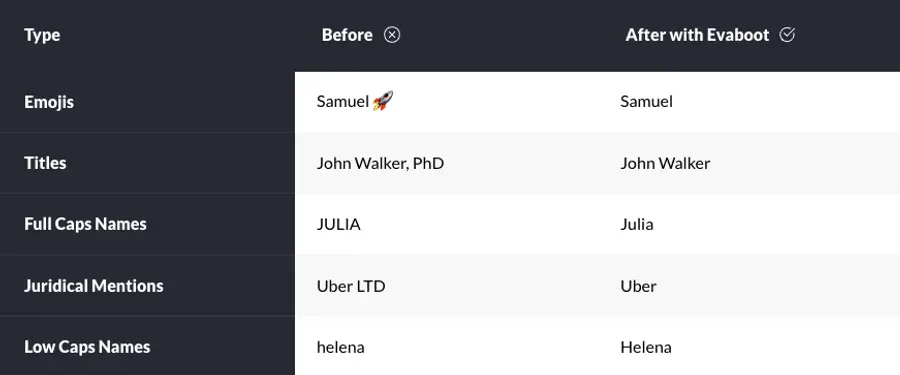
Evaboot extracts and cleans Sales Navigator exports (e.g., fixing casing, splitting first/last names), then n8n sends the verified contacts into your CRM and outreach tool, without touching a single row in a CSV.
4. Create smarter multichannel sequences
Automated workflows make it easier to reach leads on multiple channels — email, Slack, LinkedIn, or even project management tools like Trello or Asana.
You can route high-priority leads to your team instantly, while letting others enter nurture flows.
Result: Every lead is contacted on the right channel at the right time, without letting anyone slip through the cracks.
Conclusion
Manual lead exports from LinkedIn Sales Navigator are a thing of the past.
With Evaboot’s webhook integration and n8n’s no-code automation, you can build a fully automated pipeline — sending verified LinkedIn leads straight into your CRM, outreach tools, or internal dashboards in real time.
No spreadsheets. No repetitive tasks. Just one smart workflow that runs on autopilot while you focus on what matters: closing deals and scaling results.
Set it up once, and let your LinkedIn prospecting flow handle itself.
FAQs
Can I connect LinkedIn Sales Navigator directly to n8n?
Not directly. LinkedIn doesn’t offer a native integration with n8n.
However, you can connect Sales Navigator to n8n using Evaboot’s webhook integration.
Evaboot extracts leads from Sales Navigator and sends the clean data to n8n, where you can build automations to send it anywhere — CRM, email tools, Slack, Google Sheets, and more.
What can I do with Sales Navigator + n8n automation?
Once connected via Evaboot, you can use n8n’s visual workflow builder to automate powerful sequences like:
• Sending Sales Navigator leads to your CRM (e.g. HubSpot, Pipedrive)
• Triggering personalized email outreach via tools like MailerSend or Mailgun
• Creating real-time Slack alerts for high-priority leads
• Updating Google Sheets or Airtable dashboards instantly
• Enriching or filtering leads based on job title, location, or email status
With n8n’s 350+ integrations, you can design custom lead workflows that match your exact sales or marketing setup, without writing code.
Does Evaboot clean and verify the emails before sending them to n8n?
Yes. During export, Evaboot enriches and verifies each email, ensuring only clean, deliverable leads are sent through your webhook.
That means your CRM, cold email tool, or pipeline stays clean and up to date — no need to manually verify or clean your lists later.
Can I connect Evaboot to tools besides n8n?
Absolutely. In addition to n8n, Evaboot supports Zapier, Make.com, and custom webhook URLs, giving you total flexibility across your tech stack.
Whether you use Airtable, Notion, Lemlist, or a custom-built CRM, you can route your LinkedIn leads exactly where you need them.
Does LinkedIn Sales Navigator have an API?
Yes, but with major limitations. The LinkedIn Sales Navigator API is only available to LinkedIn’s official partners and large enterprise customers, which means most users can’t access it.
Evaboot offers a no-code alternative: you extract leads from Sales Navigator via our Chrome extension, and push that data into n8n using webhooks. No API key, no code, no enterprise contracts.
Is n8n free to use?
Yes, n8n is open-source and free for self-hosted use.
There’s also a cloud version (n8n Cloud) with paid plans that offer more capacity, team features, and hosted infrastructure.
It’s a great choice for startups, growth teams, and technical users who want flexibility without platform limits.


