
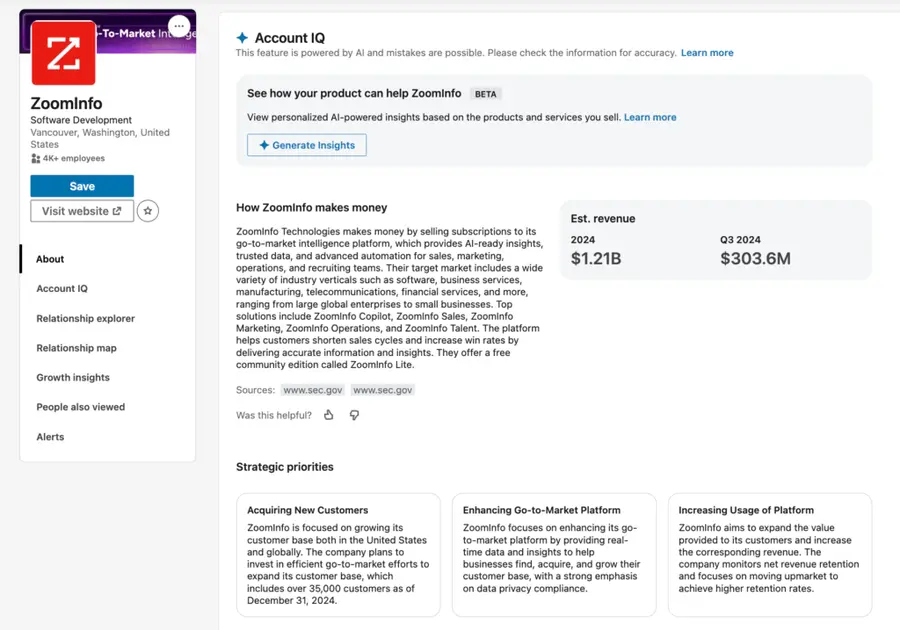
Account IQ is a LinkedIn Sales Navigator feature that delivers powerful company insights directly on account pages.
If you’re still jumping between tools to research a company before cold outreach, you’re doing it the hard way.
Account IQ eliminates the guesswork by giving you a complete overview of any target account: financials, executive messaging, business challenges, competitive landscape, and more.
With this AI-powered tool, sales reps can personalize messages at scale, prioritize high-value accounts, and sound like an insider in every conversation.
Here’s what we’ll cover in this guide so you can become an Account IQ pro:
- What Is LinkedIn Sales Navigator Account IQ?
- How To Access Account IQ?
- What Insights Does Account IQ Give You?
- How To Use Account IQ For Outbound Prospecting
- Account IQ Integration With CRM
- How to Export Lead Lists from LinkedIn Sales Navigator
Let’s dive in.
What Is LinkedIn Sales Navigator Account IQ?
Account IQ is an AI-powered intelligence layer built into LinkedIn Sales Navigator. It turns a company’s LinkedIn page into a goldmine of real-time insights.
With Account IQ, you can unlock a full company briefing in one click: how they make money, what’s keeping their execs up at night, who the key players are, and which teams are scaling fast.
Think of it as a cheat sheet for building context fast, without leaving LinkedIn.
Instead of reading 5 blog posts, 3 earnings reports, and 20 LinkedIn profiles, Account IQ puts it all in one place, so you can spend less time researching and more time closing.
How To Access Account IQ?
Getting started with Account IQ is simple. Just follow these steps:
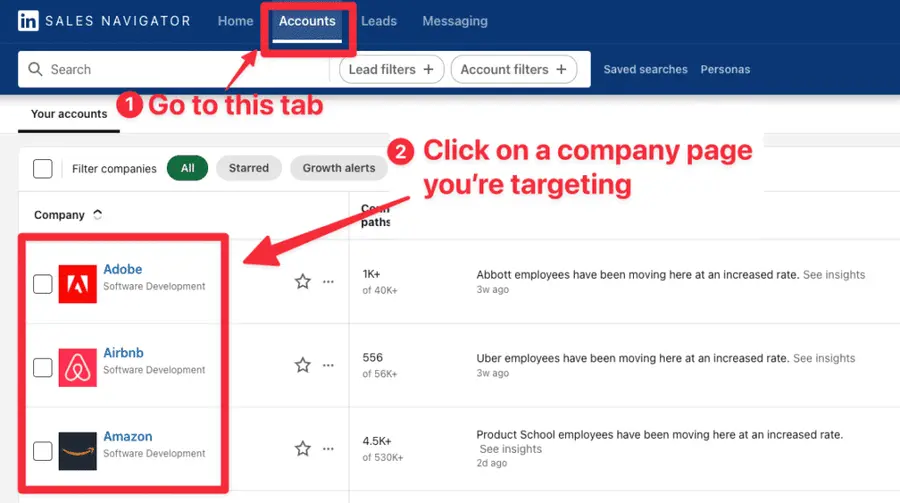
Sign in to your LinkedIn Sales Navigator account, go the Accounts tab and click on a company page you’re targeting.
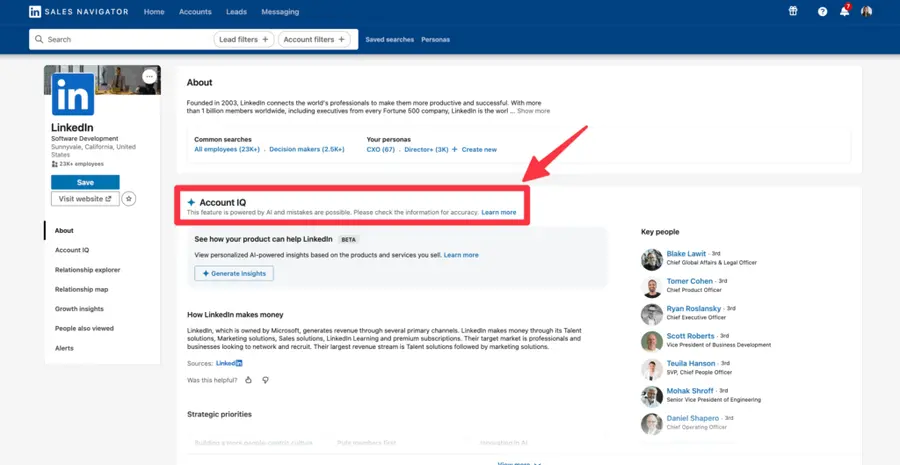
Scroll to the “Account IQ” section on the Overview tab.
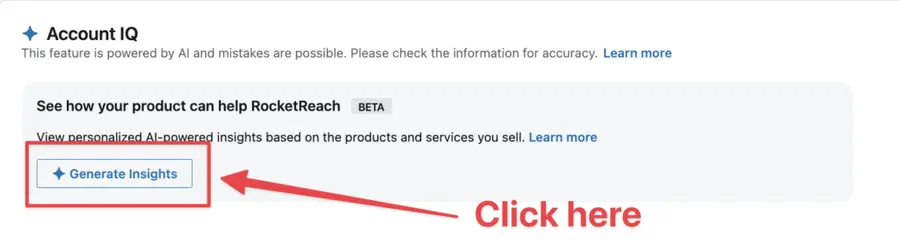
Click “Generate Insights” to unlock the full summary.
And that’s it!
What Insights Does Account IQ Give You?
Here’s exactly what Account IQ reveals:
- AI-Generated Pitch Suggestions
- Business Model & Revenue Estimates
- Business Challenges
- Executive Voices
- Headcount Insights & Growth Signals
- Competitive Landscape
- Key People
- Related News
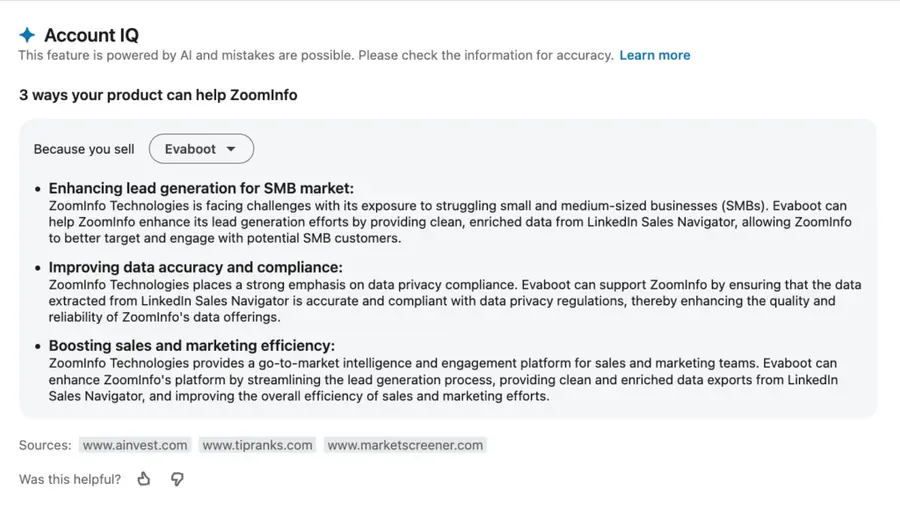
1. AI-Generated Pitch Suggestions
Account IQ shows how your product could help the target company based on what you sell.
How to use it: Drop these suggestions into your cold email prompts to generate hyper-relevant messaging with ChatGPT—faster and smarter.
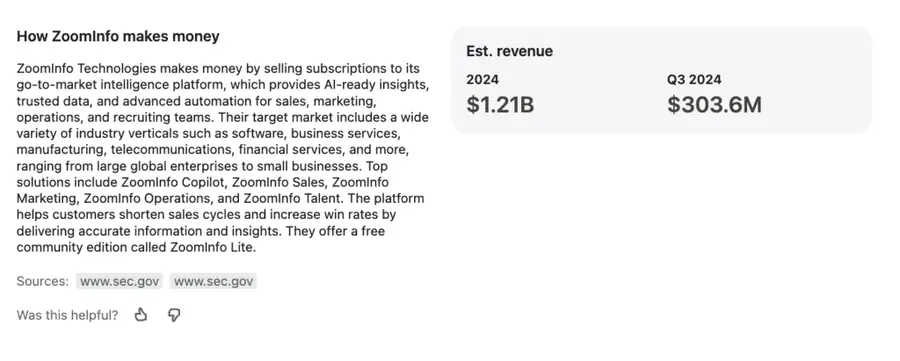
2. Business Model & Revenue Estimates
See how the company makes money, who they target, and how big they are, with revenue estimates.
How to use it: Quickly qualify accounts by size and model so you only pitch companies that align with your ICP.
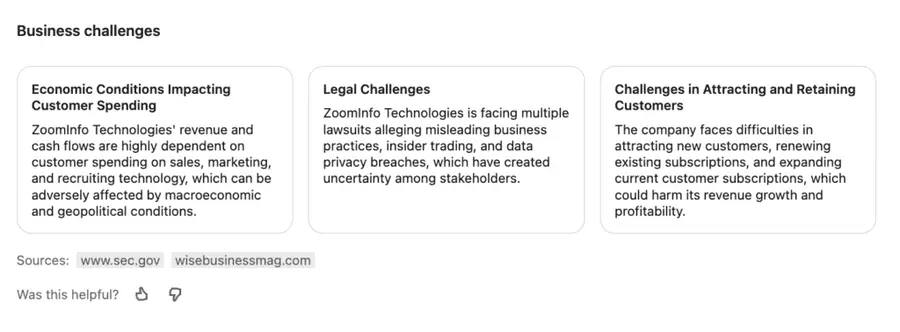
3. Business Challenges
Understand what goals the company is pursuing and what’s standing in the way. Think: expansion plans, legal risks, churn issues.
How to use it: Mirror these challenges in your outreach to create urgency and position your product as the fix.
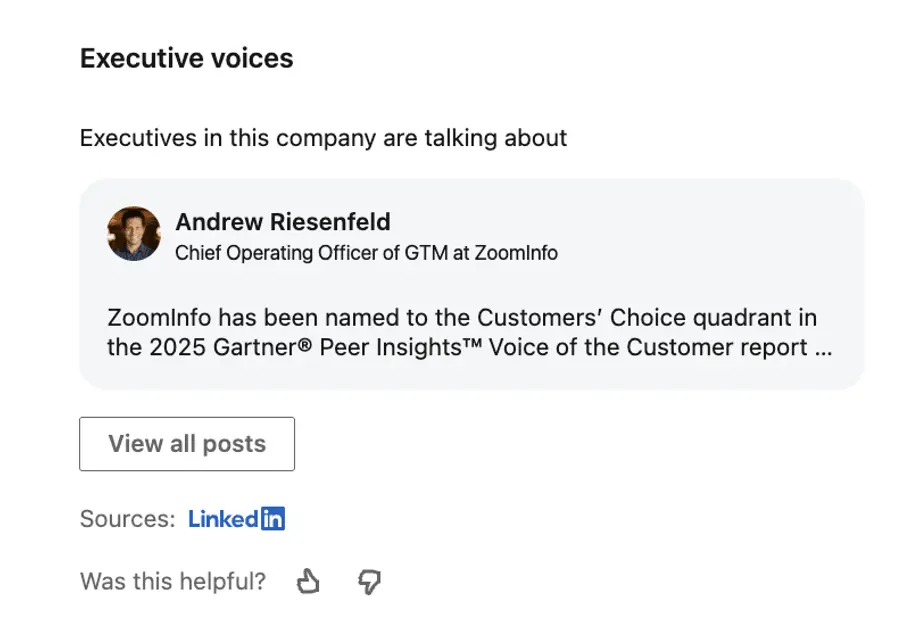
4. Executive Voices
Account IQ identifies key people at the company—C-suite leaders, VP-level roles, decision-makers—and shows recent executive posts.
How to use it: Quote an exec’s recent post or public statement in your email opener to instantly establish relevance and credibility.
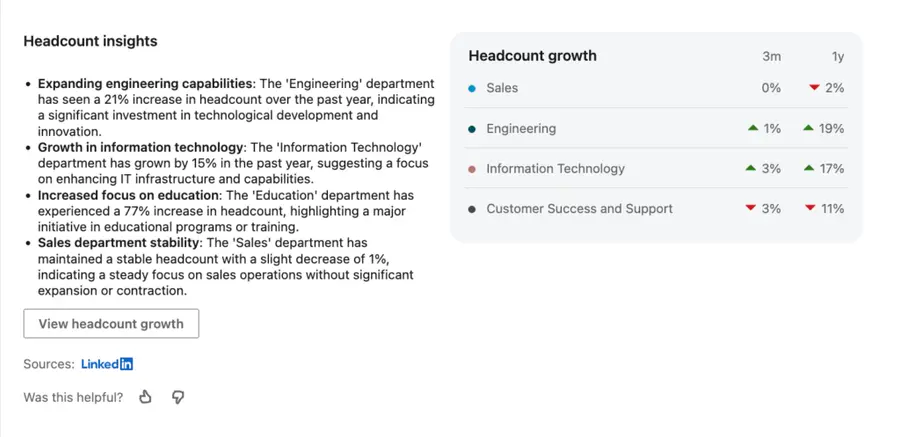
5. Headcount Insights & Growth Signals
Which teams are expanding? Who’s hiring aggressively? See department-level headcount trends to detect buying intent or scalability pains.
How to use it: Target departments with rapid growth to offer tools that help them scale, onboard, or automate faster.
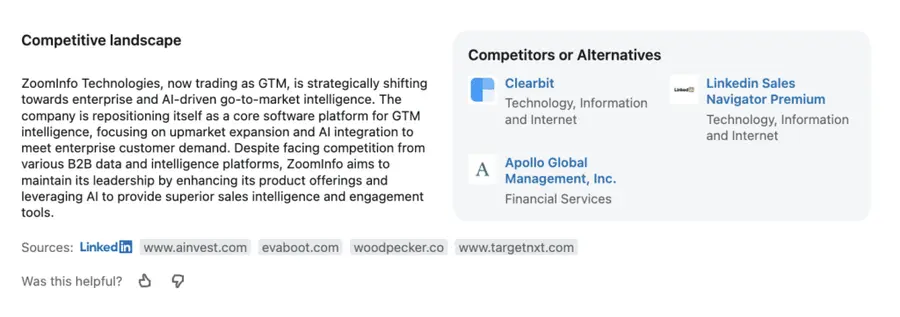
6. Competitive Landscape
Account IQ lists competitors and alternatives—and shows how the company positions itself in the market. A goldmine for sharpening your unique value prop.
How to use it: Use competitor mentions as social proof or to contrast how your solution gives them an edge.
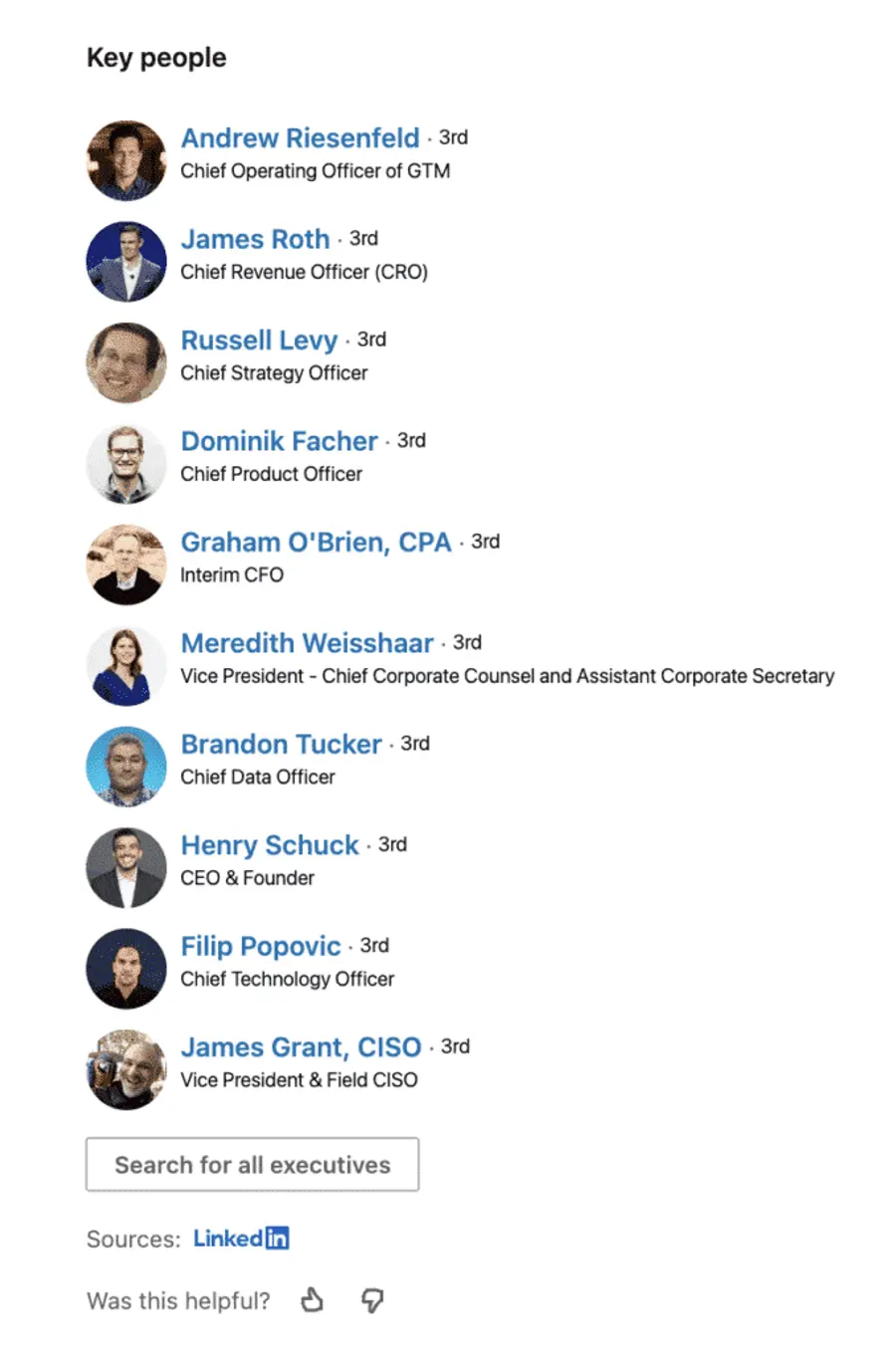
7. Key People
An overview of decision-makers and influencers within the company.
How to use it: Instantly create high-quality lead lists based on roles and seniority—then export them with tools like Evaboot to kickstart your outbound.
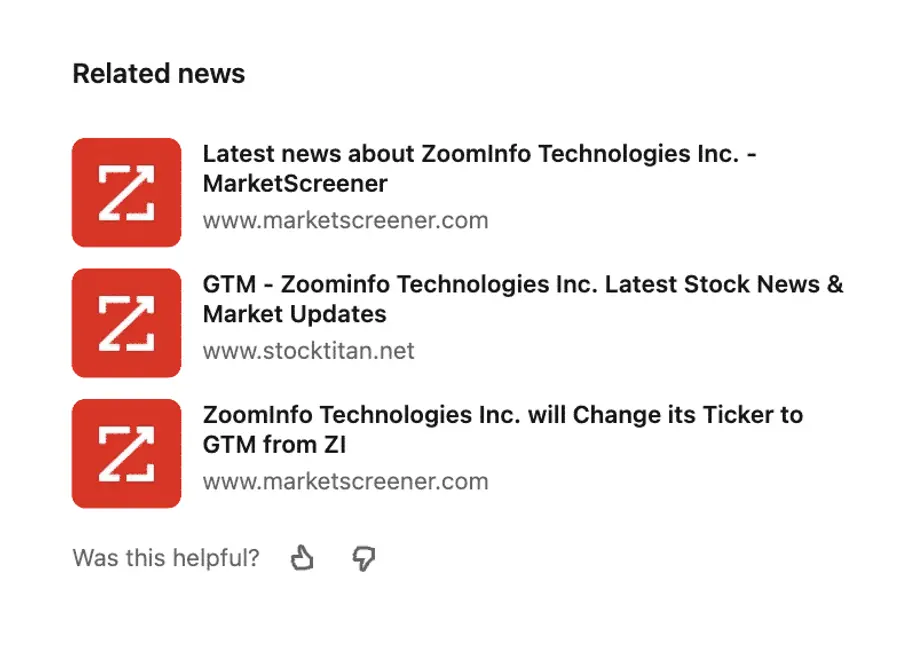
8. Related News
Stay up-to-date with funding rounds, product launches, and leadership changes. Every insight is sourced and ready to click through.
How to use it: Open your outreach with something timely to break the ice—“Saw you just raised your Series B…” beats a generic intro every time.
Every section is AI-generated but backed by LinkedIn data and public sources—so you get speed and credibility.
How To Use Account IQ For Outbound Prospecting
Knowing what an account looks like is one thing. Knowing what to do with that info is where you win deals.
Here’s how to plug Account IQ directly into your outbound process to send smarter messages and build pipeline faster:
- Identify Your Target Account
- Build Prospect Lists
- Craft Personalized Messaging
1. Identify Your Target Account
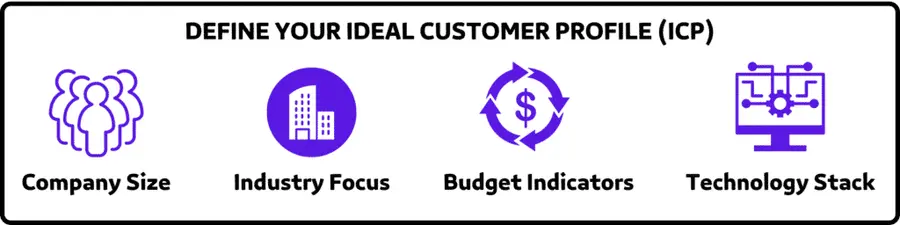
- Start with your ideal customer profile (ICP)—industry, size, tech stack, pain points
- Use Account IQ’s revenue and business model data to qualify or disqualify companies
- Prioritize accounts with signs of growth, budget, or strategic shifts
2. Build Prospect Lists
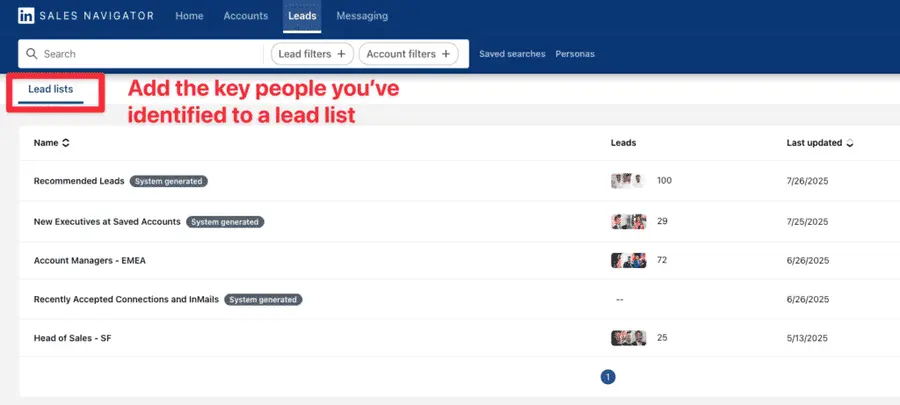
- Use the “Key People” tab in Account IQ to find relevant decision-makers
- Focus on C-suite, VP, or department leads in growing teams
- Add them to Sales Navigator lead lists or export them to your sales engagement platform
3. Craft Personalized Messaging
Forget the copy-paste templates. This step is where the real personalization starts.
Use the AI-generated insights from Account IQ to write cold emails with ChatGPT in under 60 seconds.
Here’s how:
- Click “Generate Insights” on your target account.
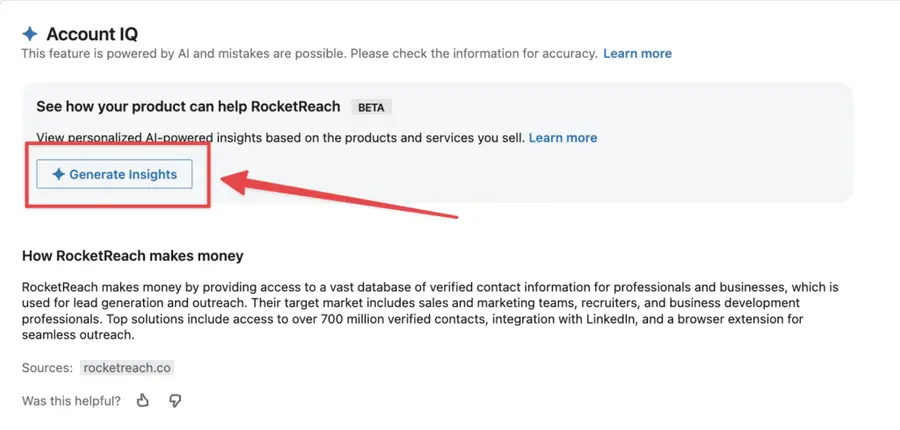
- Copy the “3 ways your product can help” block…
- And prompt ChatGPT like this:
Write a short cold email to ZoomInfo, pitching Evaboot. Use the RABT framework:
You’ll get this kind of output:
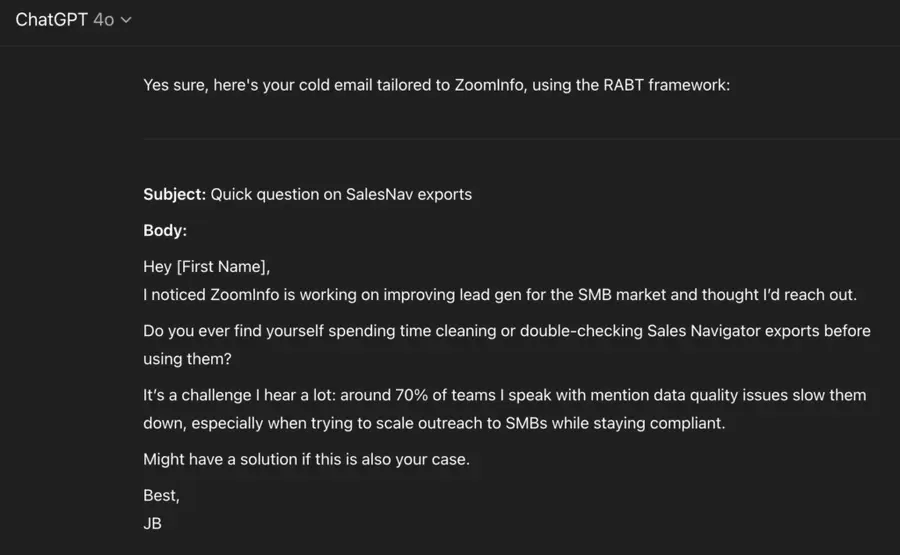
Fast and targeted. That’s how you turn AI insights into high-performing cold messages in seconds.
Account IQ Integration With CRM
Account IQ doesn’t just live in Sales Navigator.
With an Advanced Plus plan, you can bring those AI insights straight into your CRM—like Dynamics 365, Salesforce, or HubSpot.
That means your reps get context where they work. No tab-hopping. No data gaps.
Here’s what the CRM integration delivers:
- Strategic priorities: See what the company is focused on.
- Business challenges: Uncover friction points that impact growth.
- Estimated revenue: Get a snapshot of company size with recent financial estimates.
- One-click summary: Generate a full Account IQ overview.
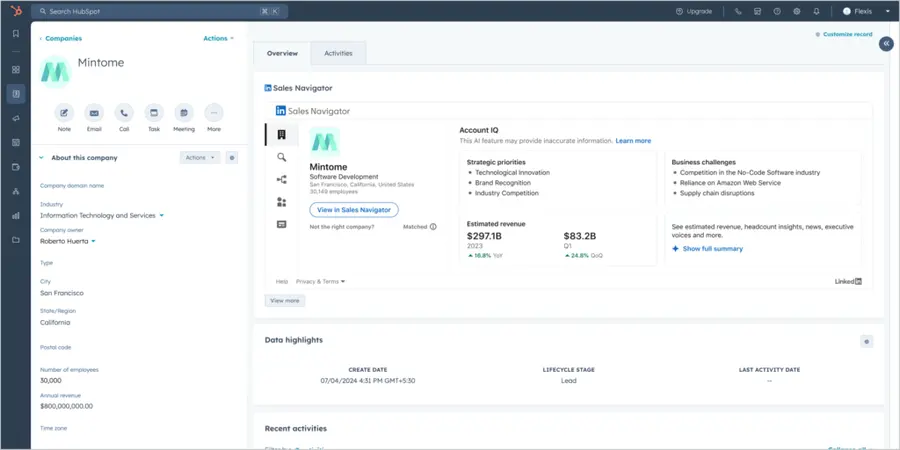
Setup note: To use this feature, your admin must enable Account IQ from the Sales Navigator Admin Settings page. Also, you’ll need to sign in to LinkedIn inside your CRM to see the insights.
Not every account is eligible for Account IQ. If it is, you’ll see the insights panel automatically. If not, you’ll see a message that the account doesn’t yet qualify.
How to Export Lead Lists from LinkedIn Sales Navigator
Once you’ve identified valuable leads through Account IQ, you’ll want to export them for outreach.
That’s where Evaboot comes in.
Instead of copying profiles manually, this Sales Navigator scraper lets you extract clean, verified lead lists from Sales Navigator in just a few clicks—ready for your CRM, cold email tool, or enrichment flow.
Here’s how to export leads from Sales Navigator:
- Create an Evaboot account
- Download the Chrome Extension
- Select your Sales Navigator lead or account lists
- Name and launch your export
- Download your cleaned list
1. Create an Evaboot account
Step 1 is to go to Evaboot and click “Sign up”. Then, create an account.
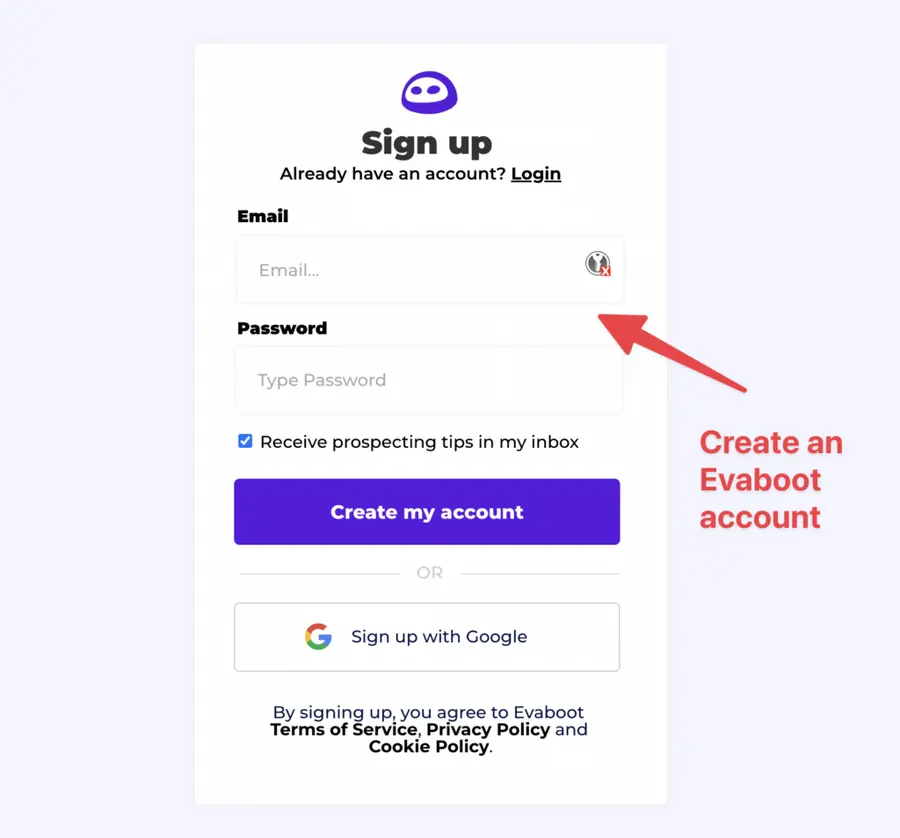
Once you’ve created your account, click on “Get Chrome Extension” to download it from the Chrome Web Store.
2. Download the Chrome Extension
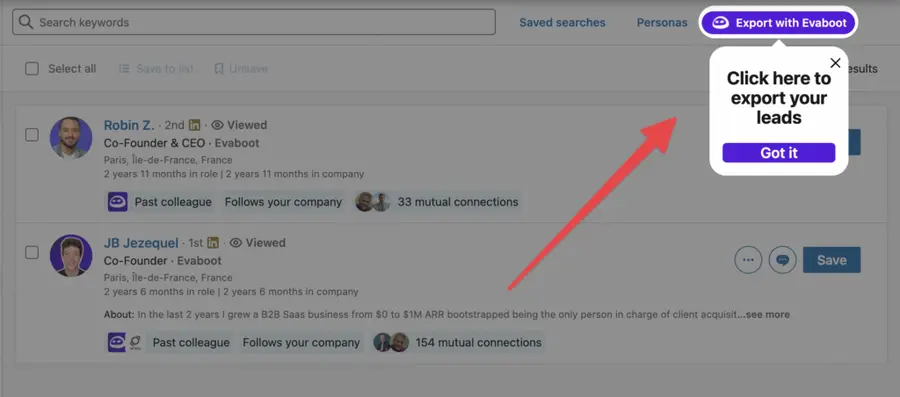
When on the Chrome Store page, click “Add to Chrome” to install the extension.
You’ll be automatically redirected to Sales Navigator. A popup will show you where the button is located.
3. Select your Sales Navigator lead or account list
Once the Chrome extension is installed, go to the list of leads or accounts you want to export. It can be:
- Lead Searches
- Lead Lists
- Account Searches
- Account Lists
- Saved Searches
Evaboot handles all the use cases.
The “Export with Evaboot” button is at the top of these LinkedIn Sales Navigator pages.
This is what it will look like for lead lists:
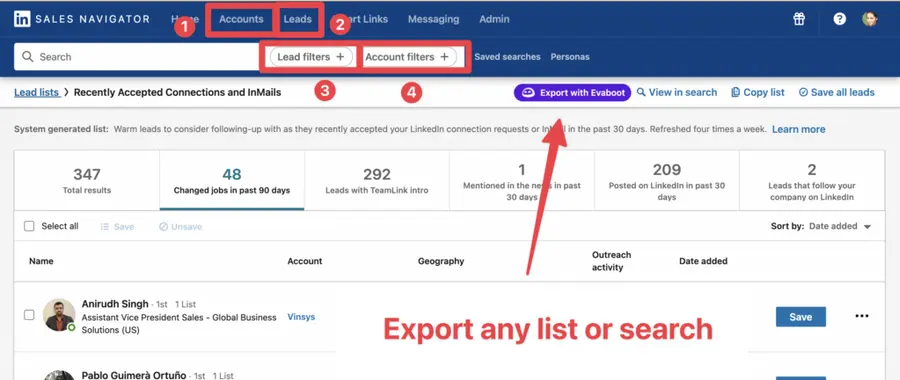
You can export specific tabs in your lead lists, such as “Changed jobs in the past 90 days.”
And this is what it will look like for account lists:
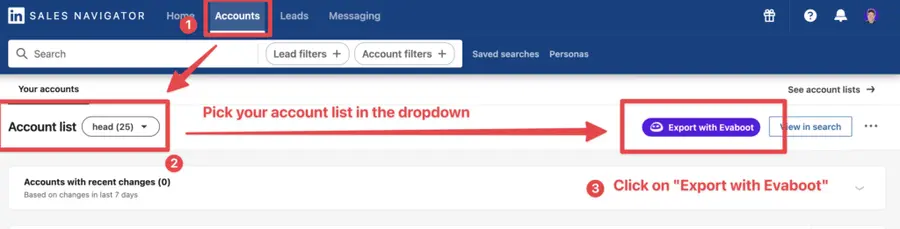
When you export account lists from the Sales Navigator with Evaboot, you get the following:
- Company Name
- Company Website
- Industry
- Specialties
- Employee Count
- Employee Range
- Location
- Company Linkedin URL
- Company Type
- Year Founded
- Company Profile Picture
- Company Description
Evaboot’s cleaning and filtering algorithms also clean and filter all this data.
4. Name and launch your export
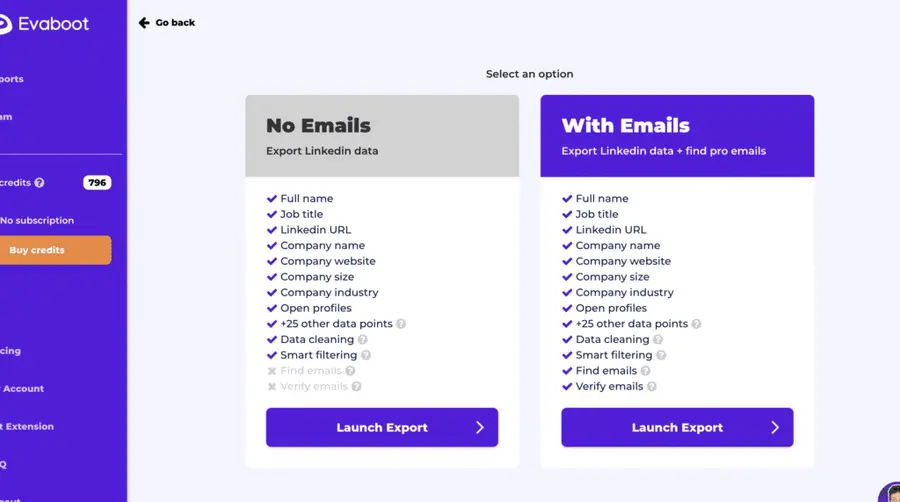
When you click “Export with Evaboot” you will be redirected to the Evaboot app.
Choose whether you want to find emails for these leads.
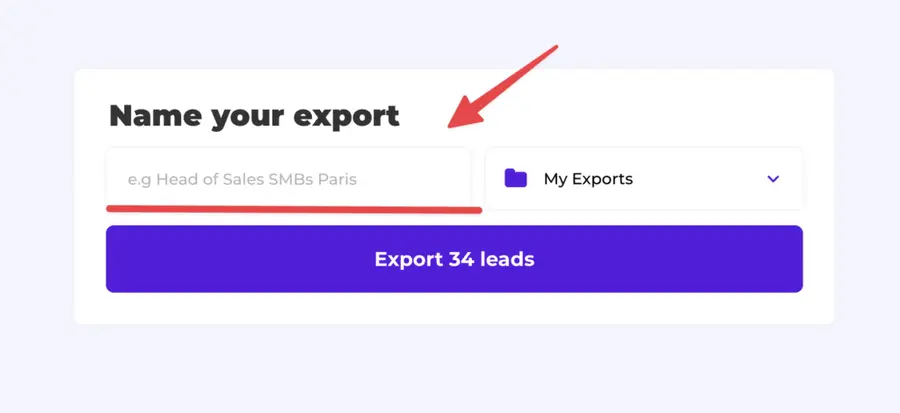
Give a name to your export and click on “Export leads”.
The estimated end date will appear on the left right after launching the export.
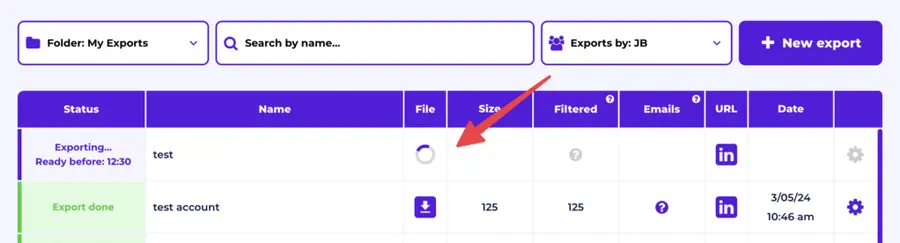
Evaboot will export all these leads in real-time.
That makes your lead generation process GDPR-compliant, in opposition to using databases.
5. Download your cleaned list
After the extraction is done, you will get an email. This email will have a link to download your lead list in a CSV file.
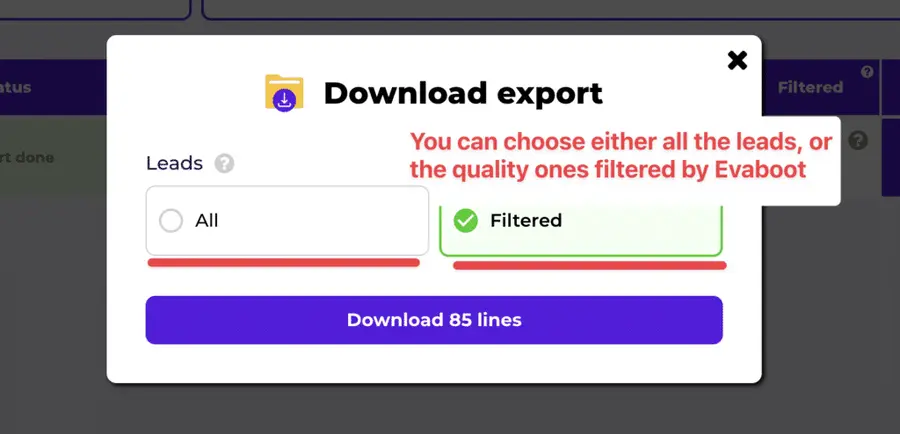
Choose the list type that you want to download. And you’re done.
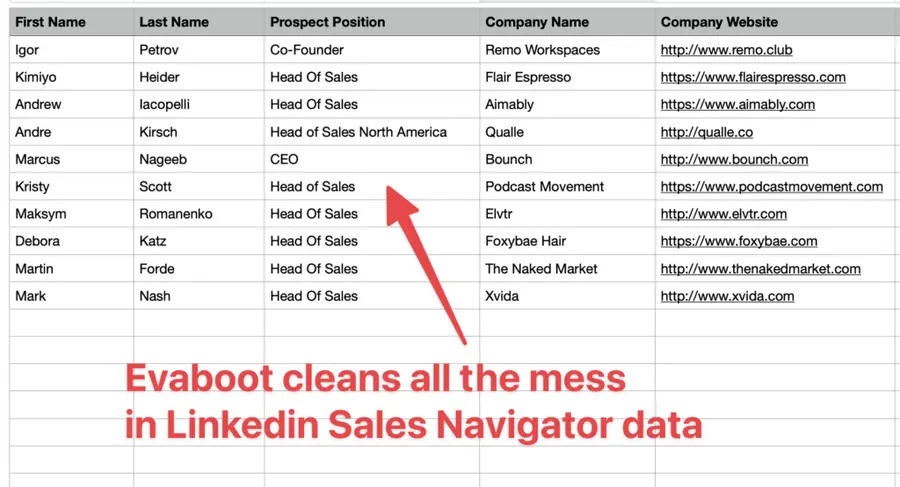
Evaboot does much more than export your list. It also cleans all the names and company names of your LinkedIn contacts.
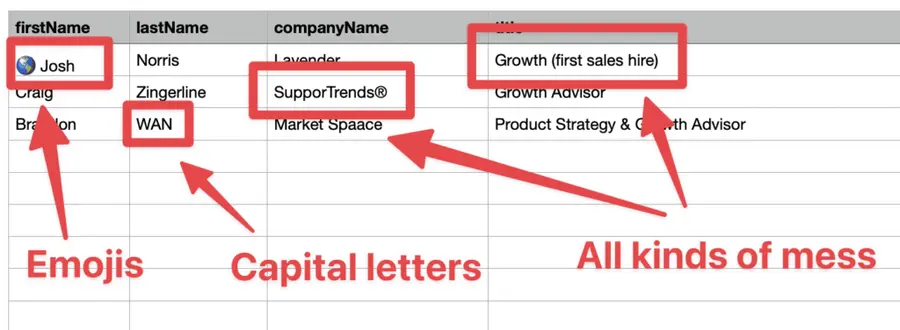
The data on LinkedIn is not clean.
Cleaning data from your sales navigator export can take hours if you do it manually.
Hopefully, the Evaboot cleaning algorithm takes care of all this work for you by automatically cleaning:
- First names
- Last names
- Company names
- Job titles
Nobody wants to spend hours cleaning Excel files. Better let robots do this boring job.
You will often find false positives in your LinkedIn Sales Navigator search results.
Even if you’re using super precise LinkedIn boolean search operators.

You will frequently find leads that don’t match the search filters you chose in the Sales Navigator search engine.
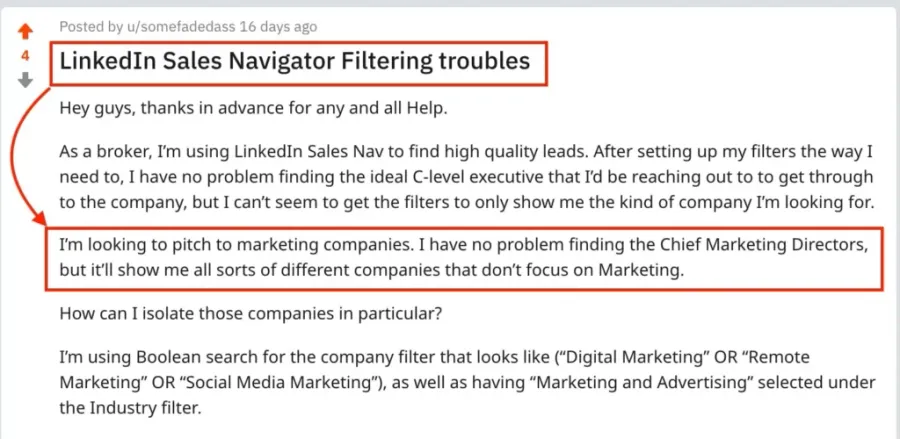
That’s why many people spend hours double-checking their search results manually.
This is a painful task, but it’s no problem.
Evaboot is the best Sales Navigator scraper.
Our algorithm checks your leads twice to make sure they fit your search filters.
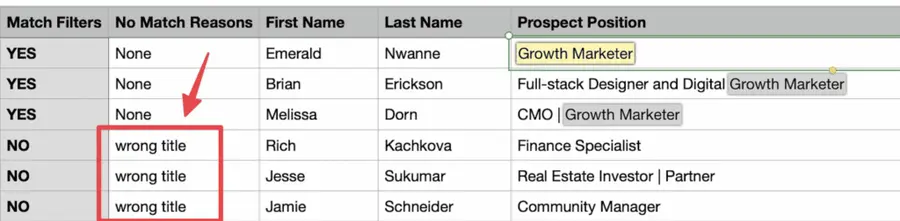
In this export, there’s a column named “No Match Reasons.” This column tells you if your leads really match your search filters.
If they don’t, we will explain why. In this example, the leads have the wrong title. The initial search was for growth marketers.
To reduce false positives in your Sales Navigator searches, check out our full Sales Navigator tutorial.
And here you go!
With this data, your sales team can now use multichannel outreach.
Conclusion
If you’re tired of generic outreach and slow research, Account IQ changes the game.
In seconds, you get strategic priorities, key challenges, revenue data, and decision-makers—directly inside Sales Navigator and your CRM.
And with tools like Evaboot, you can turn those insights into clean, ready-to-contact lead lists with just a few clicks.
Use Account IQ to work smarter.
Use Evaboot to move faster.
Combine both to crush your prospecting goals.
FAQs
What Is Account IQ In LinkedIn Sales Navigator?
Account IQ is an AI-powered feature that gives you a complete overview of a company—including strategic priorities, business challenges, and estimated revenue—within LinkedIn Sales Navigator.
Can My Employer See My LinkedIn Activity With Sales Navigator?
No, your employer can’t see private activity like profile views or searches. Sales Navigator activity remains confidential unless you publicly engage with content.
How Much Does LinkedIn Sales Navigator Cost?
There are 3 LinkedIn Sales Navigator plans:
1. Core plan: $99.99/month or ~$959.88/year (annual billing saves ~20%) 2. Advanced plan: $179.99/month or $1,679.88/year (annual billing saves ~20%) 3. Advanced Plus plan: Enterprise pricing only—typically starts around $1,600 per seat per year, but exact cost is custom and requires contacting LinkedIn for a quote
This tiered pricing reflects growing feature access.


