
As a recruiter, you might agree that standing out is critical in talent acquisition.
Equally crucial is saving time and effort when making new connections and contacting the best candidates for your job offer.
But how can you engage with a sea of candidates and maintain quality interaction?
If you’re looking for LinkedIn InMail best practices, you should consider using them to contact your potential candidates.
InMail is your golden ticket to bypass the usual LinkedIn connection requests and reach any LinkedIn user directly in their inbox.
LinkedIn data suggests that crafting personalized InMails can boost your performance by about 15%.
Furthermore, InMails boost an open rate that’s 166% higher compared to standard emails.
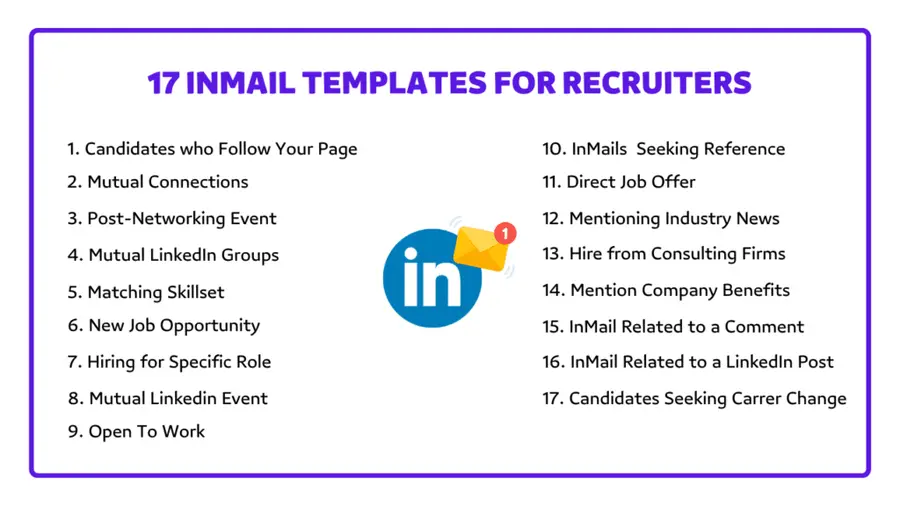
Here are our 17 LinkedIn InMail templates for recruiters that will enhance your hiring strategy, attract top talent, and boost engagement.
- Find Candidates in LinkedIn Company Followers
- Mutual Connections
- Post-Networking Event Approach
- Candidate in a LinkedIn Group
- Candidate With Perfect Skillset
- Job Opportunity
- Recruiting for Specific Role
- LinkedIn Event Participant
- Open To Work
- InMail Seeking Referrals
- Direct Job Offer Message
- Approach with Industry News
- Hire Employees From Other Firms
- Highlight Company Benefits
- InMail Related to a LinkedIn Post Comment
- InMail Related to a LinkedIn Post
- IaMail to Candidates Interested in Career Change
Without further ado, let’s get it started!
1. Find Candidates in LinkedIn Company Followers
So, you want to hook some top talent on LinkedIn?
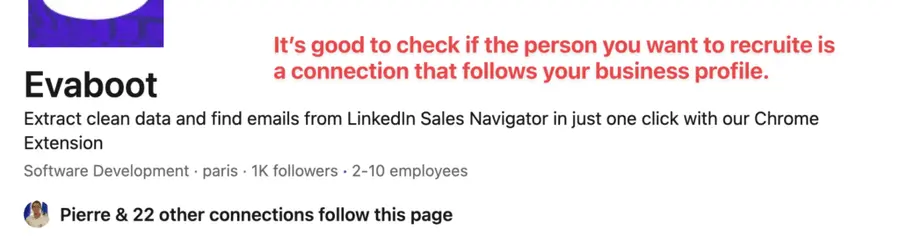
Check out your company page followers. Why?
Your followers like your company’s vibe enough to hit “follow.”
That means they’re probably down to chat about job openings.
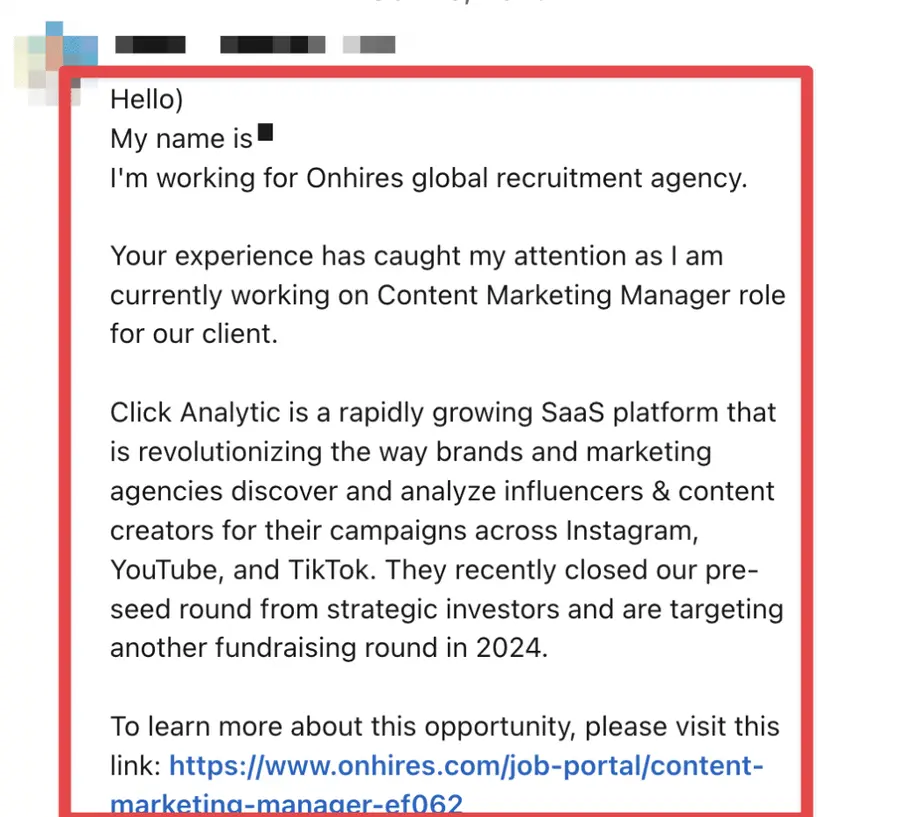
You have to make that InMail personalized, like passing a note in class that says, “Hey, you’re awesome, and here’s why.”
Here’s how you slide into those DMs as a hiring manager with a call to action:
Subject: [company name] needs a [job title]
2. Mutual Connections
Now, imagine having a secret weapon when scouring LinkedIn for top-notch candidates.
That’s right – using LinkedIn mutual connections!
It’s a game-changer!
Why?
That shared link is your trusty sidekick, boosting your credibility and giving you that perfect ice-breaker.

And guess what?
LinkedIn numbers don’t lie – dropping a mutual contact’s name in your InMail rockets your response rates up by 27%!
So, here’s a killer LinkedIn message that leans on mutual connections:
Subject: [mutual connection] recommended you
3. Post-Networking Event
So, you’ve attended a networking event, a webinar, a conference, or a chill meetup.
You’ve met a bunch of great prospects who are interested in your business or the whole industry.
Ok, the smart move is coming up!
Subject: loved connecting at [event name]
Send a LinkedIn InMail like this, reminding them about your chat and inviting them to apply for a job offer at your company.
4. Candidate In A LinkedIn Group
LinkedIn groups are these little gold mines where you can spot candidates vibing with the same stuff you and your company dig.
Imagine bumping into a potential candidate in a LinkedIn group. It’s like fate.
Then, this InMail message template might be the perfect conversation starter you need:
Subject: saw your post on [group name]
5. Candidate With Perfect Skillset
So, you’ve stumbled upon a candidate with the exact set of skills that scream ‘perfect fit’?
Well, you’re in luck!
By tailoring your LinkedIn Recruiter message template to complement their skills, you’re praising their expertise and letting them know they’re not just another resume in the pile.
Subject: need your [skills]
This tactic is your smart move to show that you mean business and that you see their potential impact within your organization.
6. Job Opportunity
So, you’ve spotted the perfect fit for that opening in your company, huh?
You’re about to play your best card — the job proposal.
With the job opportunity approach, it’s all about showing you’re not just another recruiter sending out generic messages.
Subject: job offer – [job title]
By sending a hyper-personalized LinkedIn message to a candidate, you demonstrate your genuine interest in the candidate’s unique skills and experience.
You want to show them that you’ve got something they want that screams — it’s meant for them.
7. Recruiting For Specific Role
Ever been picked out of a crowd as the perfect fit for something?
Feels great, right?
That’s precisely the sense of uniqueness and value you deliver when you adopt the recruiting for a specific role tactic.
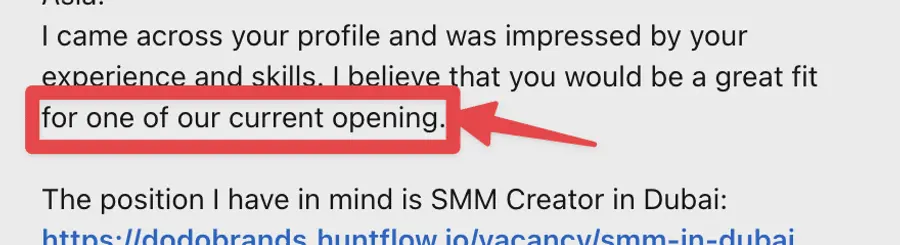
This approach demonstrates that you pinpointed the ideal person for the job from many candidates.
Here is the best LinkedIn InMail template to send to a candidate pre-selected for a niche role:
Subject: perfect fit for the [job title]
8. LinkedIn Event Participant
Picture this: you and your potential candidate are both tuning into the same LinkedIn webinar, workshop, or panel discussion.
Subject: great [event name]
Using this LinkedIn message template for a job seeker, you can turn your conversation into a business deal.
9. Open To Work
Have you ever stumbled upon a LinkedIn profile with that green circle signaling they’re “Open To Work”?
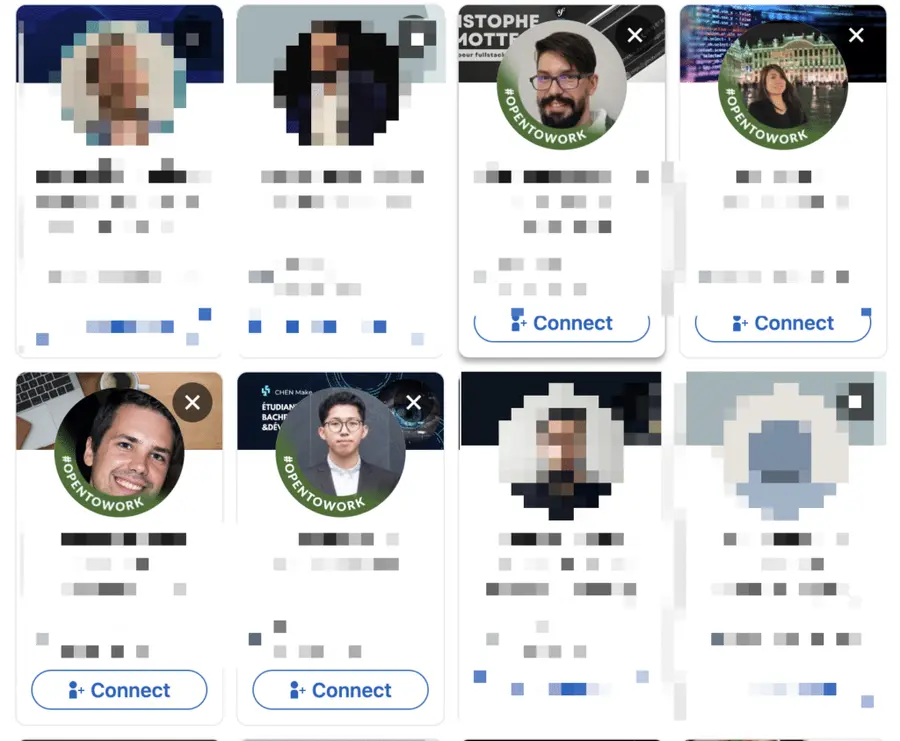
It’s almost as if they’re waving at you, inviting you to reach out.
They behave as “passive candidates”.
Taking the “Open To Work” route is not just brilliant; it’s a nod to the candidate’s aspirations and an assurance that you’re not there to waste their time.
Subject: are you still “open to work”
10. InMail Seeking Referrals
Ever had a candidate who just wasn’t into your job offer?
But hey, maybe they know someone who can be a perfect fit for your job offer.
Subject: know someone for [job title]
Look… A tactical nudge for referrals shows you’re a networking ninja.
You respect their choices, appreciate their professional circle, and you’re setting the stage for future gigs.
11. Direct Job Offer Message
Have you met an ideal candidate for the job you’d like to hire immediately?
Here is a LinkedIn message template for recruiters ready to offer direct jobs.
By firing off a direct job offer, you’re saying, “You’re it, no second-guessing, let’s do this.”
Subject: you’re in [job title – company name]
Crafted suitable, a LinkedIn InMail dropping this kind of offer can light up a candidate’s day.
12. Approach with Industry News
So, you want to grab the attention of top-tier talent?
Let’s see the industry news approach.
Leveraging the latest industry intel suggests you’re savvy, in the loop, and armed with insights that could be a game-changer for your candidate.
Subject: breaking update on [industry news]
It’s not just about listing job details; it’s about starting a valuable conversation and making a professional connection.
13. Hire Employees From Other Firms
Do you think you’ve got what it takes to tempt employees to leave their comfy positions after several fruitful years?
You’re onto something!
LinkedIn’s data analysis has uncovered an interesting trend: People with three years of experience often seek new opportunities.

This suggests they are more keen on exploring new open roles than those who are just starting or have been in the field for a long time.
This makes them ideal candidates for recruitment for your next major project.
Here’s a LinkedIn InMail template for recruiters looking for new talents:
Subject: looking for a new role
14. Highlight Company Benefits
So, you’re focused on attracting exceptional candidates who match your company values, right?
This way, you can put your company’s perks center stage.
Subject: have you ever wondered about [benefit]
This is about showing your company culture and values that align well with what job seekers search for in their careers.
15. InMail Related To A LinkedIn Post Comment
Ever tried to reach out to a hot prospect who just left a savvy comment on a LinkedIn post?
Those online comments are valuable opportunities for recruiters like you.

That’s a great way to engage them because you’re on the same page.
Subject: impressed by your insight on [post topic]
It’s time to slide into their DMs and show that you see them.
16. InMail Related To A LinkedIn Post
Imagine this…
You’re scrolling through LinkedIn and spot a post relevant to your company’s mission, industry trends, or the exact role you’re hiring.
Here’s the thing: You can use the candidate’s post as a conversation starter!
It builds trust, paves the way for credibility, and, yes, rapport—because who doesn’t like acknowledging and appreciating their thoughts?
Subject: your insights on [Post Topic] are impressive
This is the LinkedIn InMail template to tap into the potential of candidates who’ve hit the nail on the head with their posts.
17. InMail to Candidates Interested in Career Change
Let’s talk about targeting talents eager to make a career switch-up and get a new job.
By presenting your company as a place for growth and flexibility, you set the hook for a new beginning.
Subject: ready to reshape your career’s trajectory
Instead, what gets your motor running is someone ready to evolve.
A real go-getter who thirsts to learn and scale new heights alongside your business.
Conclusion
Let’s wrap up the best LinkedIn InMail practices with the 17 best LinkedIn InMail templates for the savvy recruiters among you.
So, what’s the game plan?
- Follow these golden rules,
- Take these templates,
- Give them a personal twist and a catchy subject line,
- And launch them into the LinkedIn universe.
You’ll be sending not just LinkedIn InMails but personalized message invitations to the future stars of your corporate galaxy!
FAQ
What is the best message for a LinkedIn recruiter?
Subject: opportunity in [department] for [job title]
What is the best InMail message for a LinkedIn recruiter?
Hi [Candidate Name],
I came across your comment on LinkedIn [Name of the publication] and really liked your approach and way of thinking on [Name a specific question of on the scope of your company’s expertise].
Your perspective seems to align well with our vision at [Company Name].
We’re currently seeking dynamic individuals for [Job Title] at [Department Name] team, and your profile caught my attention.
Will you be interested in discussing details?
How to create a LinkedIn Recruiter InMail template?
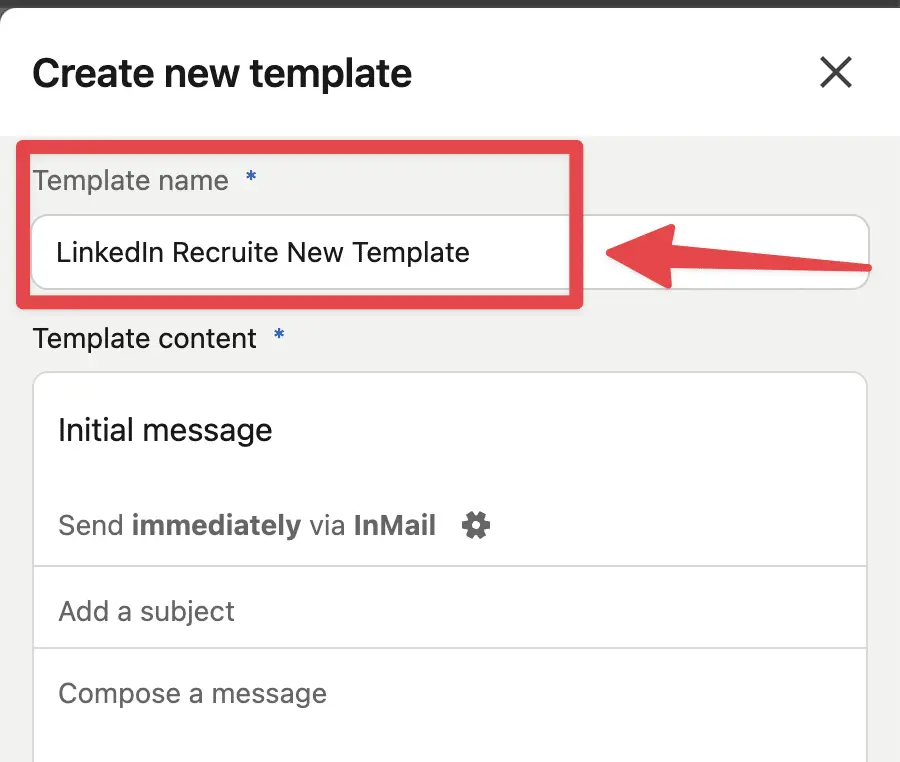
Follow these 7 steps to create a LinkedIn Recruiter InMail template:
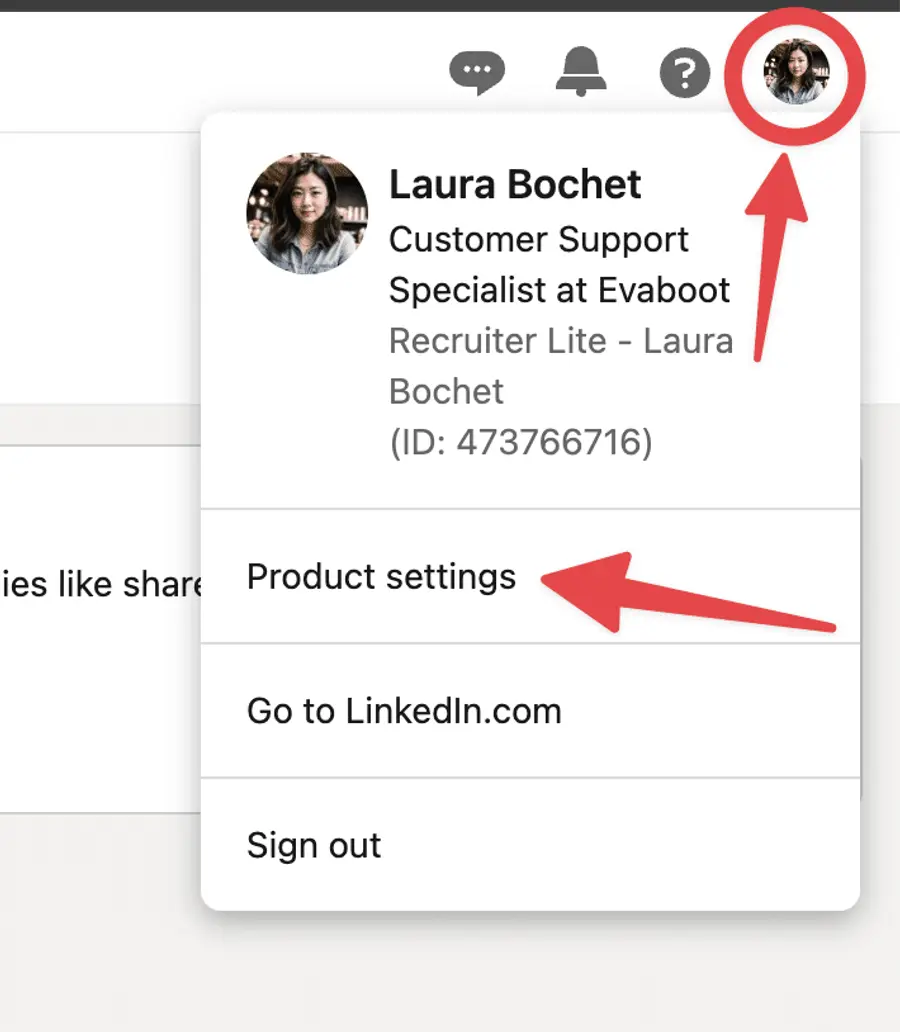
1. Click on your profile picture at the top right of your LinkedIn Recruiter homepage and choose “Product settings” from the dropdown menu.
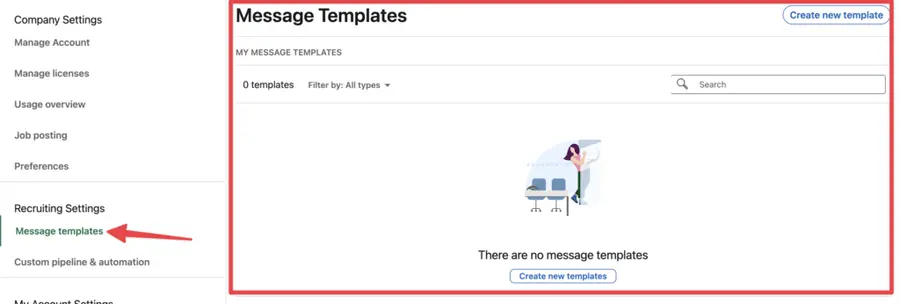
2. Click “Message templates” on the left side.
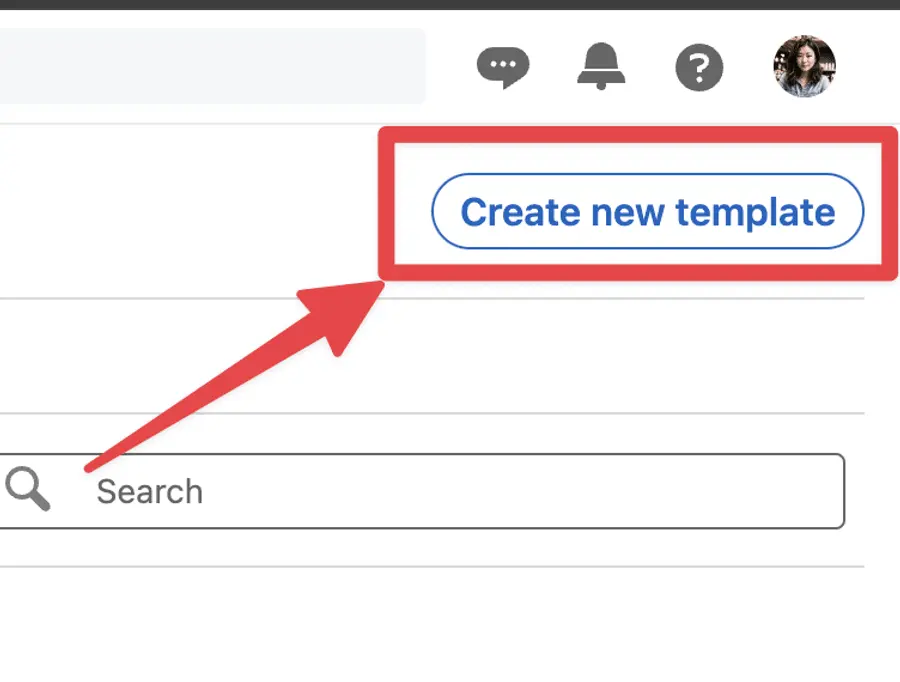
3. Click on “Create New Template”
4. Give a name to your “New Template”
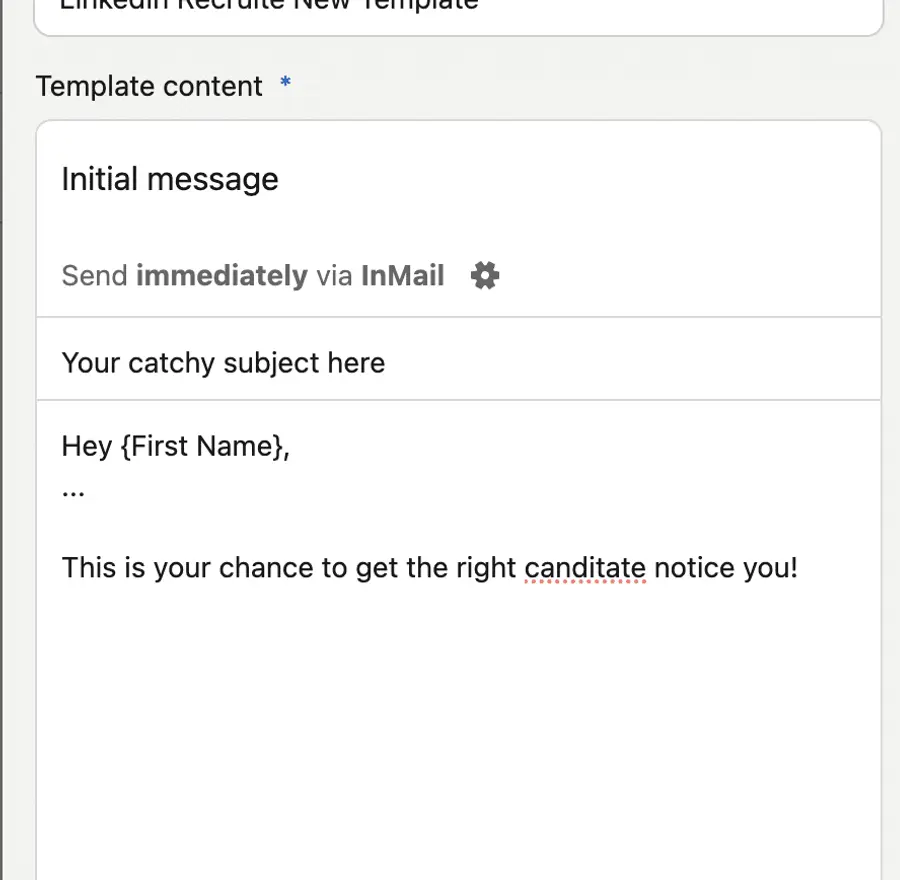
5. Add a catchy subject and write a message
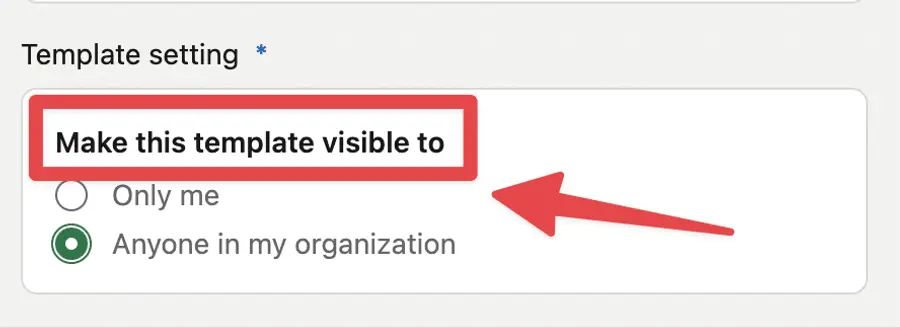
6. Decide if you want the template to be seen only by you: “Only me.” Or if others in your organization can see it too: “Everyone in my organization”.
7. Hit on “Save”.

How do I write an InMail message to a recruiter on LinkedIn?
To keep it short, here is the ultimate tip: save your InMail to a recruiter on LinkedIn.
Just follow the RAB strategy, and you’ll get a response:
1. Mention the Reason for your outreach.
Be direct and exciting.
2. Ask a question to show you get their challenge.
This will give you more credit.
3. Don’t forget to Back up with data.
This can be statistics, testimonials, or any data that will give credibility to the recruiter.
What is the best message for a LinkedIn recruiter?
Subject: opportunity in [department] for [job title]
Disclosure
![How to Use LinkedIn Recruiter? [Complete Guide 2026]](https://cdn.sanity.io/images/c7r5pqu4/production/59cb5bc881b7625a0a716023c9cb8a711c744e70-2032x1142.png?rect=9,0,2015,1142&w=600&h=340&fm=webp&fit=crop)
![How To Find Candidates On LinkedIn ? [Complete Guide 2026]](https://cdn.sanity.io/images/c7r5pqu4/production/3f3de087bb43adc6bae589f6110db7f3a1d3ce53-1280x720.jpg?rect=5,0,1271,720&w=600&h=340&fm=webp&fit=crop)
