
Tired of searching for a clear answer to “How much does LinkedIn Sales Navigator cost?“
You’re not alone. Between vague pricing pages and multiple pricing tiers and features, it’s challenging to get a straight answer and determine which plan best suits your needs.
So we did the work for you.
In this article, I’ll talk about:
- How Much is LinkedIn Sales Navigator?
- Sales Navigator Core Pricing
- Sales Navigator Advanced Pricing
- Sales Navigator Advanced Plus Pricing
- How To Make Sales Navigator Worth The Cost With Evaboot
- Why Be Aware Of Sales Navigator Flaws
Let’s see why this tool is worth the investment and why you should know how to use LinkedIn Sales Navigator.
How Much is LinkedIn Sales Navigator?
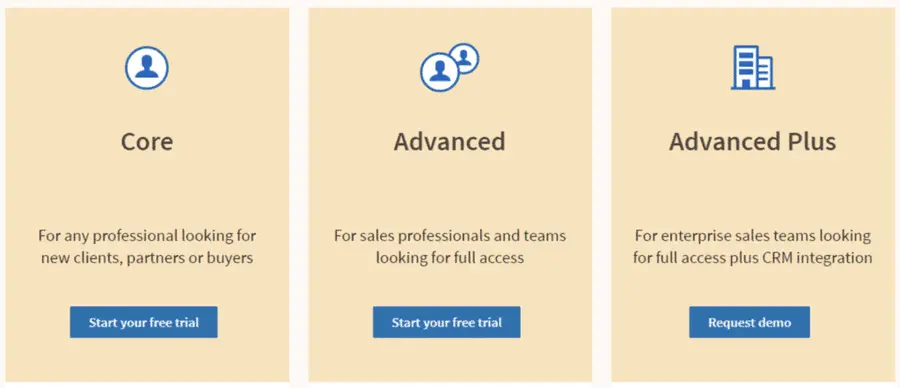
There are 3 LinkedIn Sales Navigator plans, each with different features and therefore different prices:
- Sales Navigator Core (Professional): $99.99/month
- Sales Navigator Advanced (Team): $149.99/month
- Sales Navigator Advanced Plus (Enterprise): custom pricing, starts at $1600/year
If you decide to pay Sales Navigator annually, prices drop by 20%:
- LinkedIn Sales Navigator Core : $79.99/month ($959.88/year)
- LinkedIn Sales Navigator Advanced: $139.99/month ($1,679.88/year)
- LinkedIn Sales Navigator Advanced Plus: custom pricing, starts at $1600/year
| Plan | Monthly Price | Annual Price | Best For |
|---|---|---|---|
| Sales Navigator Core | $99.99/month | $959.88/year($79.99/month) | Individual professionals starting with LinkedIn prospecting |
| Sales Navigator Advanced | $179.99/month | $1,679.88/year($139.99/month) | Sales teams needing collaboration, reporting, and CRM sync |
| Sales Navigator Advanced Plus | Custom pricing | Starts at $1,600/year per seat | Large enterprises requiring CRM integrations and advanced analytics |
Sales Navigator Core Pricing
The pricing of Sales Navigator Core (Professional) is:
- $79.99 per month
- $959.88 per year
The Core plan is the most cost-effective program the Sales Navigator app offers.
It’s an ideal plan for those new to marketing or Sales.
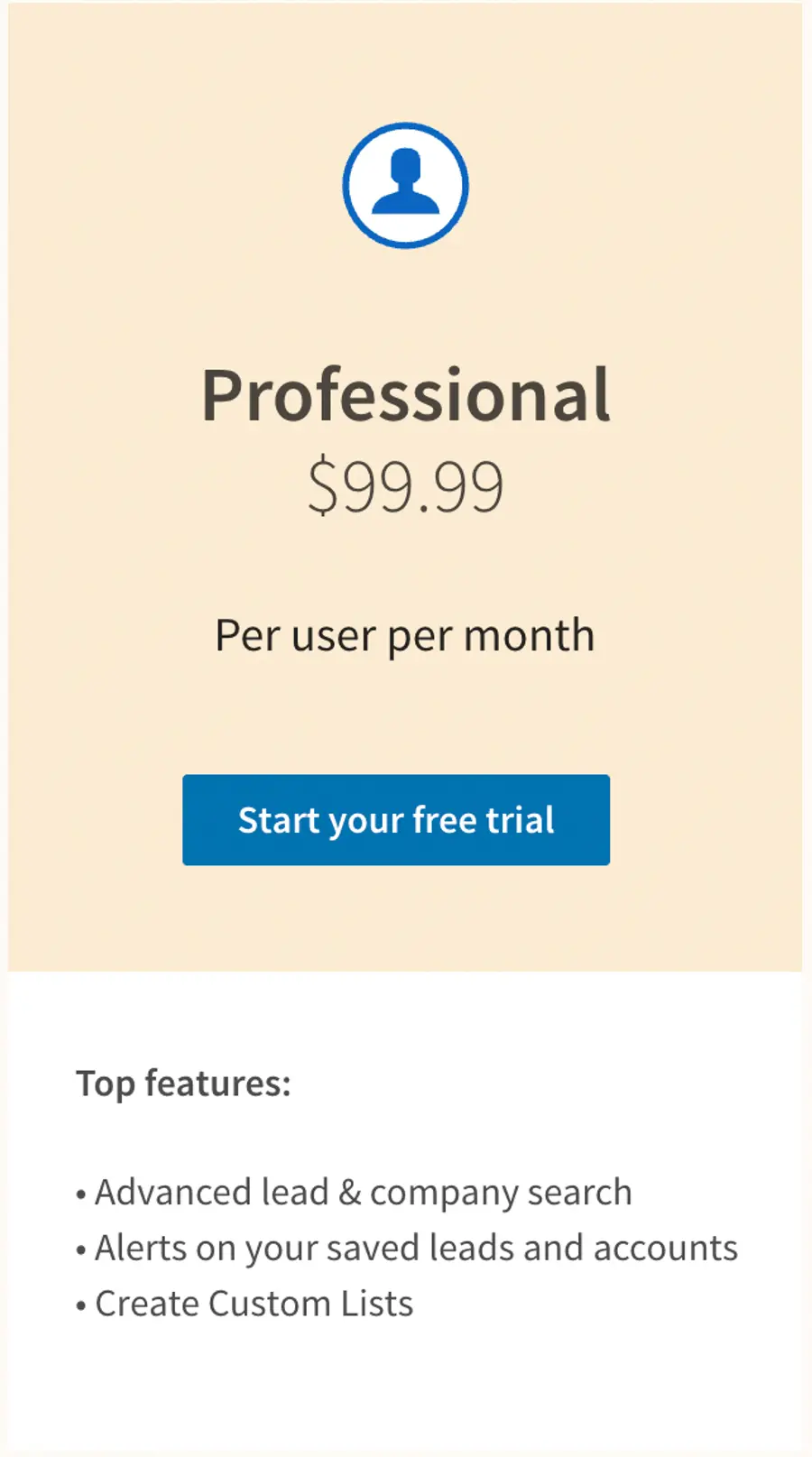
By paying this price, you’ll get access to the core features of Sales Navigator:
- Advanced filters for lead and account search
- Alerts on lead and account activities
- Lead recommendations
- Possibility to create custom lead and account list
- Saved Searches
Check the demo of all these features in this video.
Sales Navigator Advanced Pricing
The pricing of the Sales Navigator Team (Advanced) is:
- $149.99 per month.
- $1620 per year.
Due to its additional features, the Sales Navigator Advanced Plan is slightly more expensive than the Core (Professional) Plan.
Additional features Of Sales Navigator Advanced
You’ll get 3 additional functionalities on Sales Navigator Advanced for this price:
- Smart Links that allow you to share content and track your prospect engagement
- TeamLinks that allow you to access 2nd and 3rd network of your teammates
- CSV upload allows you to create an account list from the file upload.
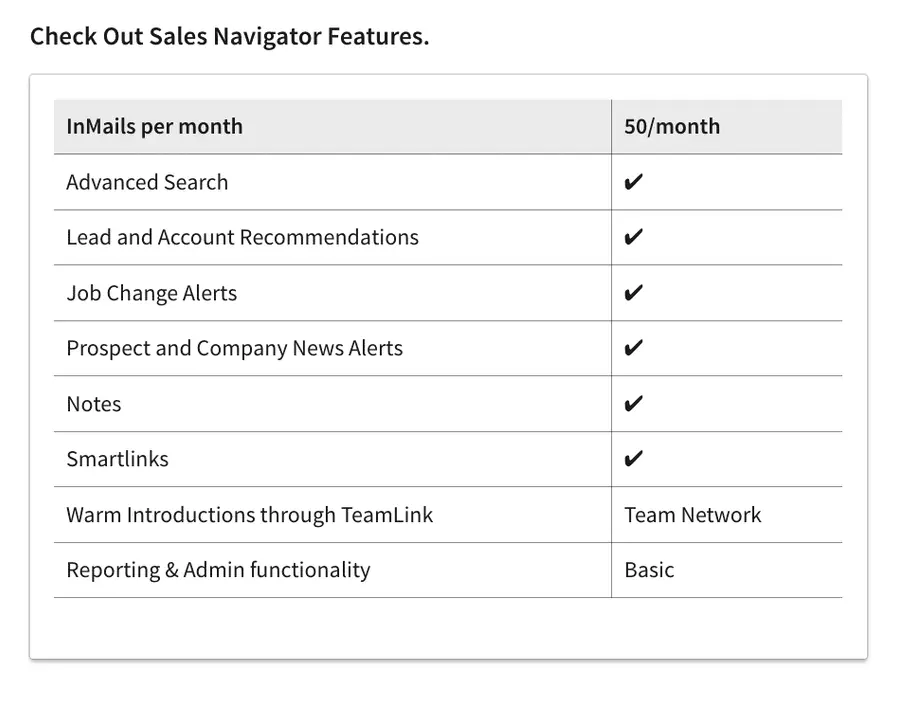
The Sales Navigator Team plan is probably best if your sales team has more than 5 people.
It offers you:
- 10 more monthly InMail Credits
- TeamLink to contact your sales team, second-degree and third-degree connections
- CRM integration to Salesforce, Microsoft 365, HubSpot
Sales Navigator Advanced Plus Pricing
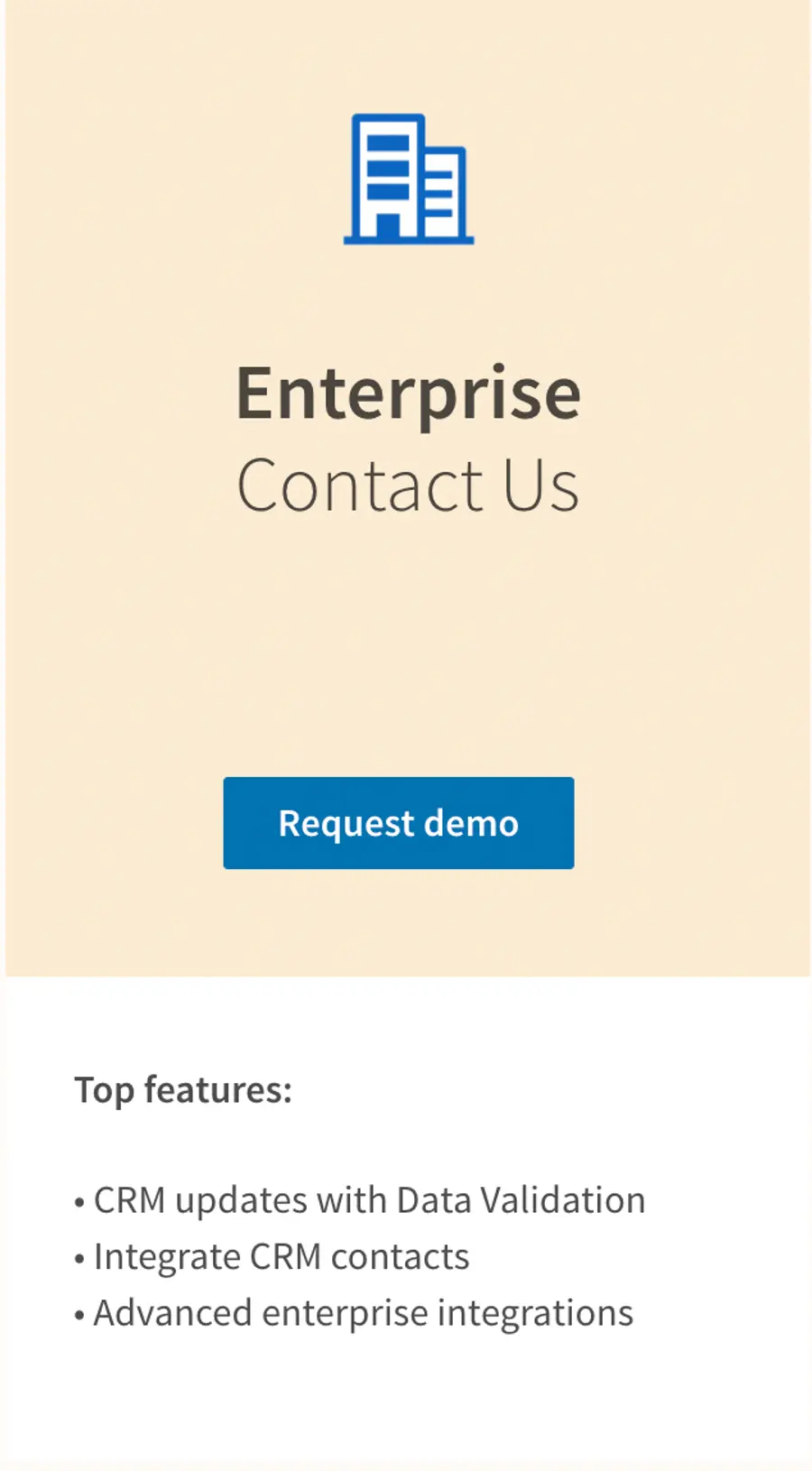
There is no fixed price for Sales Navigator Enterprise.
A web page will appear asking you to book a demo.
However, pricing costs approximately $1,600/seat per year.
The price depends on your needs, and you will have a custom Account Manager to discuss this with you.
Additional features on Sales Navigator Advanced Plus for this cost
You’ll get 3 additional features on Sales Navigator Enterprise for this price:
- You have 50 InMail messages
- TeamLink Extend: access 2nd and 3rd-degree connections of all your colleagues
- Real-Time Contact Update: get notified when someone in your CRM custom lists makes a job change
- Advanced CRM integration: get all LinkedIn Data in your CRM
Now that you know these different LinkedIn plans, let’s see how combining Sales Navigator and Evaboot can provide even more value.
How To Make Sales Navigator Worth The Cost With Evaboot
No matter what Sales Navigator pricing plan you pick, you won’t be able to export lead lists from LinkedIn Sales Navigator into a CSV.
It’s simply not a Sales Navigator native feature. To do this, you will need to use a Chrome Extension.
You can easily export your leads in just one click with the Evaboot Chrome Extension.
Here is how to export Sales Navigator lead lists, step-by-step with Evaboot:
- Create an Evaboot account
- Download the Chrome Extension
- Select your Sales Navigator lead lists
- Name and launch your export
- Download your cleaned list
1. Create an Evaboot account
Step 1 is to create an account on Evaboot.
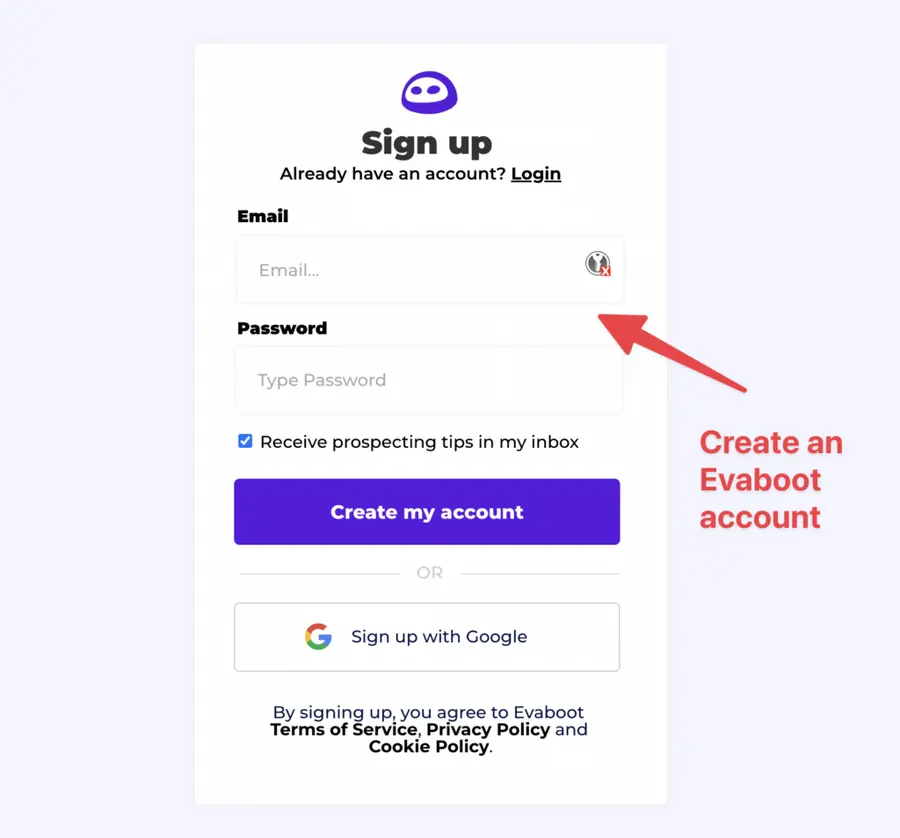
Once you’ve created your account, click on “Get Chrome Extension” to download it from the Chrome Web Store.
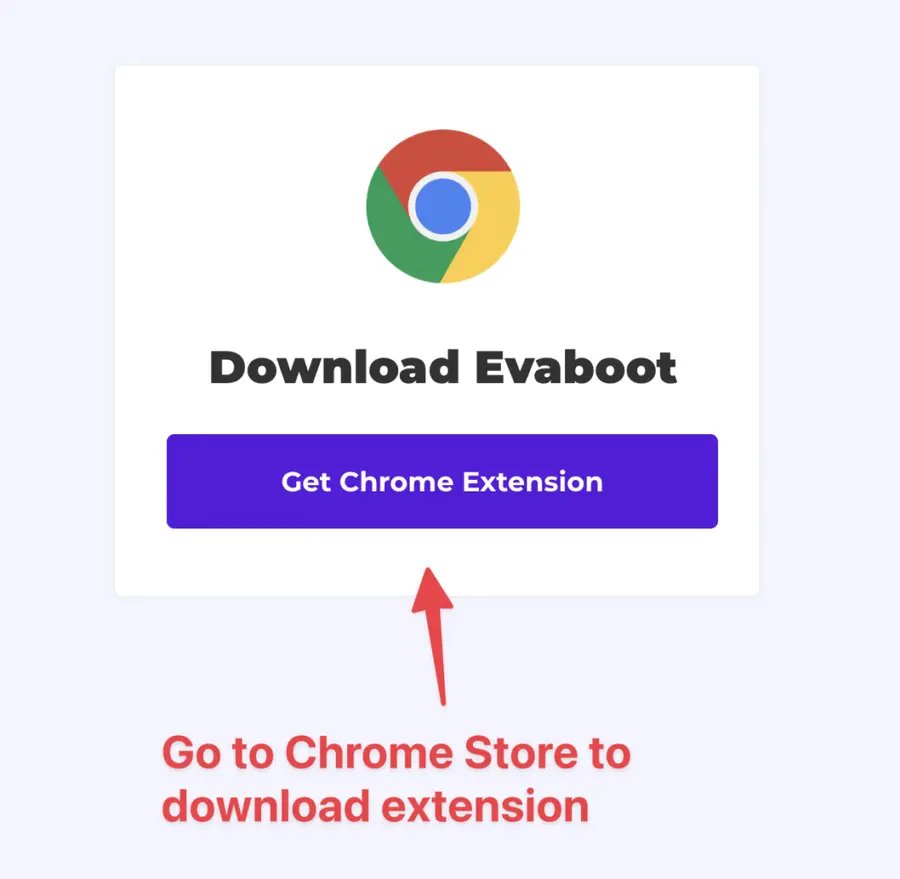
2. Download the Chrome Extension
When on the Chrome Store page, click “Add to Chrome” to install the extension.
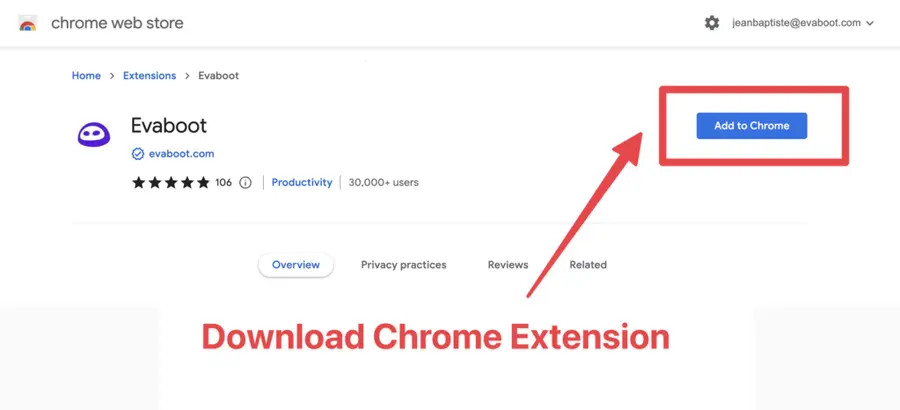
You’ll be automatically redirected to Sales Navigator. A popup will show you where the button is located.
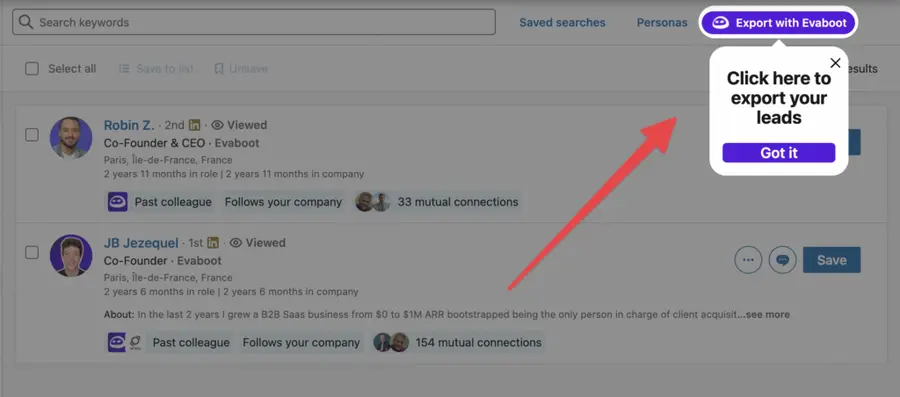
3. Select your Sales Navigator lead list
Once the Chrome extension is installed, go to the list of decision-makers or potential leads you want to export. It can be:
- Advanced Lead Searches
- Lead Lists
- Account/Company Searches
- Account Lists
- Saved Searches
Evaboot handles all the use cases. You will see the “Export with Evaboot” button on the top of these LinkedIn Sales Navigator pages.
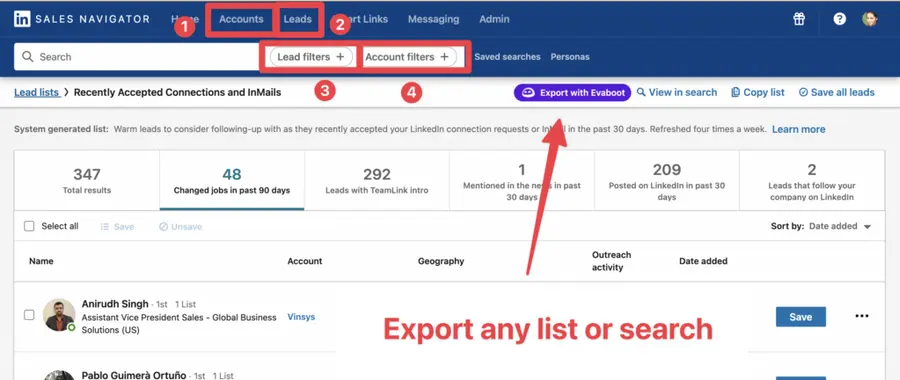
You can export specific tabs in your lead lists, such as “Changed jobs in the past 90 days.”
4. Name and launch your export
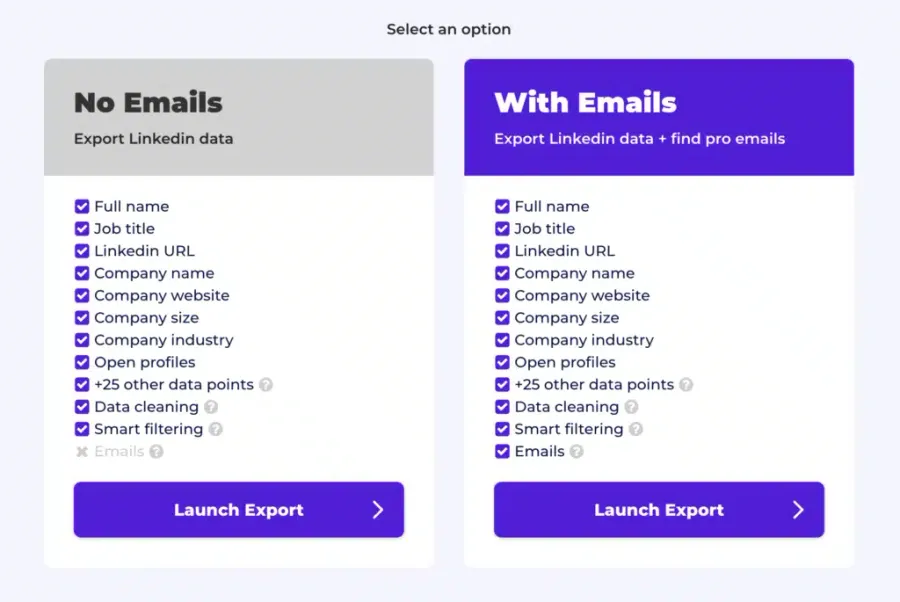
When you click “Export with Evaboot,” you will be redirected to the Evaboot app.
Select if you want to find emails for these leads or not
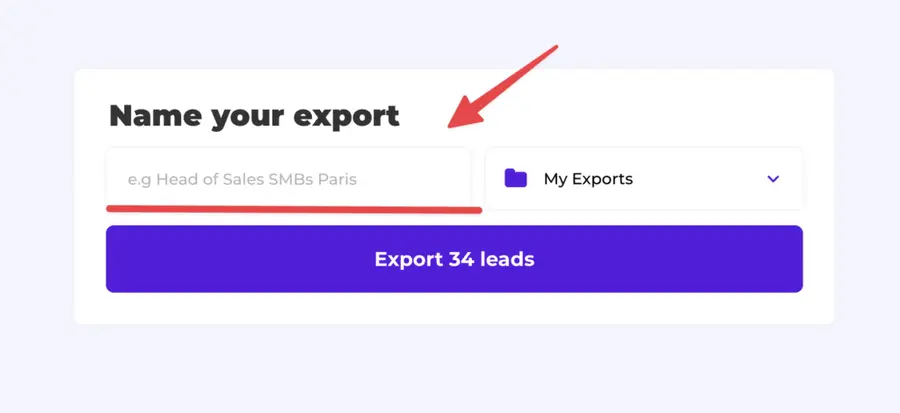
Give a name to your export and click on “Export leads”.
The estimated end date will appear on the left right after launching the export.
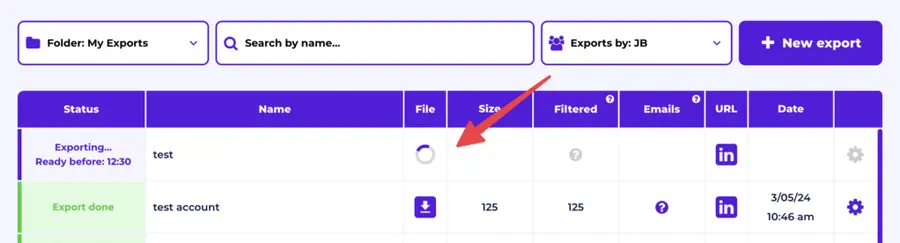
Evaboot will export all these leads in real-time. That makes your LinkedIn lead generation process GDPR-compliant on opposition to using databases.
5. Download your cleaned list
Once the extraction is finished, you will receive an email notification with a link to download the CSV file containing your lead list.
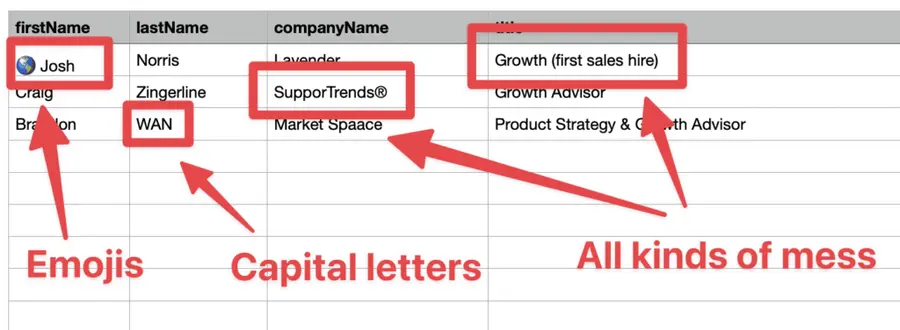
Evaboot does much more than export your list. It also cleans all your LinkedIn contacts’ prospect names and company names.
The data on LinkedIn is not clean.
Cleaning data from your Sales Navigator export can take hours if you do it manually.
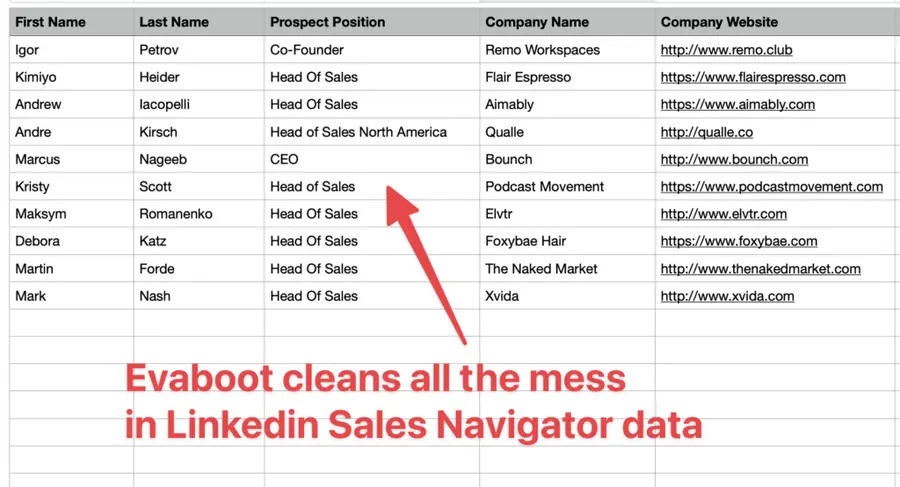
Hopefully, the Evaboot cleaning algorithm takes care of all this work for you by automatically cleaning:
- First names
- Last names
- Company names
- Job titles
Nobody wants to spend hours cleaning Excel files and using aditional data validation tools.
Better let evaboot do this tedious job.
Plus, you will often find false-positive in your LinkedIn Sales Navigator search results even if you use super precise LinkedIn search operators.

You will frequently find new leads that don’t match the search filters you chose in the Sales Navigator search engine.
That’s why many people spend hours going over their search results manually and trying to enrich missing data.
Evaboot is the smartest Sales Navigator scraper because our algorithm double-checks your leads to ensure they match the advanced search filters you selected.
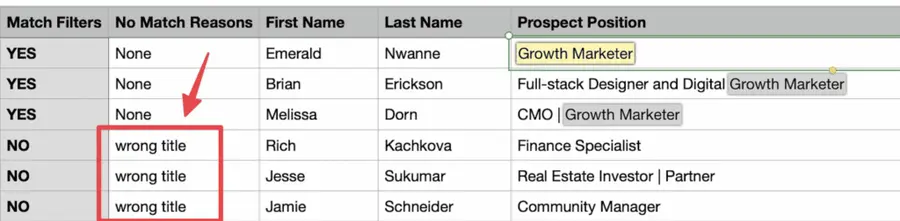
In this export, there’s a column named “No Match Reasons.” This column tells you if your leads match your search filters.
That being said, lead data is not static.
B2B data decays by 2.1% per month, meaning 22.5% of your exported leads could be outdated within a year. Job titles change, companies evolve, and outdated information leads to wasted outreach efforts.
To solve this, Evaboot offers LinkedIn profile URL Enrichment: a tool allowing you to upload Linkedin URLs stored in your CRM to enrich your LinkedIn contacts with Sales Navigator data.
How it works:
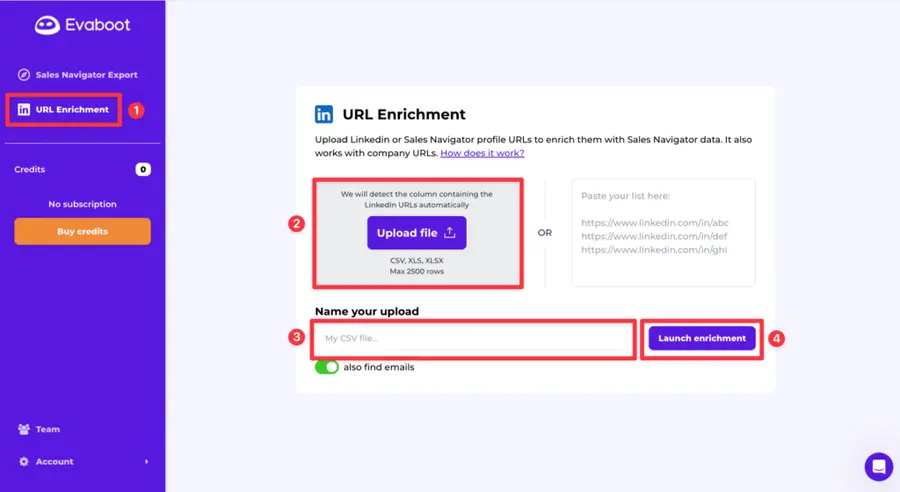
- Log in to your Evaboot account and go to the “URL Enrichment” feature.
- Upload an old list of LinkedIn or Sales Navigator URLs.
- Name your CSV file
- Launch enrichment.
- Wait a few minutes while the data updates, then download your refreshed list as a CSV file.
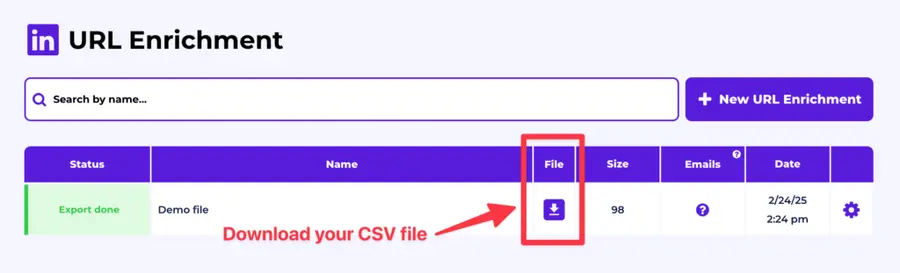
And here you go!
We recommend updating your lead lists every 3-6 months to maintain accuracy. This ensures your database stays fresh, relevant, and effective—so your sales efforts never go to waste.
For a visual step-by-step guide, check out the video tutorial:
Why Be Aware of Sales Navigator Flaws?
Sales Navigator is the best tool for prospecting on LinkedIn. It offers many benefits, but you need to be aware of two challenges:
- There are many irrelevant in the search results
- The data needs to be cleaned
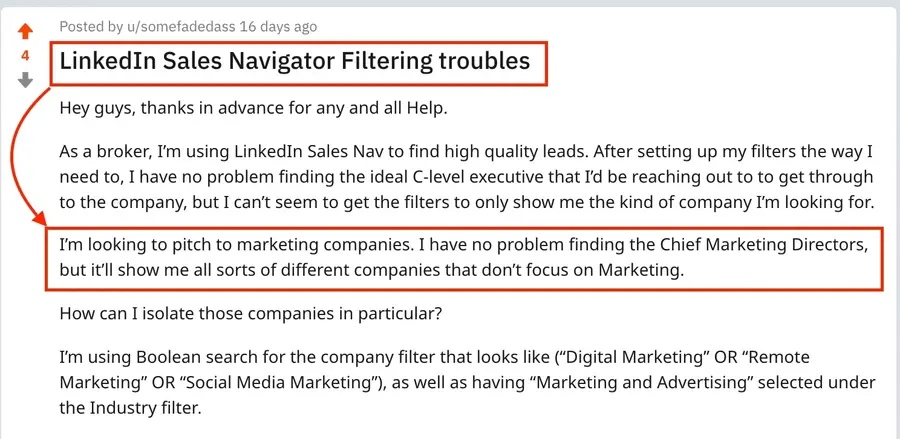
Indeed, the search engine has many flaws, as described in this Sales Navigator tutorial.
Evaboot allows you to automatically detect and eliminate irrelevant leads that don’t match your search filters on Sales Navigator. We compare your results with the original search filters you entered on Sales Navigator to double-check your leads.
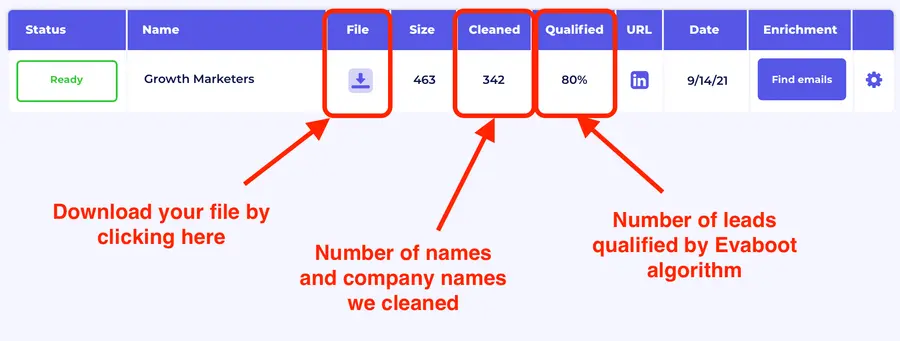
For example, in this screenshot, you can see that Evaboot cleans 342 data in your export.
Among them:
- Emojis in the names fields
- Names written with capital letters
- Legal status of the company names (ex: Evaboot LLC)
Evaboot also double-checks all the leads. It also shows that only 80% of the 463 leads extracted were qualified.
If you want to streamline your LinkedIn prospecting workflow, consider using Evaboot to save time on data cleaning and lead qualification.
Conclusion
LinkedIn Sales Navigator is a powerful tool for sales professionals who want to improve their prospection and sales processes and drive close more deals.
Knowing how to use LinkedIn Sales Navigator is the key to maximizing your return on investment.
Multiple pricing tiers offer flexibility and scalability to meet different niches.
Whether you’re an individual sales rep or part of a larger organization, you can find a LinkedIn Sales Navigator plan that matches perfectly your business objectives.
FAQ
Can I Try LinkedIn Sales Navigator for Free Before Subscribing?
You can sign up for a free trial of Sales Navigator using your LinkedIn account. The free trial is only available to members who do not have a paid subscription to LinkedIn and who haven’t used a free LinkedIn trial in the last 365 days.
Once your free trial ends, LinkedIn will automatically charge you the money for your subscription plan. So make sure to cancel your free trial subscription before it expires.
Are There Any Discounts Available for LinkedIn Sales Navigator?
Usually, when you choose an annual subscription to LinkedIn Sales Navigator, you get significant discounts.
Committing to a yearly plan gives you access to all Sales Navigator advanced features and saves you more than monthly subscriptions.
How Much Does LinkedIn Sales Navigator Cost?
LinkedIn Sales Navigator has 3 pricing areas:
- Sales Navigator Core (Professional): $99/month
- Sales Navigator Advanced (Team): $149/month
- Sales Navigator Advanced Plus (Enterprise): starts at $1600/year
What features are included in LinkedIn Sales Navigator?
Linkedin Sales Navigator features include:
- Advanced search capabilites to find new target leads
- Store up to 10,000 leads and accounts
- 50 free InMail messages per month
- Customised lists to track and prioritise leads
- Alerts for news and job changes that affect leads
- Access to lead profiles and account pages for research
- Relationship Map to identify and connect with key decision makers

![What is LinkedIn Premium and Is It Worth It? [Features Review]](https://cdn.sanity.io/images/c7r5pqu4/production/31d80c2b756f68c4e7ece11f6ca3dd57af0c6025-2032x1142.png?rect=9,0,2015,1142&w=600&h=340&fm=webp&fit=crop)
